VectorStyler
    • Categories
    • Unread
    • Recent
    • Tags
    • Popular
    • Register
    • Login

    Addional Alignment Option, align Objects with one click horizontal and vertical

    Scheduled Pinned Locked Moved Features and Ideas
    5 Posts 3 Posters 1.3k Views 3 Watching
    Loading More Posts
    • Oldest to Newest
    • Newest to Oldest
    • Most Votes
    Reply
    • Reply as topic
    Log in to reply
    This topic has been deleted. Only users with topic management privileges can see it.
    • S Offline
      Subpath
      last edited by

      I don't think any user here can count how many times they've
      clicked these two icons to center objects horizontally and
      vertically.
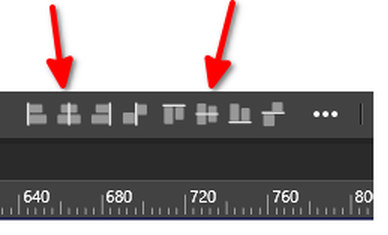
      0_1760613072683_Alignment Option.png
      .
      .
      Maybe I'm just lazy?

      But I would plaid for an additional alignment option that
      combines these two icons into one. And I would only have to
      click once to center align objects horizontally and vertically.

      I'm also surprised this was never considered.

      Win 11
      CPU: AMD Ryzen 5 9600X, 6-core.
      GPU: Nvidia Geforce RTX 5070.

      M VectorStylerV 2 Replies Last reply Reply Quote 1
      • M Online
        monsterfox @Subpath
        last edited by

        @Subpath Actually, it's quite simple. My workflow is to set up an action: select the objects that need alignment, press the vertical alignment once, then press the horizontal alignment, and finally assign a shortcut key to this specific action to get it done.
        What I set up is the F5 key

        S 1 Reply Last reply Reply Quote 2
        • S Offline
          Subpath @monsterfox
          last edited by Subpath

          @monsterfox

          Indeed it's actually easy and possible ☺
          And I think I'll use that approach.

          But I wonder why combining these two alignment options
          was never considered.

          @VectorStyler, forget my request. I'll use an action like
          Monsterfox suggested.

          Win 11
          CPU: AMD Ryzen 5 9600X, 6-core.
          GPU: Nvidia Geforce RTX 5070.

          1 Reply Last reply Reply Quote 1
          • VectorStylerV Offline
            VectorStyler @Subpath
            last edited by

            @Subpath But which combinations are to be added? Out of the 9.

            S 1 Reply Last reply Reply Quote 0
            • S Offline
              Subpath @VectorStyler
              last edited by Subpath

              @VectorStyler

              As I already wrote, just ignore my request.
              I'll create an action, just like Monsterfox suggested.

              I dont know if my idea was so well thought. Because a ninth
              Alignment Icon would create a mess in the Alignment panel.

              But my idea was to combine these two in a addional icon.

              0_1760687924943_center alignment.png

              Currently, two clicks are always required to center objects
              horizontally and vertically, something that would normally
              require just one click and is used very often.

              But forget it. I'll use an action, and that'll be fine for me.

              Win 11
              CPU: AMD Ryzen 5 9600X, 6-core.
              GPU: Nvidia Geforce RTX 5070.

              1 Reply Last reply Reply Quote 3
              • First post
                Last post