VectorStyler
    • Categories
    • Unread
    • Recent
    • Tags
    • Popular
    • Register
    • Login

    Scale the shape WITHOUT scaling the stroke
    Scheduled Pinned Locked Moved Questions and Support
    5 Posts 4 Posters 1.6k Views 4 Watching
    Loading More Posts
    • Oldest to Newest
    • Newest to Oldest
    • Most Votes
    Reply
    • Reply as topic
    Log in to reply
    This topic has been deleted. Only users with topic management privileges can see it.
    • RaaskotR Offline
      Raaskot
      last edited by Raaskot

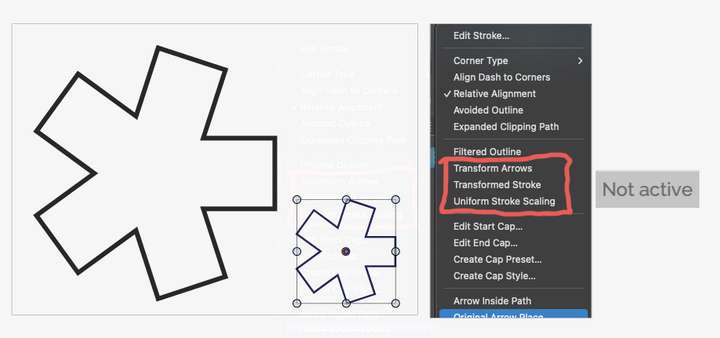
      I wonder how I can scale the shape WITHOUT scaling the stroke? Is there other settings to activate?

      0_1761132228027_scale-shape-not-stroke.vstyler
      0_1761131955631_b275214b-a3dc-4640-88c4-c15e641a9b03-image.png

      VectorStylerV S 2 Replies Last reply Reply Quote 0
      • VectorStylerV Offline
        VectorStyler @Raaskot
        last edited by

        @Raaskot In the Appearance panel menu, with the Stroke selected, disable Transformed Content.

        There seems to be some redundancy here. I will try to fix this.

        1 Reply Last reply Reply Quote 2
        • S Offline
          Subpath @Raaskot
          last edited by Subpath

          @Raaskot

          Is a bit strange, i made a new file with a shape
          like you made which work as expected.

          But when i copy a shape from your file in my
          new file the stroke of your shape will be transformed
          no matter which "Transform Stroke" Setting is off.
          I think i set all off that i know and find.

          Btw my shapes still work as expected.

          Win 11
          CPU: AMD Ryzen 5 9600X, 6-core.
          GPU: Nvidia Geforce RTX 5070.

          RaaskotR 1 Reply Last reply Reply Quote 1
          • RaaskotR Offline
            Raaskot @Subpath
            last edited by

            @Subpath
            Had same experience. For now new shapes seems to work.

            M 1 Reply Last reply Reply Quote 0
            • M Offline
              MrDixioner @Raaskot
              last edited by

              @Raaskot I also have everything working fine by default, meaning I didn't configure anything when I first launched the program. In such cases, deleting the program's settings files is usually recommended, but you could lose all your settings, so the choice is yours.


              1 Reply Last reply Reply Quote 1
              • First post
                Last post