VectorStyler
    • Categories
    • Unread
    • Recent
    • Tags
    • Popular
    • Register
    • Login

    Should setting png export panel background fill turn off "transparency" option?

    Scheduled Pinned Locked Moved Features and Ideas
    1 Posts 1 Posters 908 Views
    Loading More Posts
    • Oldest to Newest
    • Newest to Oldest
    • Most Votes
    Reply
    • Reply as topic
    Log in to reply
    This topic has been deleted. Only users with topic management privileges can see it.
    • BoldlineB Offline
      Boldline
      last edited by

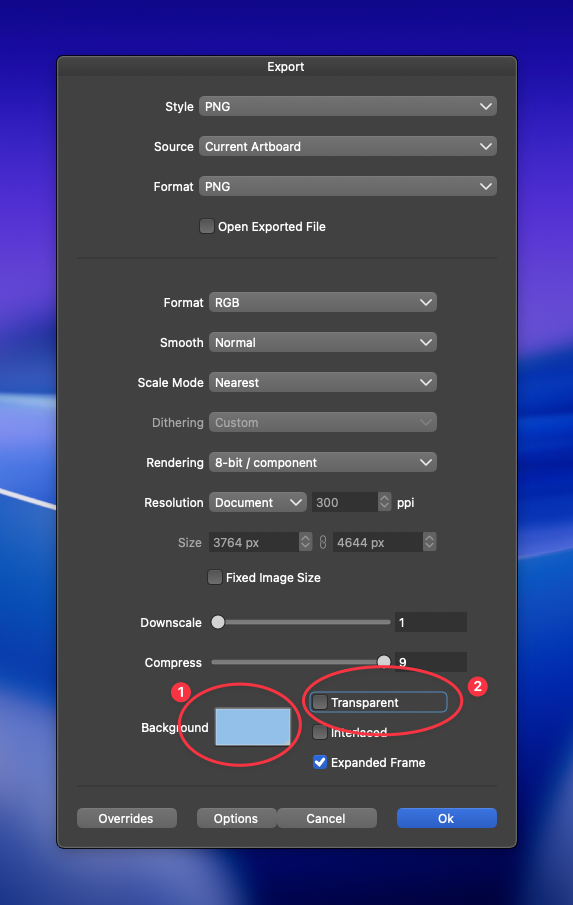
      I was setting a background color (#1) in the export panel for a png, but forgot to disable the "transparent"option (#2). So when I checked my output png file, it still was transparent and I had to go back in and see what happened with it.
      I was wondering if one should disable the other? So if I set a color, the "transparent' would uncheck itself or a popup would warn the user - but then part of me didnt want to do this because I like the flexibility of choosing a background color and still be able to control easily whether it gets utilized or not.

      I'm throwing the idea out there because it fooled me, but then also just wanting to see what others think
      0_1762646298686_24289130-d398-4f0d-8d00-771801208352-CleanShot 2025-11-08 at 18.55.29.png

      🍎 macOS Tahoe 26.2, Mac mini (M1, 2020), Chip Apple M1, Memory 16 GB
      Cintiq 27QHD Display and LG Ultra HD Display

      1 Reply Last reply Reply Quote 1
      • First post
        Last post