VectorStyler
    • Categories
    • Unread
    • Recent
    • Tags
    • Popular
    • Register
    • Login

    Magnetic Selection

    Scheduled Pinned Locked Moved Features and Ideas
    3 Posts 2 Posters 463 Views 2 Watching
    Loading More Posts
    • Oldest to Newest
    • Newest to Oldest
    • Most Votes
    Reply
    • Reply as topic
    Log in to reply
    This topic has been deleted. Only users with topic management privileges can see it.
    • M Offline
      monsterfox
      last edited by

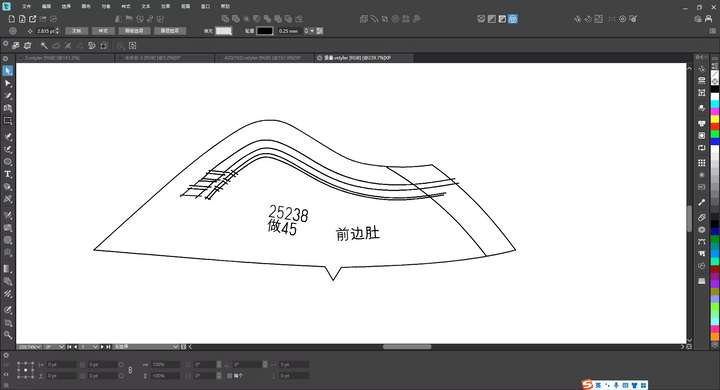
      0_1766068666405_mmexport1766068397616.jpg
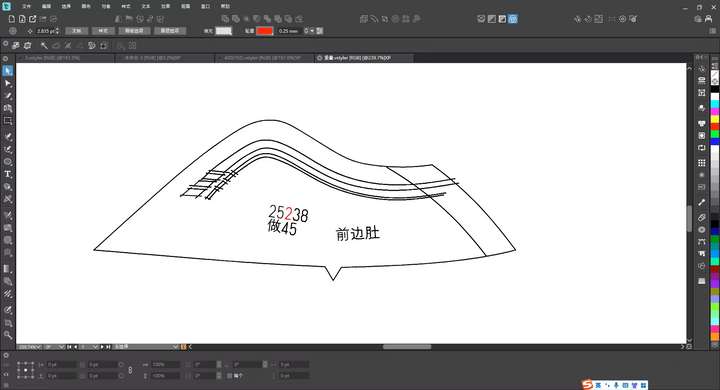
      0_1766068687031_mmexport1766068403281.jpg
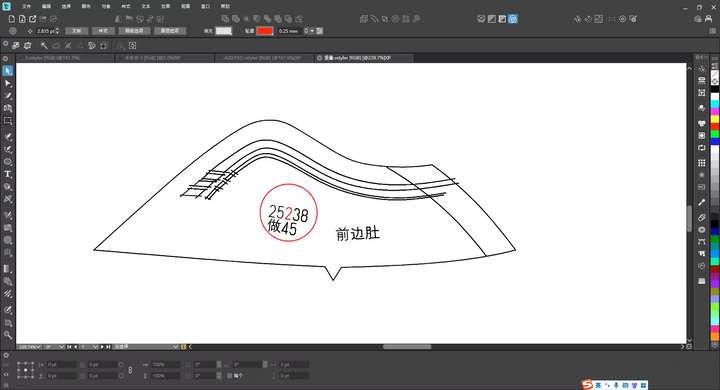
      0_1766068698837_mmexport1766068399563.jpg



      There are several text paths in the sample image. When you set the magnetic field distance and click on the number "2", all elements within the magnetic field diameter of the number "2" will be selected. Meanwhile, the path surrounded by the magnetic field will have the same magnetic field parameters. Thus, clicking on the number "2" will select all paths in that area. (It might be easier to understand if we use the concept of an electric field: when you click on the number "2", the surrounding paths can be regarded as conductors, and all of them will be within the range affected by the electric field.) We hope this function can be added.

      VectorStylerV 1 Reply Last reply Reply Quote 1
      • VectorStylerV Offline
        VectorStyler @monsterfox
        last edited by

        @monsterfox I added this to the backlog. Should this work as a magic wand tool option?

        M 1 Reply Last reply Reply Quote 0
        • M Offline
          monsterfox @VectorStyler
          last edited by

          @VectorStyler Yes, the magnetic field distance can be set.

          1 Reply Last reply Reply Quote 1
          • First post
            Last post