Redrawing part of a path with the pencil tool
-
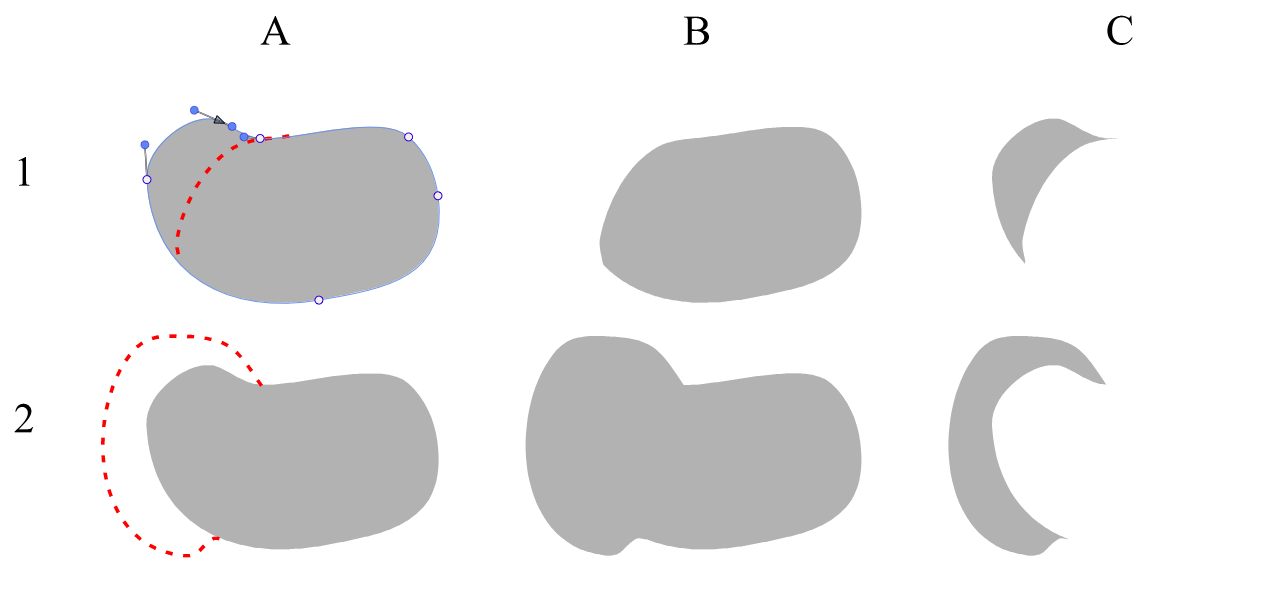
This normally works as expected, but I can't get it to redraw the part of a closed path containing the start/end node.
In example 1 A below:
- the start/end node is the triangle indicator at the upper left of the grey blob shape.
- the red dash shows the path of the pencil tool, attempting to reduce the area that contains the start/end node.
- the wanted outcome is B. the actual outcome is always C.
In example 2 A:
- the red dash shows the pencil tool attempt to expand the area that contains the start/end node.
- wanted B but always get C.
It seems that the start/end node is untouchable.
How to acheive this without resorting to Combine Path?
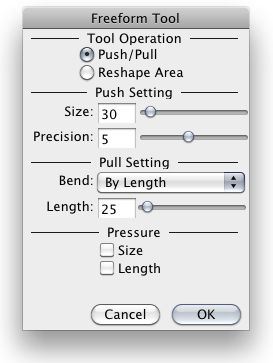
Is there an equivalent to FreeHand's Freeform tool to reshape paths using an adjustable size?
-
not sure if i understand this right
but wouldnt the "Path Sketch" Tool work for that ?
(its right beside the Pencil Tool) -
@Raven What was the direction of drawing with the pencil tool?
Send me those shapes in a VS file, I will try to replicate it. -
VS file attached
0_1767857815660_Redraw parts of a path.vstyler
Looking at the Path Sketch tool now.
tries...
tries...Thanks Subpath. You are right - the Path Sketch tool can do this.
I didn't know it can be used to modify closed shapes that were already created by other tools, eg Pencil.Reshaping using the pencil tool is still useful whilst in the process of creating shapes with the Pencil tool, to avoid frequently changing tools.
Now to find an equivalent to FreeHand's Freeform tool.
-
@Raven said in Redrawing part of a path with the pencil tool:
FreeHand's Freeform tool
Is this a 4-point transform tool?
VS has a 4-point distortion non-destructive shape effect -
@VectorStyler said in Redrawing part of a path with the pencil tool:
Is this a 4-point transform tool?
The Freeform tool is an adjustable size circle that can be used to "push" paths, in or out. It's destructive.
It is similar to VS's Path Brush tool when used starting inside a closed path, adding area to the shape and smoothing the transition points.
It can also be used starting from outside a closed path to push the touched area in, creating new nodes as required.
I don't know how to do that in VS other than by using the Redraw with Pencil function, or now, the Path Sketch tool, but they both work by drawing the replacement path section - a different experience to simply pushing the outline around like clay.
Have experimented without success so far with VS's Eraser tool, the Path Eraser tool and the Reshape tool. May be a setting or modifier key I've not found.
-
@Raven Closest I can think of is the Liquify tool in VS
-
Sounds a bit like the Nudge Tool in "Concepts" too me
Here a video (Concepts for Windows)(ignore the video title)
the liquify tool in VS is similar
-
The Nudge Tool in "Concepts" looks like the FH Freeform tool. Right down to the real-time preview of the resultant path and the tendency to smooth out what it contacts.
I haven't been able to get VS's Liquify tool to act the same. It is pulling paths around instead of pushing them (hard to explain that concept) and generating many nodes and spiky shapes. There are lots of settings there so I will experiment.
The Path Brush tool in VS could suffice for most work, even though seems to be limited to closed shapes has no smoothing, if only it could work in reverse when dragged from outside the shape - subtracting area instead of adding. Is that possible?
-
@Raven said in Redrawing part of a path with the pencil tool:
The Nudge Tool in "Concepts" looks like the FH Freeform tool. Right down to the real-time preview of the resultant path and the tendency to smooth out what it contacts.
That's interesting to know.
Yes, the Liquify tool doesn't quite measure up.I have a copy of Corel Draw 2020.
It has a tool called "Attract and Repel." which works also quit nice -
@Raven said in Redrawing part of a path with the pencil tool:
I haven't been able to get VS's Liquify tool to act the same.
I added the Freeform tool to the 1.4 feature backlog
