Add new pages dialog when pressing nex page button and you are in the last page of the document.
-
Is a good idea i have seen in other software. When you reach the last page of your document, you press the "next page" button or keyboard shortcut, and the page manager dialog appears, letting you adding pages or delete. Is a handy thing, imho.
Ryzen 9 3900X on Asus prime x570-p
Memory 48gb ddr4
Nvidia gtx 970 on an Asus strix, 4gb gddr5
NVMe CT100p 1TB -
@marce I added this to the features backlog of 1.4
-
Is a good idea i have seen in other software. When you reach the last page of your document, you press the "next page" button or keyboard shortcut, and the page manager dialog appears, letting you adding pages or delete. Is a handy thing, imho.
It is very useful

-
I would find this rather annoying myself. I often just hold or spam-click such buttons to reach the end; when working in a multi-page document I would be likely to bring up the dialog when it was not wanted far more often than when it was.
-
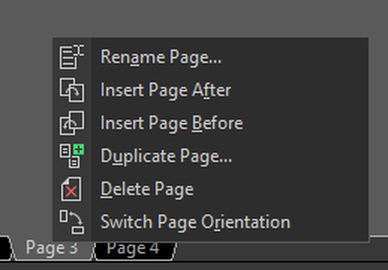
how about clicking with a "right click"
and the Dialog/Menu appears ?Corel have this
.
.
.
i use very rarely multi pages these days and
not yet in VS.
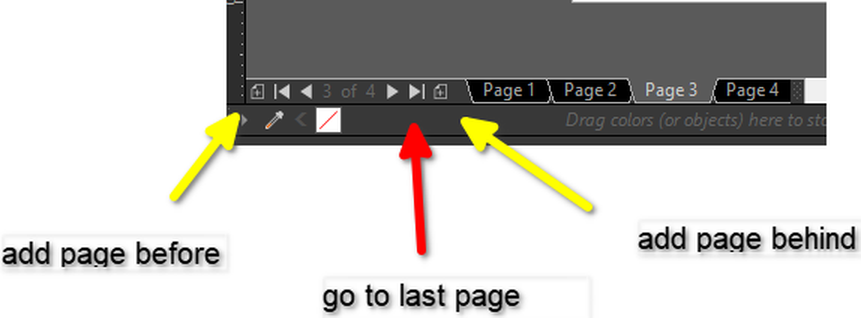
But here how Corel has solved Add Pages
.
.
-
@Subpath Those both seem like better options, but adding more buttons next to the existing ones will obviously increase the space taken up by the controls and reduce available space for the scroll bar, which is not unreasonable, but can be avoided for the specific situation @marce seems interested in optimizing for.
Another option would be for a right-click on the existing arrows to simply add an artboard in that location. Left-click to switch artboards, right-click to add one: right-click the next artboard button to insert an artboard after the current one, right-click the first artboard button to insert one before the beginning, etc.

