VectorStyler
    • Categories
    • Unread
    • Recent
    • Tags
    • Popular
    • Register
    • Login

    Batch export, export selected objects as individual SVG files

    Scheduled Pinned Locked Moved Features and Ideas
    5 Posts 2 Posters 14 Views 2 Watching
    Loading More Posts
    • Oldest to Newest
    • Newest to Oldest
    • Most Votes
    Reply
    • Reply as topic
    Log in to reply
    This topic has been deleted. Only users with topic management privileges can see it.
    • S Offline
      Subpath
      last edited by Subpath

      I don't know if this is relevant to Vectorstyler, but its a case of mine.
      I'm missing a feature that allows me to export selected objects as
      individual SVG files.

      For example: 10 selected objects would be exported into a folder,
      e.g., as Name_1.svg ... Name_10.svg.

      Inkscape offers this feature.

      Here a pic of inkscape solution
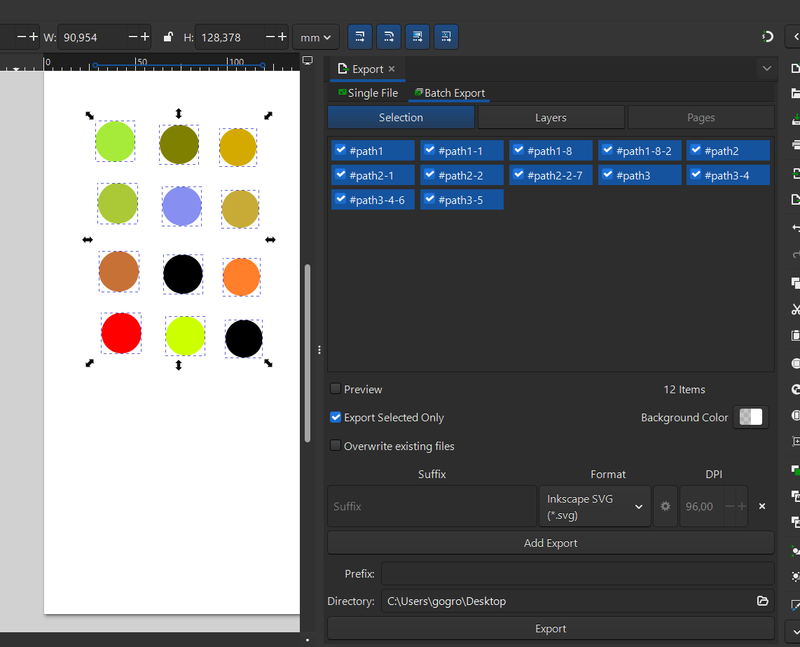
      Batch export.png

      Win 11
      CPU: AMD Ryzen 5 9600X, 6-core.
      GPU: Nvidia Geforce RTX 5070.

      VectorStylerV 1 Reply Last reply Reply Quote 1
      • VectorStylerV Offline
        VectorStyler @Subpath
        last edited by

        @Subpath Thsi can be done, but only through the object export panel, but adding the selected object as separate export objects (possible with a single click).

        S 1 Reply Last reply Reply Quote 1
        • S Offline
          Subpath @VectorStyler
          last edited by

          @VectorStyler

          Dont know how.
          Could you describe the steps needed ?

          Win 11
          CPU: AMD Ryzen 5 9600X, 6-core.
          GPU: Nvidia Geforce RTX 5070.

          VectorStylerV 1 Reply Last reply Reply Quote 0
          • VectorStylerV Offline
            VectorStyler @Subpath
            last edited by

            @Subpath

            Select the objects and in the Windows -> Editing -> Object Export panel click the 3rd button

            Set up the file formats in the panel.

            Now either use the panel menu Export All,
            or checkmark individual objects from the panel to be exported with the last button of the panel.
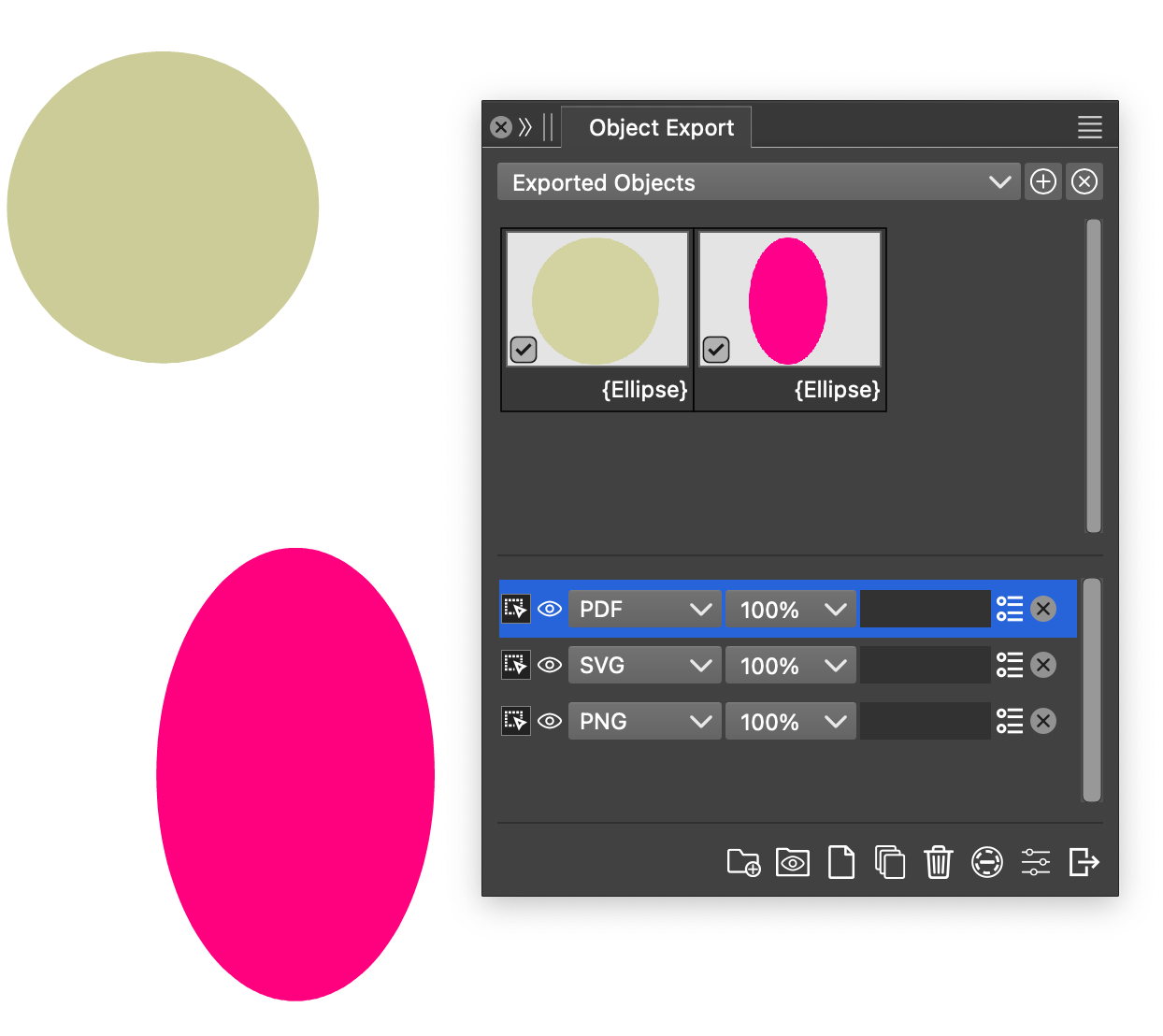
            objectexport.png

            S 1 Reply Last reply Reply Quote 1
            • S Offline
              Subpath @VectorStyler
              last edited by Subpath

              @VectorStyler

              Thank you !

              I figure it out also myself a bit, via the Manual.
              Was a bit irritating to find the Object Export Panel
              under Menu > Editing. But i can live with that.

              If i have further Questions, i may come back.
              Anyway its really nice and handy to have this feature.
              Thanks again.

              Win 11
              CPU: AMD Ryzen 5 9600X, 6-core.
              GPU: Nvidia Geforce RTX 5070.

              1 Reply Last reply Reply Quote 1
              • First post
                Last post
