Multiple occurrences of the same color are not included when creating a color palette.
-
Duplicate or multiple occurrences of the same color are not
included when creating a color palette from selected objects.
I already mentioned this in another thread once.I mention it here again because it also plays a role in my
gradient ideas and would be needed there as well.In my current experiments, identical colors are not added to the
color palette in the order they appear on selected objects.
Instead, each color is displayed only once.It's a bit strange, because I can definitely have multiple instances
of a color within a color palette. Identical colors can also be copied
from one color palette to another via drag and drop. So a color palette
itself doesn't have any problems with duplicate colors.It would therefore be very helpful if the colors of selected objects
could be copied simply from left to right into a color palette, even
if the same colors are present multiple times.Here a pic with the selected Objects and the color palette result
after choose "Create Palette from selected Objects"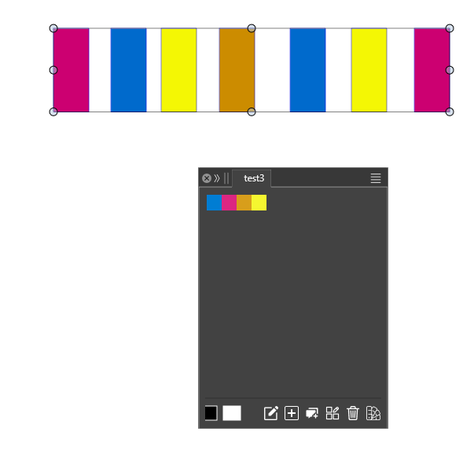
-
S Subpath referenced this topic
-
@Subpath Yes, this is by design.
This can only be solved if I add an option
-
If this is possible, i would plaid for that option
because it would make things a bit easier
e.g. if you like to use a Palette for colorize
