Question about optimization the "center line" outline effect
-
Question about optimization the "Center line" outline effect
I occasionally use the little vector graphics app "Alchemy" and its
"Boid" effect to create random curved vector paths.Which is essentially a kind of flock of birds simulation, where the
way the birds fly produces vector paths.Since these can only be imported in VS as outline objects, I use then
the " center linec" outline effect to convert them back into paths.Unfortunately, this effect has problems with self-intersecting lines.
Is there a way to improve this effect so that it handles self-intersecting
paths better?Here a video about Alchemy Boids for anyone who is interested.
.
.
Here some Pics to show the problem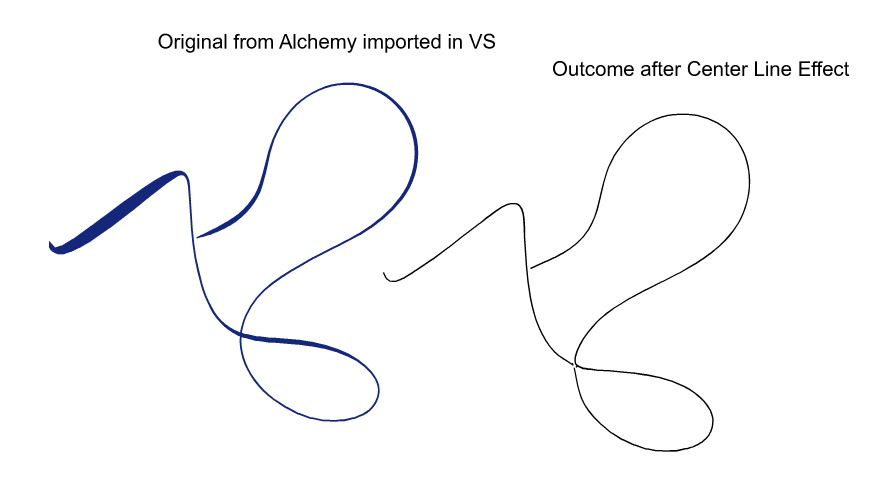
.
.
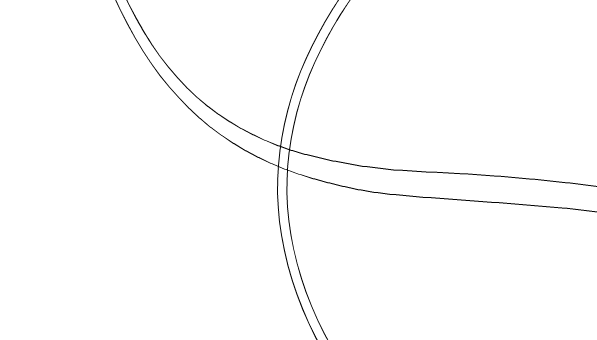
.
.
the Result after center line
.
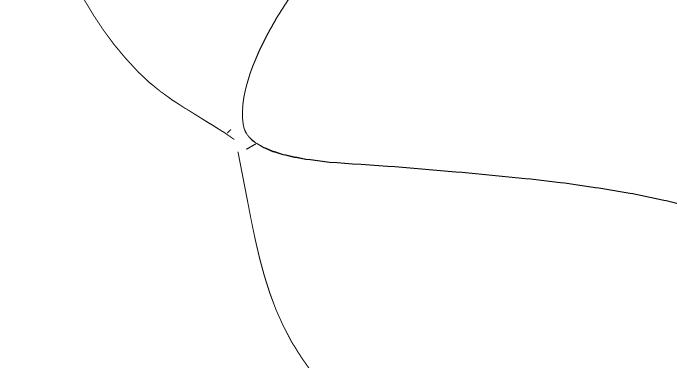
Here the Vectorstyler File:
center line problem-1.vstylerWin 11
CPU: AMD Ryzen 5 9600X, 6-core.
GPU: Nvidia Geforce RTX 5070. -
@Subpath Alchemy seems like a very interesting application (for "vibe drawing"), very experimental and unconventional, which I like. Thanks for the recommendation
I tried but could not run it on mac yet (Apple could not verify ... even control open does not work).
However, it seems like the app should be able to export paths in vector (refer to main page : "Switch the canvas. Automatically open your sketch in a more ‘conventional’ drawing application, either as a bitmap or vector file."
Maybe the pdf export also contains paths, or you could edit some of the modules source code to capture and export the traced points
That would be much more reliable than trying to recreate the paths through tracing + center line effect.
-
@Subpath The "center line" effect cannot handle self intersecting paths. This is inherent to the algorithm.
-
@VectorStyler said in Question about optimization the "center line" outline effect:
@Subpath The "center line" effect cannot handle self intersecting paths. This is inherent to the algorithm.
Okay, I thought that already.
It's not that big of a problem, I can fix it manually
and maybe i find another solution. -
@Subpath I've played a little bit with screenshots of this page. I'm not sure why you would use centerline effect at all for this, especially on 2nd example which only has thin lines.
Centerline would work if you trace the image using "Extract Fills", where you end up with closed shape outlining the black pixels of your original image (stroke empty, fill black). Then applying centerline would "skeletonize" the mask and find the median paths of this closed shape (with artifacts at intersections).
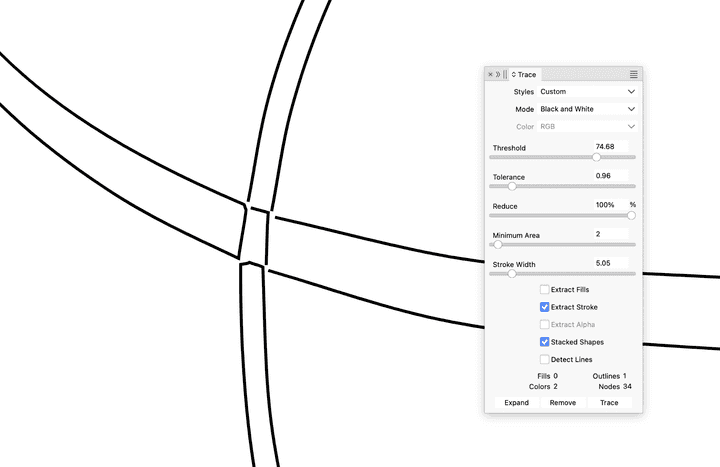
Another approach would be to trace using the "Extract Stroke" method where you directly end up with open paths and you don't need to apply centerline effect. It's not perfect either but seems a more direct approach.
This is what I got using low resolution screenshots. You'd probably get better results with higher resolution images
-
Those curves was just an example to illustrate the Problem
with " Center Line ".Alchemy is a writen in Java, maybe this cause Problems on your Mac.
No Problem on PC here even the App is old. Yes, its a very unique
little App. You could take a search on youtube btw.
.
.
Vector graphics could be exported .SVG or as .PDF non of them export "Boids"
as simple Paths. Export as .PDF is sometimes a better option to keep some
colored results.
.
.
I dont see tracing as an solution.
Editing the code is also out of reach.To simple split the Alchemy Result and use the " center line " effect on
both sides seems the easiest solution to me. But i will look for alternative ways.
.
.
Why i want a Path ?
I like to experiment and do not have a clear goal all of the time. I just take
on step after another. My next Step is just how to get a path out of that
Alchemy results.While the Boids are a bit random, i love the tangled curved results and
thought it would be nice to have this as simple Paths. Of course there
are cases where i could use just the Alchemy Result direct.But having that Result as paths offers further procession options
in many ways. Of course also in other Apps too.
