Arrange order icons - more intuitive and clean option?
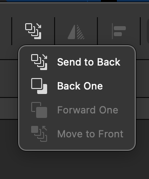

-
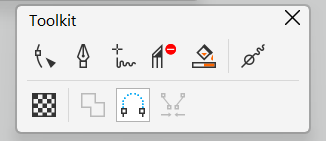
@Subpath I know exactly what you mean. Here is mine in CDR. Custom toolbars that are resizable are a big help especially when there are dividers present. It helps make the layout more visually legible.
I think Outline Tools is a default-ish one. I've forgotten because I have saved Workspaces that I use, but I seem to remember I added things like the individual stroke configurations:
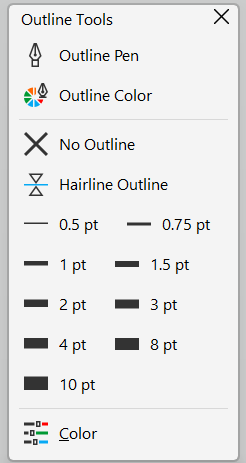
Similar to VS and some of the complaints above about options being hidden by a toggle, some common tools for my workflow like the Pen tool in CDR can't be used by default with keyboard at all (kinda crazy to me), so having these selectable by mouse is certainly handy. VS responds very slowly at times at least on my end, so I tend to avoid using it and referring to shortcuts where possible.
VS's UI by comparison lends itself to mouse-heavy users more than most other design/art programs I've used. CDR's interface is more bare bone until tools are actually in use causing a change in the context toolbar or dockers are opened. Otherwise, it is deceptively simple looking.
-
@VectorStyler
New objects should be inserted above the currently selected object in the layer stack (context aware), instead of always going to the top. This would greatly improve workflow and reduce manual layer reordering.Not sure if this behavior already exists or can be enabled in VectorStyler, but it would be a very valuable addition.
-
@Honor Is already available
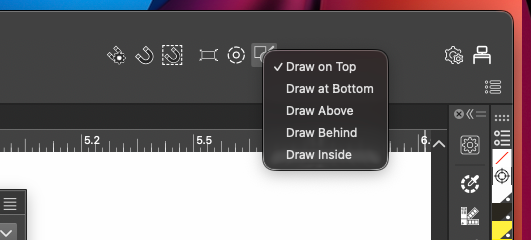
 Select > Drawing > Draw Above
 -
@encart Thank you very much.
 I had no idea it was there. Every time I think VectorStyler is missing something, I end up discovering it already has it
-
@Honor You're welcome. Each of us experiences this
-
We all experience this quite often.
See this thread of mine:
https://www.vectorstyler.com/forum/topic/5677/houston-i-have-a-problem-vectorstyler-solution-is-already-build-inIt's incredible what Vectorstyler thought ahead.
In addition, he's very open to user suggestions, many
of which have found their place in the app Vectorstyler over time. -
@Honor If you encounter things like this, always feel free to post a new thread. That way we all know how others are using the program and if they're having the same difficulties. Some of us don't even know all the options and little operations that exist within the program and so teaching some of us that there are other solutions... for example, I didn't know about this option and I will definitely be using it..
-
There is also an icon dropdown in the upper right corner of the UI that also accomplishes this:
-
@Subpath Totally agree
There are definitely features in VectorStyler that keep surprising me the more I use it. It’s quite impressive how many things already have well-thought-out solutions in place, especially considering the app doesn’t have a 20–30 year legacy behind it.@debraspicher Same here I honestly thought this behavior was something only Affinity had turns out I was wrong. I’ll definitely start using this more now.
@boldline Having it in the UI like that makes it much easier to switch quickly during frequent use. Thank you
-
@Boldline said in Arrange order icons - more intuitive and clean option?:
the "arrange order" icons in Affinity seem more intutive to me than what we have in VS and it looks cleaner:
I like the VS solution better and faster to use. In my opinion, even icons are clearer in VS.


