VectorStyler
    • Categories
    • Unread
    • Recent
    • Tags
    • Popular
    • Register
    • Login

    Redrawing screen hide toolbars and then show them again

    Scheduled Pinned Locked Moved Bugs in VectorStyler
    23 Posts 3 Posters 139 Views 3 Watching
    Loading More Posts
    • Oldest to Newest
    • Newest to Oldest
    • Most Votes
    Reply
    • Reply as topic
    Log in to reply
    This topic has been deleted. Only users with topic management privileges can see it.
    • M Offline
      marce
      last edited by

      Here is what happens. It is random, so i can say what is exactly the reason. It happens doing nothing too.

      https://icedrive.net/s/v1yh59wT7bvFTC4x9jxCaAt6VAC9

      Ryzen 9 3900X on Asus prime x570-p
      Memory 48gb ddr4
      Nvidia gtx 970 on an Asus strix, 4gb gddr5
      NVMe CT100p 1TB

      debraspicherD VectorStylerV 3 Replies Last reply Reply Quote 1
      • debraspicherD Offline
        debraspicher @marce
        last edited by

        @marce I've seen the grid flickering, but have not seen the interface flickering like that.

        Windows 11 Build 26200.7171 (25H2)
        AMD Ryzen 7 9700X with Gigabyte X870E Aorus Pro Ice
        32GB RAM @ 6000MHz
        PNY NVIDIA RTX 5070 Ti 16GB; Display 1: 4K @150%; Display 2: 4K @150%
        Wacom Intuos Pro L (2025); Wacom Intuos Pro M; Epson ET-8550; Siser Romeo

        1 Reply Last reply Reply Quote 0
        • VectorStylerV Offline
          VectorStyler @marce
          last edited by

          @marce This looks problematic, not sure what could cause this.

          Did this happen while holding the mouse and dragging in the color wheel?

          Also: is the Windows display scaled in Windows Settings?

          M 1 Reply Last reply Reply Quote 0
          • M Offline
            marce @VectorStyler
            last edited by

            @VectorStyler said in Redrawing screen hide toolbars and then show them again:

            @marce This looks problematic, not sure what could cause this.

            Did this happen while holding the mouse and dragging in the color wheel?

            Also: is the Windows display scaled in Windows Settings?

            Hi. No scaling. I have been trying to found when it happens, but im unable. It just happens randomly. I deactivated the multiple monitors, i changed the performance from software to gpu, but it randomly continue doing this.
            My setup is quite regular. Meanwhile writing here, VS made this issue. I was doing nothing with it, it was just open.
            I see some other strange things related to the screen. One of them is that pointers contour looks pixelated as you can see in this screenshot:

            e88028cf-e95f-494d-b024-c294aa0c4cb3-image.png

            Ryzen 9 3900X on Asus prime x570-p
            Memory 48gb ddr4
            Nvidia gtx 970 on an Asus strix, 4gb gddr5
            NVMe CT100p 1TB

            1 Reply Last reply Reply Quote 1
            • VectorStylerV Offline
              VectorStyler @marce
              last edited by

              @marce Did this occur in previous versions?

              M 1 Reply Last reply Reply Quote 0
              • M Offline
                marce @VectorStyler
                last edited by

                @VectorStyler I dont remember to saw that behavior, i try to report inmediately when i see something..
                Can an older version be installed along with the current to test or this is not possible?

                Ryzen 9 3900X on Asus prime x570-p
                Memory 48gb ddr4
                Nvidia gtx 970 on an Asus strix, 4gb gddr5
                NVMe CT100p 1TB

                VectorStylerV 1 Reply Last reply Reply Quote 1
                • VectorStylerV Offline
                  VectorStyler @marce
                  last edited by

                  @marce You can install an older version but first you have to remove the current one.

                  Another thing to try: uninstall VS and remove all files from "Program Files \ NumericPath"
                  and let me know if after the Windows uninstall, something is left in that folder
                  on Windows the MSI installer can create problems when updating (by not updating some files)

                  M 1 Reply Last reply Reply Quote 0
                  • M Offline
                    marce @VectorStyler
                    last edited by

                    @VectorStyler The uninstaller deleted the Numeric Path folder, nothing left behind.
                    I installed VS 1.2.078. That is the one i had in my downloads folder.
                    I started working on it. Long run, but after a while, it did something similar. Not so long as it happened in 1.3, but it did something similar. Menus drawing appear faster in 1.2 than in 1.3.
                    So far, i dont know what can be the issue. My Graphics Card is an Standard nVidia. The exact model is Geforce GTX 970 with 4gb or ram.
                    I dont have issues in the rest of the system with the display, i use several other programs for design, and appear related to VS. But im not able to root the cause. If i leave open 1.2 without doing nothing, it flickers as 1.3.

                    Ryzen 9 3900X on Asus prime x570-p
                    Memory 48gb ddr4
                    Nvidia gtx 970 on an Asus strix, 4gb gddr5
                    NVMe CT100p 1TB

                    VectorStylerV 1 Reply Last reply Reply Quote 1
                    • VectorStylerV Offline
                      VectorStyler @marce
                      last edited by

                      @marce I will try to find out what can cause this

                      M 1 Reply Last reply Reply Quote 0
                      • M Offline
                        marce @VectorStyler
                        last edited by

                        @VectorStyler In 017 it also does the same.

                        Ryzen 9 3900X on Asus prime x570-p
                        Memory 48gb ddr4
                        Nvidia gtx 970 on an Asus strix, 4gb gddr5
                        NVMe CT100p 1TB

                        VectorStylerV M 2 Replies Last reply Reply Quote 1
                        • VectorStylerV Offline
                          VectorStyler @marce
                          last edited by

                          @marce Could not replicate this issue yet.

                          1 Reply Last reply Reply Quote 1
                          • M Offline
                            marce @marce
                            last edited by

                            said in Redrawing screen hide toolbars and then show them again:

                            @VectorStyler In 017 it also does the same.

                            For some reason 018 does it but not so often. I was believen it was fixed, but at last, it did it. I know you couldnt find the casus still, but anyway i believed was good to know.

                            Ryzen 9 3900X on Asus prime x570-p
                            Memory 48gb ddr4
                            Nvidia gtx 970 on an Asus strix, 4gb gddr5
                            NVMe CT100p 1TB

                            M 1 Reply Last reply Reply Quote 1
                            • M Offline
                              marce @marce
                              last edited by

                              So annoying, no fixed by any of the updates. My windows machine, pretty standard, dont like VectorStyler.

                              Ryzen 9 3900X on Asus prime x570-p
                              Memory 48gb ddr4
                              Nvidia gtx 970 on an Asus strix, 4gb gddr5
                              NVMe CT100p 1TB

                              VectorStylerV 1 Reply Last reply Reply Quote 1
                              • VectorStylerV Offline
                                VectorStyler @marce
                                last edited by

                                @marce said in Redrawing screen hide toolbars and then show them again:

                                So annoying, no fixed by any of the updates. My windows machine, pretty standard, dont like VectorStyler.

                                The problem is that I cannot replicate this.

                                Did you try with all default settings / workspace?

                                M 1 Reply Last reply Reply Quote 0
                                • M Offline
                                  marce @VectorStyler
                                  last edited by marce

                                  @VectorStyler Yes, i reset the settings, restarted it. The same thing. It flickers, often. I dont know if there any other thing i can do to inform the problem, some kind of log vstyler saves.

                                  Ryzen 9 3900X on Asus prime x570-p
                                  Memory 48gb ddr4
                                  Nvidia gtx 970 on an Asus strix, 4gb gddr5
                                  NVMe CT100p 1TB

                                  VectorStylerV 1 Reply Last reply Reply Quote 1
                                  • VectorStylerV Offline
                                    VectorStyler @marce
                                    last edited by

                                    @marce said in Redrawing screen hide toolbars and then show them again:

                                    @VectorStyler Yes, i reset the settings, restarted it. The same thing. It flickers, often. I dont know if there any other thing i can do to inform the problem, some kind of log vstyler saves.

                                    There is no log saved.

                                    Is this on Windows 11?

                                    M 1 Reply Last reply Reply Quote 0
                                    • M Offline
                                      marce @VectorStyler
                                      last edited by

                                      @VectorStyler No, is windows 10. Here is my specs
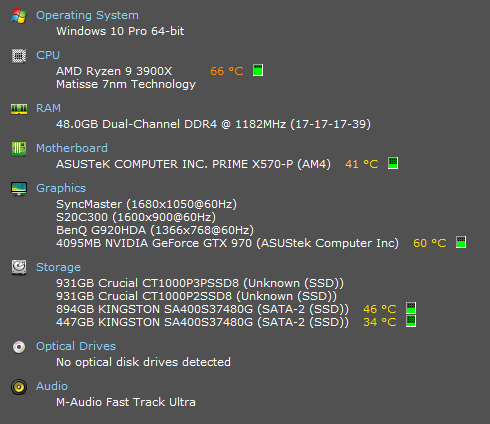
                                      2f6a1da2-0247-4809-80d9-e1cd240c9929-image.png

                                      Ryzen 9 3900X on Asus prime x570-p
                                      Memory 48gb ddr4
                                      Nvidia gtx 970 on an Asus strix, 4gb gddr5
                                      NVMe CT100p 1TB

                                      VectorStylerV 1 Reply Last reply Reply Quote 1
                                      • VectorStylerV Offline
                                        VectorStyler @marce
                                        last edited by

                                        @marce In the VectorStyler user data folder (Help -> Reveal Workspace Folder) there is a "resources" folder. This contains the VectorStyler settings and current workspace state.
                                        Can you send me these files by email? I will try to replicate the error here.

                                        And: in the original recording the error occurs when clicking or dragging in the docked color panel. Does it occur in different cases also?

                                        M 1 Reply Last reply Reply Quote 0
                                        • M Offline
                                          marce @VectorStyler
                                          last edited by

                                          @VectorStyler Hi VS. It occurs without any interaction with VS. Just you leave the program open, and it will happen while doing nothing. Meanwhile writing this message, VS do this in the secondary monitor where i have it open. But it do it also in the primary monitor.
                                          Here is the data folder:
                                          https://icedrive.net/s/b5GubGuyGNkhtzibRvDYSPj2htGR

                                          Ryzen 9 3900X on Asus prime x570-p
                                          Memory 48gb ddr4
                                          Nvidia gtx 970 on an Asus strix, 4gb gddr5
                                          NVMe CT100p 1TB

                                          VectorStylerV 1 Reply Last reply Reply Quote 1
                                          • VectorStylerV Offline
                                            VectorStyler @marce
                                            last edited by

                                            @marce said in Redrawing screen hide toolbars and then show them again:

                                            It occurs without any interaction with VS.

                                            Does something like automatic screen background change / update happen when this layout refresh occurs?


                                            M 1 Reply Last reply Reply Quote 0
                                            • First post
                                              Last post