Redrawing screen hide toolbars and then show them again
-
@marce said in Redrawing screen hide toolbars and then show them again:
So annoying, no fixed by any of the updates. My windows machine, pretty standard, dont like VectorStyler.
The problem is that I cannot replicate this.
Did you try with all default settings / workspace?
-
@VectorStyler Yes, i reset the settings, restarted it. The same thing. It flickers, often. I dont know if there any other thing i can do to inform the problem, some kind of log vstyler saves.
-
@marce said in Redrawing screen hide toolbars and then show them again:
@VectorStyler Yes, i reset the settings, restarted it. The same thing. It flickers, often. I dont know if there any other thing i can do to inform the problem, some kind of log vstyler saves.
There is no log saved.
Is this on Windows 11?
-
@VectorStyler No, is windows 10. Here is my specs
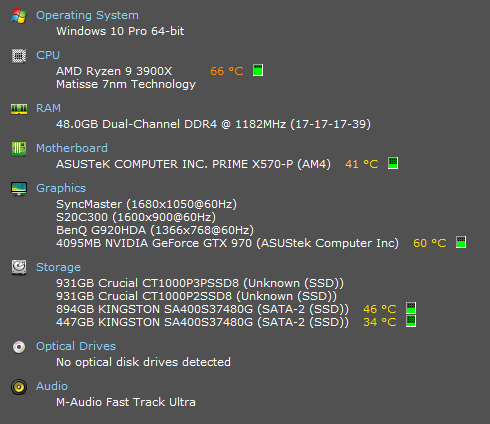
-
@marce In the VectorStyler user data folder (Help -> Reveal Workspace Folder) there is a "resources" folder. This contains the VectorStyler settings and current workspace state.
Can you send me these files by email? I will try to replicate the error here.And: in the original recording the error occurs when clicking or dragging in the docked color panel. Does it occur in different cases also?
-
@VectorStyler Hi VS. It occurs without any interaction with VS. Just you leave the program open, and it will happen while doing nothing. Meanwhile writing this message, VS do this in the secondary monitor where i have it open. But it do it also in the primary monitor.
Here is the data folder:
https://icedrive.net/s/b5GubGuyGNkhtzibRvDYSPj2htGR -
@marce said in Redrawing screen hide toolbars and then show them again:
It occurs without any interaction with VS.
Does something like automatic screen background change / update happen when this layout refresh occurs?
-
@VectorStyler
Hi VS. It seems you’ve hit the nail on the head! There is a popular tool running in the background called "John Background Switcher". I have installed it from long time, and never gave me problems with other software. But as you said, when it change the background of Windows, VStyler flicks. In the video you can see it. BUT when i change the windows background manually, from the windows standard settings, VS continue working without problem.
After i closed the automatic background switcher, VS is not flicking at all. I have worked with it several minutes, and no problem.
The solution is to not use the JBS program, or set it up to change the background not so often (it changed the background after 2 minutes!). But in any case, i know now that VS is not the guilty of the issue. Thanks very much your help. I wonder why the background change relate to VS.
Here is the video:
https://icedrive.net/s/ka3vRx5PzXCQiTZR4aCQD8X66PCbThanks again, much apreciated.
-
@marce I will try to investigate why such switching causes flickering.
One thing for sure, if Windows tells VS to relayout, then VS does a relayout. This typically happens on screen resolution changes. But it should not happen on background changes.
I will treat this as a bug for now. -
@VectorStyler I tweaked a little the settings of the utility switcher, to see if i could found some culprit setting, but i cant found nothing that makes difference. The program is capable to set a background over the three monitors, or one different for each one, to add a calendar over the background, etc. Maybe that makes some tweaking on the system, i dont know. But it affects some function that VS also is related, appear to be.
