Redrawing screen hide toolbars and then show them again
-
Here is what happens. It is random, so i can say what is exactly the reason. It happens doing nothing too.
Ryzen 9 3900X on Asus prime x570-p
Memory 48gb ddr4
Nvidia gtx 970 on an Asus strix, 4gb gddr5
NVMe CT100p 1TB -
@marce I've seen the grid flickering, but have not seen the interface flickering like that.
-
@marce This looks problematic, not sure what could cause this.
Did this happen while holding the mouse and dragging in the color wheel?
Also: is the Windows display scaled in Windows Settings?
-
@VectorStyler said in Redrawing screen hide toolbars and then show them again:
@marce This looks problematic, not sure what could cause this.
Did this happen while holding the mouse and dragging in the color wheel?
Also: is the Windows display scaled in Windows Settings?
Hi. No scaling. I have been trying to found when it happens, but im unable. It just happens randomly. I deactivated the multiple monitors, i changed the performance from software to gpu, but it randomly continue doing this.
My setup is quite regular. Meanwhile writing here, VS made this issue. I was doing nothing with it, it was just open.
I see some other strange things related to the screen. One of them is that pointers contour looks pixelated as you can see in this screenshot:

-
@marce Did this occur in previous versions?
-
@VectorStyler I dont remember to saw that behavior, i try to report inmediately when i see something..
Can an older version be installed along with the current to test or this is not possible? -
@marce You can install an older version but first you have to remove the current one.
Another thing to try: uninstall VS and remove all files from "Program Files \ NumericPath"
and let me know if after the Windows uninstall, something is left in that folder
on Windows the MSI installer can create problems when updating (by not updating some files) -
@VectorStyler The uninstaller deleted the Numeric Path folder, nothing left behind.
I installed VS 1.2.078. That is the one i had in my downloads folder.
I started working on it. Long run, but after a while, it did something similar. Not so long as it happened in 1.3, but it did something similar. Menus drawing appear faster in 1.2 than in 1.3.
So far, i dont know what can be the issue. My Graphics Card is an Standard nVidia. The exact model is Geforce GTX 970 with 4gb or ram.
I dont have issues in the rest of the system with the display, i use several other programs for design, and appear related to VS. But im not able to root the cause. If i leave open 1.2 without doing nothing, it flickers as 1.3. -
@marce I will try to find out what can cause this
-
@VectorStyler In 017 it also does the same.
Ryzen 9 3900X on Asus prime x570-p
Memory 48gb ddr4
Nvidia gtx 970 on an Asus strix, 4gb gddr5
NVMe CT100p 1TB -
@marce Could not replicate this issue yet.
-
said in Redrawing screen hide toolbars and then show them again:
@VectorStyler In 017 it also does the same.
For some reason 018 does it but not so often. I was believen it was fixed, but at last, it did it. I know you couldnt find the casus still, but anyway i believed was good to know.
-
So annoying, no fixed by any of the updates. My windows machine, pretty standard, dont like VectorStyler.
-
@marce said in Redrawing screen hide toolbars and then show them again:
So annoying, no fixed by any of the updates. My windows machine, pretty standard, dont like VectorStyler.
The problem is that I cannot replicate this.
Did you try with all default settings / workspace?
-
@VectorStyler Yes, i reset the settings, restarted it. The same thing. It flickers, often. I dont know if there any other thing i can do to inform the problem, some kind of log vstyler saves.
-
@marce said in Redrawing screen hide toolbars and then show them again:
@VectorStyler Yes, i reset the settings, restarted it. The same thing. It flickers, often. I dont know if there any other thing i can do to inform the problem, some kind of log vstyler saves.
There is no log saved.
Is this on Windows 11?
-
@VectorStyler No, is windows 10. Here is my specs
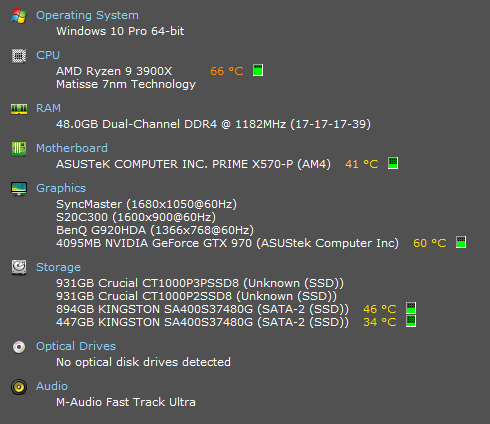
-
@marce In the VectorStyler user data folder (Help -> Reveal Workspace Folder) there is a "resources" folder. This contains the VectorStyler settings and current workspace state.
Can you send me these files by email? I will try to replicate the error here.And: in the original recording the error occurs when clicking or dragging in the docked color panel. Does it occur in different cases also?
-
@VectorStyler Hi VS. It occurs without any interaction with VS. Just you leave the program open, and it will happen while doing nothing. Meanwhile writing this message, VS do this in the secondary monitor where i have it open. But it do it also in the primary monitor.
Here is the data folder:
https://icedrive.net/s/b5GubGuyGNkhtzibRvDYSPj2htGR -
@marce said in Redrawing screen hide toolbars and then show them again:
It occurs without any interaction with VS.
Does something like automatic screen background change / update happen when this layout refresh occurs?

