Cannot be pasted in situ
-
1.How can I paste the shapes of 1.2 identical sized drawing boards on drawing board 1 in their original positions on drawing board 2?
2.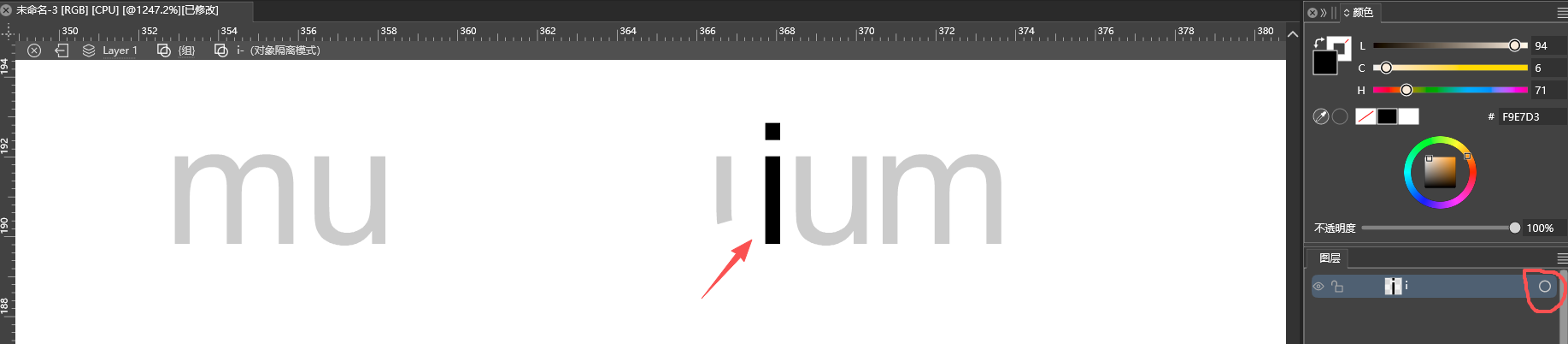 Why can't 'i' be selected in isolation mode? You must click on the layer panel to select it.
 -
-
The default Paste command pastes into the center of the view.
"Paste in Place" should keep the position -
Not sure of this, if you send me that example I can tell more?
In VS there are two different isolation modes: "inside" or "selection".
This seems to be "inside", so now you are drawing inside the "i" shape, which means you cannot select "i" (only its content, which is empty according to the layers panel).
To select "i" you need to exit the isolation mode and then single-click on "i"
-
-
@VectorStyler
I copied it on drawing board 1 and want to paste it on drawing board 2 while keeping it in the same position as drawing board 1. What should I do? -
@macos said in Cannot be pasted in situ:
I copied it on drawing board 1 and want to paste it on drawing board 2 while keeping it in the same position as drawing board 1.
When pasted on the other artboard, it will be centered. Not possible to paste at the same location on the new artboard.
-
@VectorStyler
It is recommended to implement this feature, as it can sometimes be quite useful.
Illustrator is fine. -
@macos Will be added
-
@macos There an option in Settings -> Other Options:
"Paste with Artboard Position"If enabled, it should keep the Artboard relative position
