VectorStyler
    • Categories
    • Unread
    • Recent
    • Tags
    • Popular
    • Register
    • Login

    Previewing Image Effects

    Scheduled Pinned Locked Moved Features and Ideas
    2 Posts 2 Posters 13 Views 2 Watching
    Loading More Posts
    • Oldest to Newest
    • Newest to Oldest
    • Most Votes
    Reply
    • Reply as topic
    Log in to reply
    This topic has been deleted. Only users with topic management privileges can see it.
    • S Offline
      Subpath
      last edited by Subpath

      Sometimes one just want to cycle through the available image effects,
      or through options of a Image effect.

      Unfortunately, in VectorStyler, each effect or option must be selected
      painstakly and confirmed using the mouse before you are able to see it.

      Dont know if this would be possible but I would like to suggest
      adding a way to navigate through them using the cursor keys (up and down)
      and have a kind of live preview.

      I understand that the respective settings may not necessarily match the effect.
      It's simply about getting a rough overview of what the effect looks like and then
      deciding whether to continue with it.

      This is just one possible approach; if anyone has a better idea, please feel free
      to post it here.
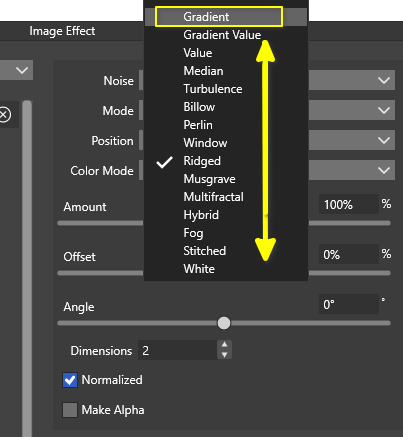
      preview via cursor keys.png

      Win 11
      CPU: AMD Ryzen 5 9600X, 6-core.
      GPU: Nvidia Geforce RTX 5070.

      VectorStylerV 1 Reply Last reply Reply Quote 2
      • VectorStylerV Offline
        VectorStyler @Subpath
        last edited by

        @Subpath I added this to the backlog

        1 Reply Last reply Reply Quote 1
        • First post
          Last post
