VectorStyler
    • Categories
    • Unread
    • Recent
    • Tags
    • Popular
    • Register
    • Login

    Add method to select all color selections in trace panel

    Scheduled Pinned Locked Moved Features and Ideas
    4 Posts 2 Posters 8 Views 1 Watching
    Loading More Posts
    • Oldest to Newest
    • Newest to Oldest
    • Most Votes
    Reply
    • Reply as topic
    Log in to reply
    This topic has been deleted. Only users with topic management privileges can see it.
    • BoldlineB Online
      Boldline
      last edited by

      In the trace panel (loving the improvements in 1.3-1.4!) could we have an easier way to clear out selected colors in the "selected colors" mode? Unless I am missing something, I cannot drag select or select all or groups of colors at one time and delete them.
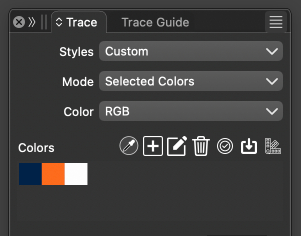
      3b5ff584-4e19-4114-bd6e-4ed1e194afcc-CleanShot 2026-11-25 at 10.29.56 AM.png

      🍎 macOS Tahoe 26.2, Mac mini (M1, 2020), Chip Apple M1, Memory 16 GB
      Cintiq 27QHD Display and LG Ultra HD Display

      VectorStylerV 1 Reply Last reply Reply Quote 1
      • VectorStylerV Offline
        VectorStyler @Boldline
        last edited by

        @Boldline I will try to add this

        BoldlineB 1 Reply Last reply Reply Quote 1
        • BoldlineB Online
          Boldline @VectorStyler
          last edited by

          @VectorStyler on a related note - what about a button that "scans" the selected raster image and delivers samples of the top ____ number of colors in that image? It could be based on how many colors the user specifies they want ahead of time - so if they ask for 5 colors, VS gives them the top 5 colors found.

          🍎 macOS Tahoe 26.2, Mac mini (M1, 2020), Chip Apple M1, Memory 16 GB
          Cintiq 27QHD Display and LG Ultra HD Display

          VectorStylerV 1 Reply Last reply Reply Quote 1
          • VectorStylerV Offline
            VectorStyler @Boldline
            last edited by

            @Boldline said in Add method to select all color selections in trace panel:

            VS gives them the top 5 colors found.

            The "Fixed Color" mode does that (but it will not show it in a list).

            1 Reply Last reply Reply Quote 0
            • First post
              Last post