Prevent accidental renaming in the Layers panel
-
I use double-click both in the Layers panel to rename objects and on the artboard to work with my artwork. I want to keep both workflows. The problem is that an object name can change before I’ve deliberately opened it for editing.
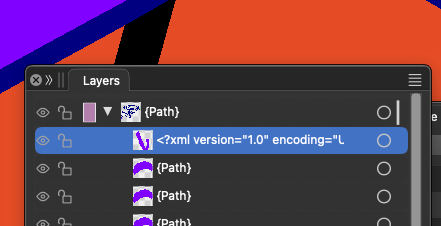
For example, I likely pressed ⌘V to paste artwork while the Layers panel still had focus. The selected path ended up named <?xml version="1.0" …. It looks like VectorStyler pasted the raw SVG text from my clipboard into the path’s name.
Could ⌘V change an object name only when the name field is open for editing? That would let me keep double-clicking to rename while preventing an ordinary paste from overwriting a name.
UPDATE: I found that enabling Object Pasteboard in the Layers panel options prevents one kind of accidental rename. When the Layers panel has focus and I press ⌘V, VectorStyler uses the clipboard for pasting objects. With the option off, it can apply clipboard text, such as an SVG title, to the selected layer or object name.
My remaining request is for a setting to disable inline renaming when I click an already selected name. I often click the row again just to select the object.