VectorStyler
    • Categories
    • Unread
    • Recent
    • Tags
    • Popular
    • Register
    • Login

    App Icon, still strangely blurry

    Scheduled Pinned Locked Moved Features and Ideas
    15 Posts 5 Posters 16.8k Views 1 Watching
    Loading More Posts
    • Oldest to Newest
    • Newest to Oldest
    • Most Votes
    Reply
    • Reply as topic
    Log in to reply
    This topic has been deleted. Only users with topic management privileges can see it.
    • michaelokrajM Offline
      michaelokraj @VectorStyler
      last edited by

      @vectoradmin no. I tested it on a Mac mini 2012 with the latest macOS, as on a MacBook Pro last Generation Intel with macOS monterey beta

      1 Reply Last reply Reply Quote 0
      • VectorStylerV Offline
        VectorStyler @Boldline
        last edited by

        @Boldline @michaelokraj This should be fixed in 1.0.044

        michaelokrajM 1 Reply Last reply Reply Quote 0
        • michaelokrajM Offline
          michaelokraj @VectorStyler
          last edited by michaelokraj

          @vectoradmin Thank you for getting back to me. Just updated … but the icon has still a blur. have a look:
          https://cln.sh/aFVc3K

          VectorStylerV 1 Reply Last reply Reply Quote 0
          • VectorStylerV Offline
            VectorStyler @michaelokraj
            last edited by

            @michaelokraj Will keep the issue open. No image was attached.

            michaelokrajM 1 Reply Last reply Reply Quote 0
            • michaelokrajM Offline
              michaelokraj @VectorStyler
              last edited by

              @vectoradmin said in App Icon, still strangely blurry:

              @michaelokraj Will keep the issue open. No image was attached.

              have a look
              https://cln.sh/aFVc3K

              b77B 1 Reply Last reply Reply Quote 0
              • b77B Offline
                b77 @michaelokraj
                last edited by b77

                @michaelokraj You could send the developer a timed screenshot — it's saved as lossless PNG, so it doesn't have the typical JPEG compression "jaggies" which don't help identify the issue.

                https://www.laptopmag.com/how-to/take-a-timed-or-delayed-screenshot-in-macos

                And don't post it here on the forum either — it gets converted to JPEG.

                MacBook Pro (Intel) running Monterey 12.6.4

                1 Reply Last reply Reply Quote 1
                • 861475_VctSt8 Offline
                  861475_VctSt @michaelokraj
                  last edited by 861475_VctSt

                  @michaelokraj
                  @vectoradmin

                  The reason why the icons are blurry or halos is that I think it is a resource problem. However, if this is the design, we have to accept it.
                  I would guess that all users see it more or less this way. Of course, there are differences in the way it looks depending on the monitor environment, etc.

                  I) Factors and considerations
                  Let's take a look at the resources.
                  a) 1024 x 1024
                  /Applications/VectorStyler.app/Contents/vector/data/resources/appicon.png
                  (fig. Copied from Resources)

                  0_1628408762981_appicon.png

                  b) (256, 64, 48, 32, 16)
                  /Applications/VectorStyler.app/Contents/vector/data/resources/appicon.ico
                  (fig. Copied from Resources)
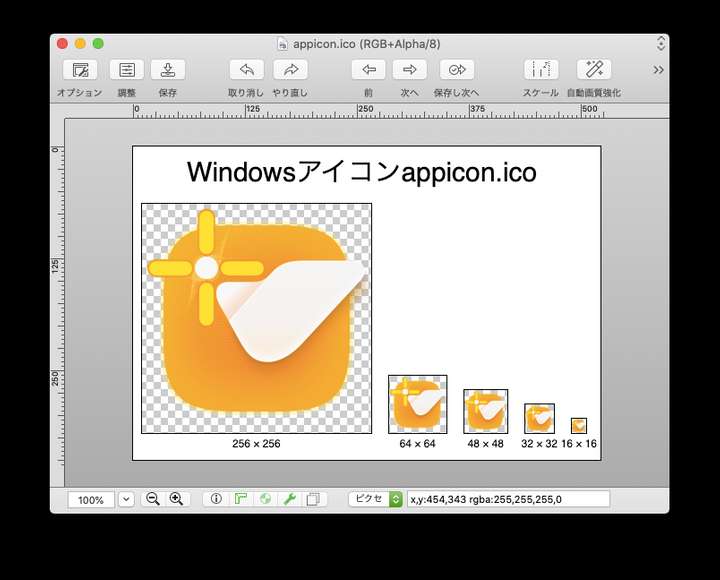
                  0_1628409544530_b).png

                  II) First, the factor
                  The icons look fuzzy because of the icon design. The originals must have been created in VS. The resources are images.

                  Main factors

                  1. Appearance of the outer corner R-frame: blur, transparency, etc.
                    When the blur of the frame overlaps with the background, it appears to stick out or false color is generated.
                  2. Inner orange dot pattern and gradient.
                    The image has lost its original form due to image interpolation.

                  Solution to 1
                  Change blur to solid.

                  Solution to 2
                  If you want to make use of the current design, create a dot pattern for each icon size.
                  However, I think it is unrealistic to create such a pattern for 64x64 or smaller.
                  So, you have to change the design. For example, create a rough pattern with solid colors for the dot pattern, etc.

                  III Considerations for issues

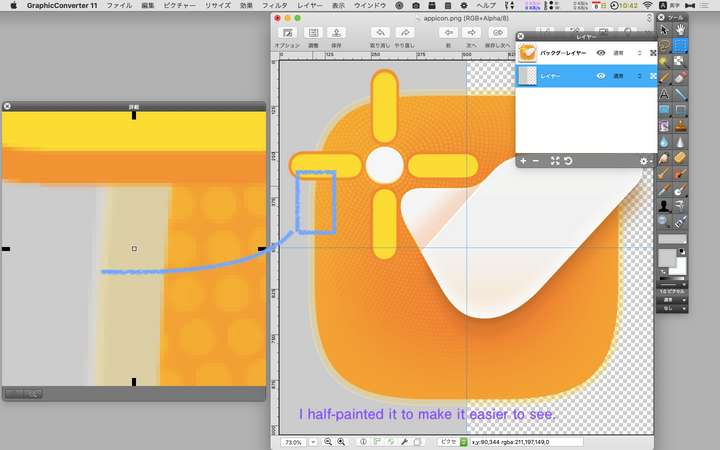
                  issue-1

                  please check this comparisson. I am not sure, if this surrounding blur is by choice or not intended. Here is a comparisson between sketch and AD. Both sharp.

                  Causes
                  The color is mixed with the background gray due to 1. Or false color is occurring.

                  (fig. )
                  0_1628409452110_2021-08-08 10.42.36.png

                  issue-2

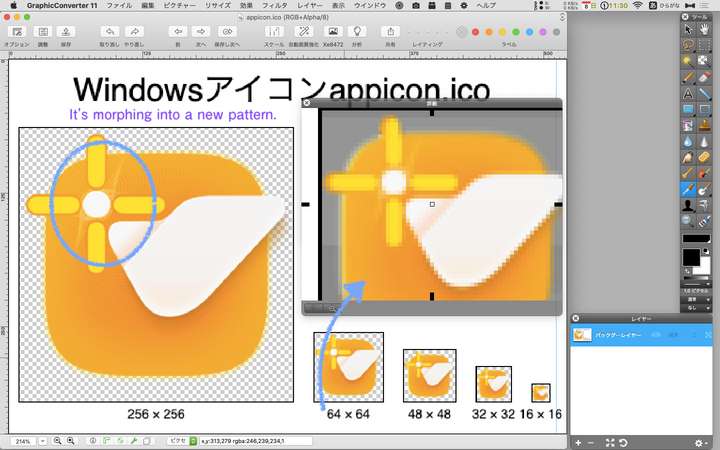
                  When you open the "About" window, the icon is destorted.

                  Cause
                  I assume that when you made b) from a), you simply used a reduction process.
                  The orange part is filled with irregular dots and gradients.
                  Because of the direct reduction, the image was interpolated and deformed.
                  At 256x256, the dots have already been destroyed, causing halos.

                  (fig. )
                  0_1628409494836_2021-08-08 11.30.17.png

                  At 64x64 and below, the original taste is lost.

                  LIc. 0 OS10.15.8
                  MacBook Air (13-inch, Mid 2012) / Intel Core i5, 8GB / Intel HD Graphics 4000
                  LIc. 1 OS15.7.4
                  MacBook Pro (14-inch, 2023) / Apple M2 Pro, 16GB / Apple GPU

                  b77B 1 Reply Last reply Reply Quote 1
                  • b77B Offline
                    b77 @861475_VctSt
                    last edited by b77

                    @861475_VctSt Are you running the latest version on the Mac? Here in version 1.0.044 the dots of the "spiral" pattern around the white dot are bigger and with more space between them:

                    0_1628413852710_icon_screenshot.png

                    …
                    But indeed there is a difference between the icon for Mac (.icns) and the one for Windows (.ico) — on Windows the spiral pattern around the white dot has an overlap, and the orange background is a bit lighter. I guess it was left that way from an older beta. Easily fixable, I think.

                    Anyway, should the semi-transparent contour around the rounded square be changed to opaque because it creates unintended blur?
                    Doesn't seem blurry on my Retina screen, but…

                    MacBook Pro (Intel) running Monterey 12.6.4

                    861475_VctSt8 2 Replies Last reply Reply Quote 0
                    • 861475_VctSt8 Offline
                      861475_VctSt @b77
                      last edited by

                      @b77 said in App Icon, still strangely blurry:

                      Are you running the latest version on the Mac? Here in version 1.0.044 the dots of the "spiral" pattern around the white dot are bigger and with more space between them:

                      Yes, I do.
                      My VS is ver1.0.044 for intelMAC. I did a clean install, not an update.

                      By the way, your icon image, from the file name, it is a screenshot, isn't it?
                      "1628413856594-icon_screenshot.png"

                      What I uploaded is not a screenshot, but the VS resource data itself.

                      I also took a screenshot.
                      This result depends on the monitor environment, so it's not really comparable.

                      (fig.)
                      0_1628468201950_2021-08-09 8.56.58.png

                      The dot pattern is now larger.
                      The outer frame is even blurrier.

                      LIc. 0 OS10.15.8
                      MacBook Air (13-inch, Mid 2012) / Intel Core i5, 8GB / Intel HD Graphics 4000
                      LIc. 1 OS15.7.4
                      MacBook Pro (14-inch, 2023) / Apple M2 Pro, 16GB / Apple GPU

                      1 Reply Last reply Reply Quote 0
                      • 861475_VctSt8 Offline
                        861475_VctSt @b77
                        last edited by 861475_VctSt

                        @b77
                        @Vectoradomin

                        This is a continuous post from before.

                        Since I was curious, I examined the icon data in a different way.
                        I extracted the ICNS data from Finder by the following procedure.
                        -Select the VS icon from Finder
                        -Copy VS from the contextual menu
                        -Create a new image from the clipboard in Preview
                        -Eight different icon images are created.

                        I laid out the background in gray to make it easier to see.
                        (fig.1024×1024)

                        0_1628472020086_aikon.png

                        It seems to look different from the original VS resource.
                        The dots are also larger now.
                        It looks like b77's icon image.
                        It seems that ICNS data is processed in some way in the Finder and clipboard process.
                        I thought I should scrutinize the original resource itself.

                        In any case, I think the following should be considered for icons of 256x256 or smaller.
                        -Dot pattern in the orange area
                        -blurred corner R-frames

                        LIc. 0 OS10.15.8
                        MacBook Air (13-inch, Mid 2012) / Intel Core i5, 8GB / Intel HD Graphics 4000
                        LIc. 1 OS15.7.4
                        MacBook Pro (14-inch, 2023) / Apple M2 Pro, 16GB / Apple GPU

                        b77B 1 Reply Last reply Reply Quote 0
                        • b77B Offline
                          b77 @861475_VctSt
                          last edited by b77

                          @861475_VctSt Not sure what happened and why your first screenshot was different.

                          Anyway, can you confirm you downloaded and tested with the .icns file I sent via forum chat?

                          MacBook Pro (Intel) running Monterey 12.6.4

                          861475_VctSt8 1 Reply Last reply Reply Quote 0
                          • 861475_VctSt8 Offline
                            861475_VctSt @b77
                            last edited by 861475_VctSt

                            @b77
                            @vectoradmin

                            Not sure what happened and why your first screenshot was different.

                            The following resources I uploaded in my first post may not be for Mac.
                            In particular, the ".ico" extension is for Win.

                            • /Applications/VectorStyler.app/Contents/vector/data/resources/appicon.png
                            • /Applications/VectorStyler.app/Contents/vector/data/resources/appicon.ico

                            I found ".ics" in another directory. This seems to be the resource for Mac.

                            • /Applications/VectorStyler.app/Contents/Resources/AppIcon.icns

                            There are 10 images in "AppIcon.icns".
                            I exported the 144DPI, 1024x1024 image from this one.

                            (fig)
                            0_1628486580257_An_Icon.png

                            Anyway, can you confirm you downloaded and tested with the .icns file I sent via forum chat?

                            I DL'd it from Dropbox.
                            This is a VS resource.

                            This is the same as your image.

                            The difference is that yours is a screenshot image (1012x1047). Mine is a resource image.

                            Improvement Case
                            Below 72DPI 128x128, false colors occur in relation to the background.
                            Two suggestions for improvement are as follows

                            • Make the blur of the corner R frame a solid color stroke.
                            • Eliminate the dot pattern.

                            LIc. 0 OS10.15.8
                            MacBook Air (13-inch, Mid 2012) / Intel Core i5, 8GB / Intel HD Graphics 4000
                            LIc. 1 OS15.7.4
                            MacBook Pro (14-inch, 2023) / Apple M2 Pro, 16GB / Apple GPU

                            1 Reply Last reply Reply Quote 0
                            • First post
                              Last post