Dealing with colors
-
@Petar_MK When in CorelDRAW and you needed a custom color you double-clicked the Fill or Stroke buttons to open a modal window where you could adjust the sliders.
So I think VectorStyler's approach is faster in this regard.
There was also this long-press (left- or right-click) on a color swatch that popped a 10x10 matrix with alternative colors close to the initial one.
Still, adjusting a color with sliders is a must, and Fill and Stroke buttons are needed along with it. Unless there is a better alternative? If there is, explain it step-by-step.
……………………………………
But if part of what you suggest is a consistent rule (left-click always assigns a color swatch to Fill, right-click always assigns a color swatch to stroke), I definitely agree with that.
-
@b77 said in Dealing with colors:
When in CorelDRAW and you needed a custom color you clicked the Fill or Stroke buttons to open a modal window where you could adjust the sliders.
I can't remember any program where you have to click on fill or outline icon to adjust the color. You move only sliders to define the color which can be used for fill or outline, or click on a color icon in swathes palette to open a dialog box to redefine it.
-
@Petar_MK Please write the steps — how would assigning a custom color to the fill then to the stroke of an object work, faster than the current method and without leaving the user guessing about where the color is assigned.
-
Without icons: STEP 1 -- left click -- fill, right click -- outline.
With icons: STEP 1 -- select the icon, STEP 2 -- apply the color. Additional step -- if you want to apply the color to the outline and the fill icon is active, you have to select the outline icon first. -
@Petar_MK said in Dealing with colors:
Without icons: STEP 1 -- left click -- fill, right click -- outline.
Sure, but here you're clicking one of the preset color swatches in the color bar, right? If so, yes, I agree with that.
But what if I want a custom color — one adjusted with the sliders, not a preset color from the color bar?
Is there a better/faster method than the current one, where (not always, but half of the time) you need to click the Fill or Stroke button in the Color panel before adjusting the sliders for that attribute (fill or outline)?
That's what I'm asking.
-
@b77 said in Dealing with colors:
But what if I want a custom color — one adjusted with the sliders, not a preset color from the color bar?
You left/right click on the icon next to the sliders where you can see what your color definition looks like.
-
@Petar_MK said in Dealing with colors:
You left/right click on the icon next to the sliders where you can see what your color definition looks like.
Sorry, I don't get it. So you want a single icon/button to the left of the sliders, not two — one for Fill and one for Stroke? A visual mockup would help.
-
-
@Petar_MK OK, but I don't see the advantage — is it just that instead of activating the Stroke attribute with a click on the part that is not under the Fill button, you now have only one button with two states that can be changed with left- and right-click? Or maybe just with left-click always to change between attributes?
Or maybe you just consider a button with two states visually better?
Again, sorry if I miss something obvious.
-
It is not complicated at all.
If you left/right click on the (single) icon next to the sliders or left/right click on a color icon in swatches you apply a fill/stroke (outline) color to the object.
No attributes at all.
As simple as this. -
@Petar_MK Not saying it's complicated, but I don't see why it is better than the current two overlapping buttons — one for the Fill attribute and the other for the Stroke attribute. Just because one single button has a bigger hit area?
Also: what are the specific disadvantages of the current method? You do know that you can drag the color from the Fill button to the Stroke button to assign the same color to the stroke?
-
@Petar_MK There is always room for improvement, we just need to clarify a bit.
So first, things that already exist:
- left/right click on color wheel to set fill/stroke colors
- left/right click in palette bar (on the margin of the window) also sets fill/stroke colors
- left/right click in palette panel (a.k.a swatches) sets fill/stroke colors
Things that are missing, and could these help ?
- left/right click on an item in Presets or Styles panels. Currently its left double click by default (can be changed to single click in menu). But these are not used that frequently.
- and a bit stretched, but why not: right click+drag the color sliders in the color panel. The color sliders are the only direct color selection, where the fill/stroke knob should be selected first.
If there are other ways to improve color selection, I'm happy to listen

-
@vectoradmin said in Dealing with colors:
left/right click on color wheel to set fill/stroke colors
left/right click in palette bar (on the margin of the window) also sets fill/stroke colors
left/right click in palette panel (a.k.a swatches) sets fill/stroke colorsYes, thats OK. Setting color without selected object, applying color with selected object.
@vectoradmin said in Dealing with colors:
left/right click on an item in Presets or Styles panels. Currently its left double click by default (can be changed to single click in menu). But these are not used that frequently.
and a bit stretched, but why not: right click+drag the color sliders in the color panel.Sorry, but I don't understand what you mean with these bullets.
@vectoradmin said in Dealing with colors:
The color sliders are the only direct color selection, where the fill/stroke knob should be selected first.
Those two knobs (fill/stroke icons) should be replaced with only one knob/icon that can be left/right click to set/apply the color to fill/stroke.
-
@Petar_MK The second set of bullets are possible ideas for improvement.
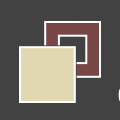
The above fill/stroke knob is almost universal by now, so this would be hard to change (from usability point of view).Do you mean, to have the color selected first with the slider, and then click on an icon to apply as fill and another icon to apply as stroke color?
-
@vectoradmin said in Dealing with colors:
The above fill/stroke knob is almost universal by now, so this would be hard to change (from usability point of view).
I was thinking the same thing - this is universal and understood across the board.
I am curous however what this single knob would look like. Would you do a quick sketch of your vision for it @Petar_MK ?
-
OK. Just leave it as it is. I can't explain it better. English is not my mother tongue.
-
@Petar_MK When the Fill button in the Color panel is active (it overlaps the Stroke button), you can Option-drag any of the sliders to change the color of the stroke directly, without having to click the Stroke button first (or press X) to activate it.
So you can't drag sliders with the right button of the mouse, but Option-drag works.
Does that help?
-
Yes, thank you.


