Rounding the corners
-
Can we expect any improvements to this feature? It currently works randomly. Sometimes the handle is visible, elsewhere it is not, appear in unexpected places (e.g. on a path), sometimes clicking has no effect.
https://recordit.co/NBE7tUxTmP
I wonder if it would not be better to give up the function of rounding all corners at the same time and place a single rounding instead of. In my case, it often activates accidentally. Personally, I prefer to select all corners with the Shift modifier. What is your opinion on this mechanic guys?
A yellow outline appears when a single corner is selected. The problem is that it's not a clickable zone, a little blue center only. -
@encart The rounding handle will overlap a path when the other segment connected to its node is not straight — in this case it probably has a Bézier handle that is very close to that node, and it bends the segment just a bit.
Anyway, multiple rounding handles can be selected with…
- direct click-and-drag (box select over multiple handles). and with…
- Shift + click-and-drag over each handle.
What indeed can be a bit confusing is that Shift-click to select multiple rounding handles doesn't do anything. Maybe it should?
MacBook Pro (Intel) running Monterey 12.6.4
-
@b77 said in Rounding the corners:
What indeed can be a bit confusing is that Shift-click to select multiple rounding handles doesn't do anything. Maybe it should?
I agree that a shift and click on individual nodes should select specific nodes to round the corners with -
-
@b77 When writing a post, as usual, I write from my own perspective. When I use rounding, I most often need to do this for a single point. For this reason, I believe that accessing this function should be the easiest and take the place for current rounding multiple corners.
Rounding single corner
- direct click-and drag
Rounding multiple corners
-
Shift + click on each handle
-
Shift + drag over handles ( i.e. selecting multiple corners in two separate areas of the object)
-
Drag over handles
Rounding all of the corners
-
Double click on any of the nodes (like selecting whole words in text editor)
-
Drag over the object
Or maybe double click on each handle could reset the rounding?
Edit:
I'm not sure if it's only my problem, but quick select single handle and drag has no effect. VideoMacBook Air M4 24Gb, Tahoe 26.3.1
-
@encart What you are proposing makes sense to me. I'm usually rounding one node - but there's a lot of value in being able to round all of them, or select ones at one time as well.
-
@encart Currently, the corner editor should work as follows:
- press + drag (no clicking) an not-selected corner, should modify all corners. This also means, that there is no selection.
- click on a corner, selects a single corner (indicated by orange circle).
- Command+Click (Control+Click on Windows) selects additional corners
Is this working (this way) for you?
-
@vectoradmin In my previous post in that thread I wrote some suggestions for consideration.
-
press + drag (no clicking) an not-selected corner, should modify all corners. This also means, that there is no selection.
//
IMHO that is the way how single corner should be edited. I round individual corners more often than all at once and wish to have easy access, no unnecessary clicking and responsiveness, -
click on a corner, selects a single corner (indicated by orange circle).
//
Double click on any corner to select all -
Command+Click (Control+Click on Windows) selects additional corners*
//
This one doesn't work on my pc. Tried to perform with Shift/Control/Alt already.
PS: Small active area of handles appears in shapes too.
https://streamable.com/joexcz -
-
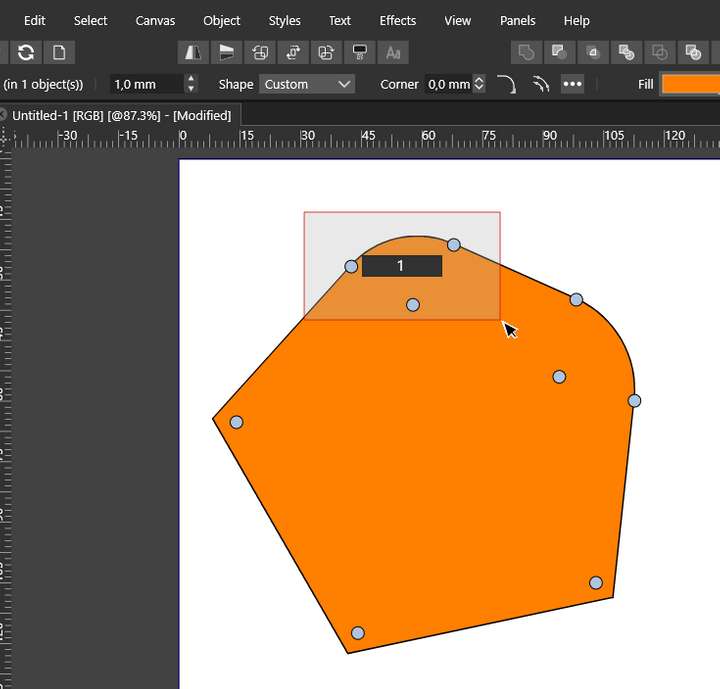
If the rounding has been made and we want to select this corner by dragging the cursor, we have to select all three points. It seems to me that only one would suffice. https://streamable.com/12z3cy
-
@encart Box selection of corners is an open issue (not always working right).
I also managed to replicate the issue on Windows (Control+Click is not working).
I will open a new bug around these corner issues.


