VectorStyler
    • Categories
    • Unread
    • Recent
    • Tags
    • Popular
    • Register
    • Login

    How do I flip text to the other side of the path?
    Scheduled Pinned Locked Moved Questions and Support
    9 Posts 3 Posters 10.6k Views 1 Watching
    Loading More Posts
    • Oldest to Newest
    • Newest to Oldest
    • Most Votes
    Reply
    • Reply as topic
    Log in to reply
    This topic has been deleted. Only users with topic management privileges can see it.
    • BoldlineB Online
      Boldline
      last edited by

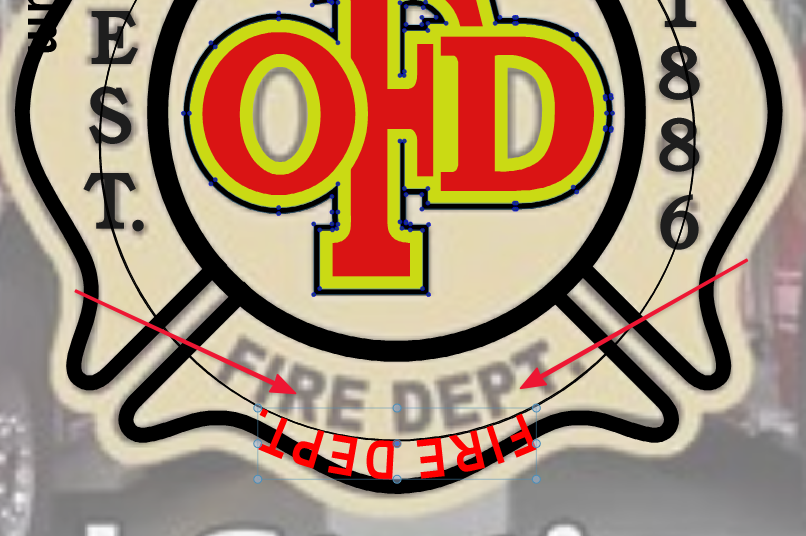
      I want to flip the words "Fire Dept" to the other side of the path to align with the sample image saved underneath. I found the "text on a path tool" but that only moves the text side to side and over to different strokes.
      Is the ability to drag text over the path a good option to add functionality to the
      "text on a path tool"?
      0_1631120595126_025d2b7e-bb23-4387-a41b-ab7df2e9bf35-image.png

      🍎 macOS Tahoe 26.2, Mac mini (M1, 2020), Chip Apple M1, Memory 16 GB
      Cintiq 27QHD Display and LG Ultra HD Display

      b77B 2 Replies Last reply Reply Quote 0
      • b77B Offline
        b77 @Boldline
        last edited by

        @Boldline If the circle was converted to curves, select it and use 'Reverse Path Direction' from the right-click menu, or from Object menu > Shape.

        MacBook Pro (Intel) running Monterey 12.6.4

        BoldlineB 1 Reply Last reply Reply Quote 0
        • BoldlineB Online
          Boldline @b77
          last edited by

          @b77 Thanks - that worked; though I don't think that is a fast or easy way to make the flip. @vectoradmin , could flipping the text to the inside of the path be made simpler somehow? What if we added the functionality to the "text on path" tool in the vertical far left side tool bar?

          🍎 macOS Tahoe 26.2, Mac mini (M1, 2020), Chip Apple M1, Memory 16 GB
          Cintiq 27QHD Display and LG Ultra HD Display

          BoldlineB 1 Reply Last reply Reply Quote 0
          • b77B Offline
            b77 @Boldline
            last edited by

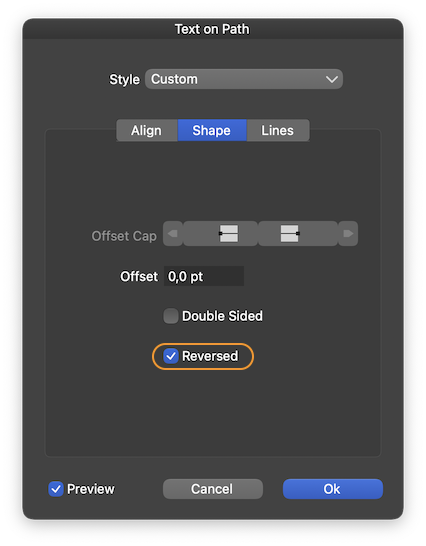
            If the shape is not converted, select 'Text on Path' from the Text menu and under the 'Shape' tab, check 'Reversed':
            0_1631121561953_reversed.png

            MacBook Pro (Intel) running Monterey 12.6.4

            BoldlineB 1 Reply Last reply Reply Quote 1
            • BoldlineB Online
              Boldline @b77
              last edited by

              @b77 that is helpful - thanks. Just re-stating this so there's no confusion - I still think this function should be tied to the text path tool in the toolbar.

              🍎 macOS Tahoe 26.2, Mac mini (M1, 2020), Chip Apple M1, Memory 16 GB
              Cintiq 27QHD Display and LG Ultra HD Display

              VectorStylerV 1 Reply Last reply Reply Quote 0
              • VectorStylerV Offline
                VectorStyler @Boldline
                last edited by

                @Boldline said in How do I flip text to the other side of the path?:

                @b77 I still think this function should be tied to the text path tool in the toolbar.

                I added this to the backlog.

                1 Reply Last reply Reply Quote 2
                • BoldlineB Online
                  Boldline @Boldline
                  last edited by

                  @vectoradmin "Improved: use space key to flip side when interactively editing a text on path."
                  Is this feature still working? I was trying to flip text tonight and I could not get it to do so with the spacebar.

                  🍎 macOS Tahoe 26.2, Mac mini (M1, 2020), Chip Apple M1, Memory 16 GB
                  Cintiq 27QHD Display and LG Ultra HD Display

                  VectorStylerV 1 Reply Last reply Reply Quote 0
                  • VectorStylerV Offline
                    VectorStyler @Boldline
                    last edited by

                    @Boldline

                    Is this feature still working? I was trying to flip text tonight and I could not get it to do so with the spacebar.

                    Should be working, when the Text on Path tool is used (icon below) and the text is dragged along the path with the mouse, hitting Space should flip the side.

                    0_1636092948120_textonpath.png

                    BoldlineB 1 Reply Last reply Reply Quote 0
                    • BoldlineB Online
                      Boldline @VectorStyler
                      last edited by

                      @vectoradmin ok yes it works. I did not have the "text on path" tool selected first. Thank you

                      🍎 macOS Tahoe 26.2, Mac mini (M1, 2020), Chip Apple M1, Memory 16 GB
                      Cintiq 27QHD Display and LG Ultra HD Display

                      1 Reply Last reply Reply Quote 1
                      • First post
                        Last post
