VectorStyler
    • Categories
    • Unread
    • Recent
    • Tags
    • Popular
    • Register
    • Login

    Keeping layers closed when editing hierarchy

    Scheduled Pinned Locked Moved Questions and Support
    3 Posts 2 Posters 4.7k Views 1 Watching
    Loading More Posts
    • Oldest to Newest
    • Newest to Oldest
    • Most Votes
    Reply
    • Reply as topic
    Log in to reply
    This topic has been deleted. Only users with topic management privileges can see it.
    • BoldlineB Online
      Boldline
      last edited by

      Is there a way to stop the layers from expanding to show the sub-layers each time they are moved inside the layers panel?
      Is this a handy feature to others? For me it just makes things confusing because I have to keep closing the layers
      For me, I'd rather the layers just stayed as they were when I moved them - if they were already open, let them stay open, if they were previously closed, let them stay closed even after the move

      🍎 macOS Tahoe 26.2, Mac mini (M1, 2020), Chip Apple M1, Memory 16 GB
      Cintiq 27QHD Display and LG Ultra HD Display

      b77B 1 Reply Last reply Reply Quote 0
      • b77B Offline
        b77 @Boldline
        last edited by b77

        @Boldline Click the Layers' options button in the upper right corner, choose 'Panel Options' and in the options window you can uncheck 'Open Selected':
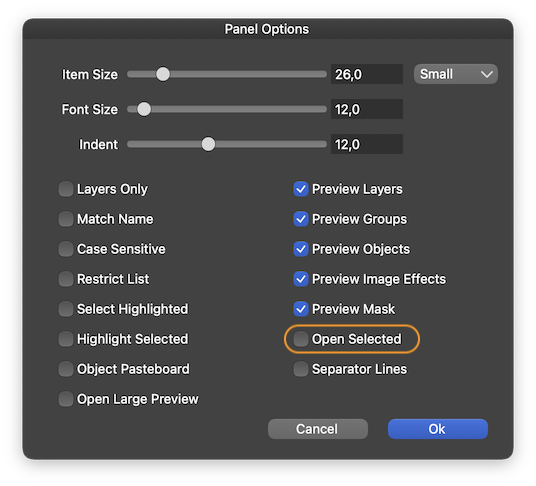
        0_1631126829542_Lpo.png

        MacBook Pro (Intel) running Monterey 12.6.4

        BoldlineB 1 Reply Last reply Reply Quote 2
        • BoldlineB Online
          Boldline @b77
          last edited by

          @b77 awesome! thank you

          🍎 macOS Tahoe 26.2, Mac mini (M1, 2020), Chip Apple M1, Memory 16 GB
          Cintiq 27QHD Display and LG Ultra HD Display

          1 Reply Last reply Reply Quote 1
          • First post
            Last post