VectorStyler
    • Categories
    • Unread
    • Recent
    • Tags
    • Popular
    • Register
    • Login

    Video Tutorial For Different Menu Functions

    Scheduled Pinned Locked Moved Features and Ideas
    13 Posts 4 Posters 14.2k Views 1 Watching
    Loading More Posts
    • Oldest to Newest
    • Newest to Oldest
    • Most Votes
    Reply
    • Reply as topic
    Log in to reply
    This topic has been deleted. Only users with topic management privileges can see it.
    • VectorStylerV Offline
      VectorStyler @KF
      last edited by

      @KF Select the Polygon tool 0_1632048612268_polygon.png
      start drawing, and while drawing (with the mouse pressed), press arrow up or down keys to increase / decrease the sides.

      1 Reply Last reply Reply Quote 1
      • K Offline
        KF
        last edited by

        Hello,
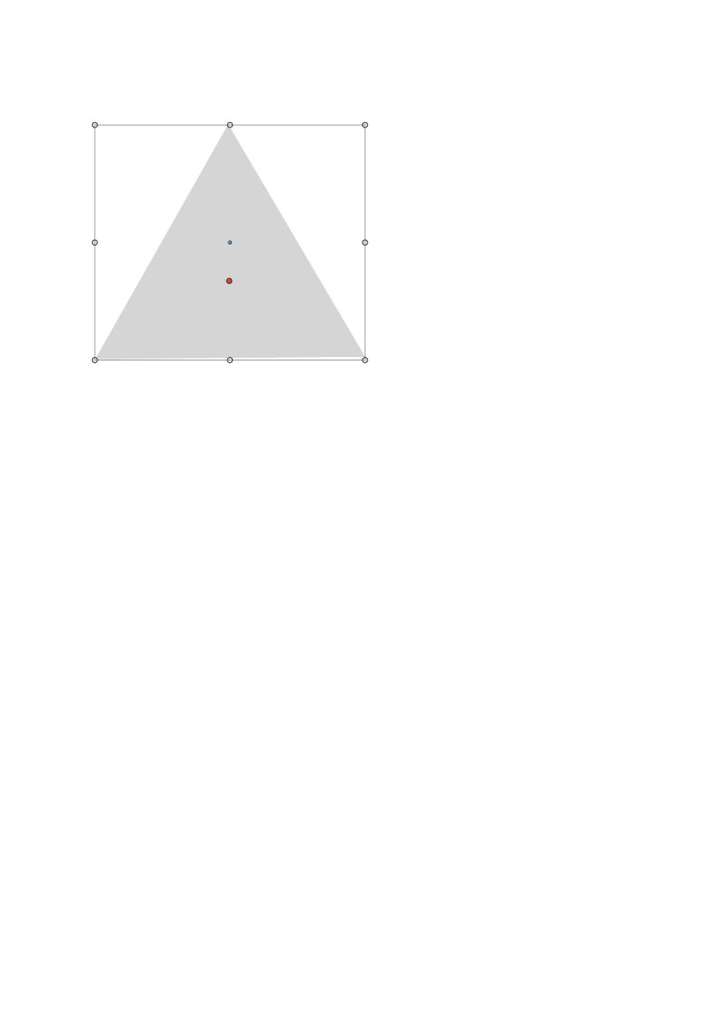
        Thank you for the information. Referring to the triangle below, is there a way to make the bottom of the triangle laying flat 90 degree? If you view the bottom right corner closely, the the triangle is not laying flat 90 degree. I am using my eyes and trying to judge whether it is laying 90 degree flat. 0_1632059068346_Print Screen.jpg
        b77B 1 Reply Last reply Reply Quote 0
        • b77B Offline
          b77 @KF
          last edited by

          @KF Hold down the Shift key when you draw it and rotate until one of the sides lays 90° flat.

          MacBook Pro (Intel) running Monterey 12.6.4

          1 Reply Last reply Reply Quote 2
          • K Offline
            KF
            last edited by

            Hello,
            Hold down the shift key and drag on canvas is not working. This is the result. Have to drag the mouse up, down, left and right to make sure one side of the triangle laying flat 90 degree before can release the mouse. Again, all depend on the eyes to judge whether it is exactly 90 degree flat.

            0_1632064388848_Untitled-2.jpg

            b77B VectorStylerV 2 Replies Last reply Reply Quote 0
            • b77B Offline
              b77 @KF
              last edited by b77

              @KF It works here without issues.

              Make sure 'Aspect Constrain' in Preferences > Editing Options is set to the default 45°.

              Then start a new polygon, press the Shift key, drag and rotate until one side is positioned horizontally.

              Release the Shift key only after you release the mouse button.

              Watch this quick video here: https://recordit.co/NvbqG523hh

              MacBook Pro (Intel) running Monterey 12.6.4

              K BoldlineB 2 Replies Last reply Reply Quote 1
              • VectorStylerV Offline
                VectorStyler @KF
                last edited by

                @KF Here is a video with holding Shift and drawing the triangle: https://recordit.co/7l29h7b8h7

                Angle Constrain should be 45 degree by default. In this case the mouse should drag the corner upwards, while holding the Shift.

                K 1 Reply Last reply Reply Quote 1
                • K Offline
                  KF @b77
                  last edited by

                  @b77 Thanks b77.

                  1 Reply Last reply Reply Quote 0
                  • K Offline
                    KF @VectorStyler
                    last edited by

                    @vectoradmin Thanks vectoradmin

                    1 Reply Last reply Reply Quote 0
                    • BoldlineB Online
                      Boldline @VectorStyler
                      last edited by

                      @vectoradmin said in Video Tutorial For Different Menu Functions:

                      @KF Yes, there will be more tutorials in the future.

                      At the rate @vectoradmin is improving and updating VS - if he updated the documentation and tutorials now- it would all need to be done again in six months!

                      🍎 macOS Tahoe 26.2, Mac mini (M1, 2020), Chip Apple M1, Memory 16 GB
                      Cintiq 27QHD Display and LG Ultra HD Display

                      1 Reply Last reply Reply Quote 0
                      • BoldlineB Online
                        Boldline @b77
                        last edited by

                        @b77 said in Video Tutorial For Different Menu Functions:

                        Then start a new polygon, press the Shift key, drag and rotate until one side is positioned horizontally.

                        Thanks for sharing this - this solution works for me.

                        🍎 macOS Tahoe 26.2, Mac mini (M1, 2020), Chip Apple M1, Memory 16 GB
                        Cintiq 27QHD Display and LG Ultra HD Display

                        1 Reply Last reply Reply Quote 1
                        • First post
                          Last post