VectorStyler
    • Categories
    • Unread
    • Recent
    • Tags
    • Popular
    • Register
    • Login

    Distributing nodes equally along a line.

    Scheduled Pinned Locked Moved Questions and Support
    21 Posts 5 Posters 35.2k Views 1 Watching
    Loading More Posts
    • Oldest to Newest
    • Newest to Oldest
    • Most Votes
    Reply
    • Reply as topic
    Log in to reply
    This topic has been deleted. Only users with topic management privileges can see it.
    • S Offline
      Subpath @VectorStyler
      last edited by

      @vectoradmin

      Ah, ok. I have select them from left to right,
      as far as i know.

      Win 11
      CPU: AMD Ryzen 5 9600X, 6-core.
      GPU: Nvidia Geforce RTX 5070.

      1 Reply Last reply Reply Quote 0
      • S Offline
        Subpath @VectorStyler
        last edited by

        @vectoradmin

        "...I think the order in which the nodes were selected might matter here...."

        It doesn't seem to matter. Just tried it from right to left and vice versa and
        get this unexpected Flip in both cases.

        Win 11
        CPU: AMD Ryzen 5 9600X, 6-core.
        GPU: Nvidia Geforce RTX 5070.

        VectorStylerV 1 Reply Last reply Reply Quote 0
        • G Offline
          Gremriel
          last edited by Gremriel

          Node distribution

          This is what happens for me. It seems the first couple of nodes seem to have an even spacing. but with the last step, the line flips.

          WIndows 11

          S 1 Reply Last reply Reply Quote 0
          • VectorStylerV Offline
            VectorStyler @Subpath
            last edited by

            @Subpath OK, I open a bug on this one.

            1 Reply Last reply Reply Quote 1
            • S Offline
              Subpath @Gremriel
              last edited by Subpath

              @Gremriel

              Hi

              If the Line flip, you could still reflip it.
              See in my steps i mentioned above.

              And as I saw your video, the last segment of your Line seems to be
              a curve. Change this segment, e.g. the whole line, to a "Straight Line"
              first. Then the nodes should distribute properly.

              Win 11
              CPU: AMD Ryzen 5 9600X, 6-core.
              GPU: Nvidia Geforce RTX 5070.

              G 1 Reply Last reply Reply Quote 0
              • G Offline
                Gremriel @Subpath
                last edited by Gremriel

                @Subpath whaddayknow.... I went to try again, and got the notification for an update. Installed that, and then it worked (albeit with the flip). Such customer support! 👌 ☺ (coincidence, I know ☺ )

                The only thing I did different, though, was to click the straight line icon in the Path Panel, just to be sure.

                WIndows 11

                S G 2 Replies Last reply Reply Quote 0
                • S Offline
                  Subpath @Gremriel
                  last edited by Subpath

                  @Gremriel

                  Great that it works.
                  And, yes it seems it have to be a "Straight Line"

                  It's also a good day for me, the update fixed a bug I mentioned.

                  Have fun being creative 😉

                  Win 11
                  CPU: AMD Ryzen 5 9600X, 6-core.
                  GPU: Nvidia Geforce RTX 5070.

                  1 Reply Last reply Reply Quote 1
                  • G Offline
                    Gremriel @Gremriel
                    last edited by

                    @Gremriel Thanks 🙂

                    Just to be absolutely sure, I made one segment slightly curved, and although the nodes were distributed evenly, the operation kind of fails when the node that precedes the curved segment is not on the line anymore. But now I know what to look out for.

                    WIndows 11

                    S 1 Reply Last reply Reply Quote 1
                    • S Offline
                      Subpath @Gremriel
                      last edited by

                      @Gremriel

                      yes, every Segment has to be a straight Line,
                      then it works. It did not work on Segments
                      which are curves.

                      Win 11
                      CPU: AMD Ryzen 5 9600X, 6-core.
                      GPU: Nvidia Geforce RTX 5070.

                      BoldlineB 1 Reply Last reply Reply Quote 0
                      • BoldlineB Online
                        Boldline @Subpath
                        last edited by

                        @Subpath It would be cool if at some point, it would work on a curved segment as well

                        🍎 macOS Tahoe 26.2, Mac mini (M1, 2020), Chip Apple M1, Memory 16 GB
                        Cintiq 27QHD Display and LG Ultra HD Display

                        S 1 Reply Last reply Reply Quote 1
                        • S Offline
                          Subpath @Boldline
                          last edited by Subpath

                          @Boldline

                          Got a kind of workaround for that.

                          Its a function i know from CorelDraw and VS have this also.
                          Take a look at the Picture here.
                          The Nodes you set this way, will always be in the middle.
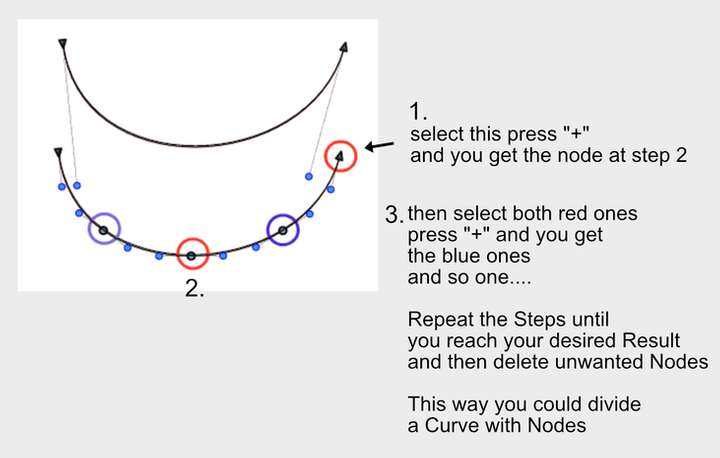
                          0_1634585247273_Insert-Nodes.png

                          Win 11
                          CPU: AMD Ryzen 5 9600X, 6-core.
                          GPU: Nvidia Geforce RTX 5070.

                          VectorStylerV 1 Reply Last reply Reply Quote 3
                          • VectorStylerV Offline
                            VectorStyler @Subpath
                            last edited by

                            @Subpath @Boldline @Gremriel The issue with distributing nodes has been identified. If any of the selected nodes has a control node (not the end of a line), the distribution may fail.

                            S 1 Reply Last reply Reply Quote 1
                            • S Offline
                              Subpath @VectorStyler
                              last edited by

                              @vectoradmin

                              Is this not also what I had written ?
                              That all segments must be a "straight line"
                              so that there are no control nodes in the line.

                              Win 11
                              CPU: AMD Ryzen 5 9600X, 6-core.
                              GPU: Nvidia Geforce RTX 5070.

                              VectorStylerV 1 Reply Last reply Reply Quote 1
                              • VectorStylerV Offline
                                VectorStyler @Subpath
                                last edited by

                                @Subpath said in Distributing nodes equally along a line.:

                                @vectoradmin

                                Is this not also what I had written ?

                                Yes, it is.

                                1 Reply Last reply Reply Quote 0
                                • J Offline
                                  Jono
                                  last edited by

                                  Good tips. I learn so much from going through these bug reports as they often mention tools and techniques I've not even thought about yet! 👍

                                  Mac mini (M1, 2020) | Tahoe 26.1 | Wacom Cintiq 16 (1920 x 1080 px)

                                  S 1 Reply Last reply Reply Quote 2
                                  • S Offline
                                    Subpath @Jono
                                    last edited by

                                    @Jono

                                    me too 😉

                                    Win 11
                                    CPU: AMD Ryzen 5 9600X, 6-core.
                                    GPU: Nvidia Geforce RTX 5070.

                                    1 Reply Last reply Reply Quote 1
                                    • First post
                                      Last post
