VectorStyler
    • Categories
    • Unread
    • Recent
    • Tags
    • Popular
    • Register
    • Login

    Tracking Keyboard Shortcuts issue

    Scheduled Pinned Locked Moved Questions and Support
    10 Posts 3 Posters 13.0k Views
    Loading More Posts
    • Oldest to Newest
    • Newest to Oldest
    • Most Votes
    Reply
    • Reply as topic
    Log in to reply
    This topic has been deleted. Only users with topic management privileges can see it.
    • BoldlineB Offline
      Boldline
      last edited by

      Correct me if I'm wrong, but I thought the default keyboard shortcuts for tracking was option-right arrow and option-right left arrow? I know we discussed this a month back or so...
      Each time I upgrade to the newest build, it seems to reset the keyboard shortcuts for tracking to what is in the screenshot attached below.
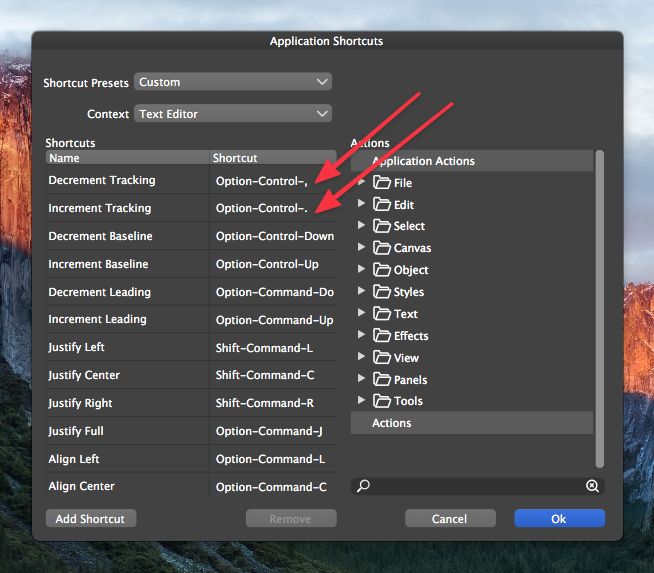
      0_1635008581135_ac00886b-4975-4d2e-8813-f9716632dc4c-image.png

      🍎 macOS Tahoe 26.2, Mac mini (M1, 2020), Chip Apple M1, Memory 16 GB
      Cintiq 27QHD Display and LG Ultra HD Display

      1 Reply Last reply Reply Quote 0
      • encartE Offline
        encart
        last edited by

        Yes, you're right. In my case nothing has changed.
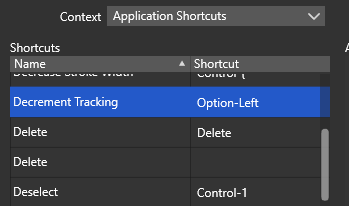
        0_1635009042049_screenshot_20211023_190958.png

        Windows 11 Home 10.0.22621

        BoldlineB 1 Reply Last reply Reply Quote 1
        • encartE Offline
          encart
          last edited by

          Have you checked if you have assigned the correct combination to another function?

          Windows 11 Home 10.0.22621

          BoldlineB 1 Reply Last reply Reply Quote 0
          • BoldlineB Offline
            Boldline @encart
            last edited by

            @encart That's interesting. Maybe it's a bug in the Mac version that reverts it to another shortcut? @vectoradmin - are you seeing this occur on the mac side or might this be an issue with my older OS?
            Also interesting that your shortcut is called "Option-Left" and on Mac, the equivalent is "Option-Numeric-Left". Maybe that is a PC/Mac nuance
            @vectoradmin could we expand the Application Shortcuts panel to allow for full view of the keyboard shortcuts? (marked "A")Several get cut off. Either expanding the panel on the left side (marked "B") or allow for it to be pulled to be wider on the right side (marked "C")?
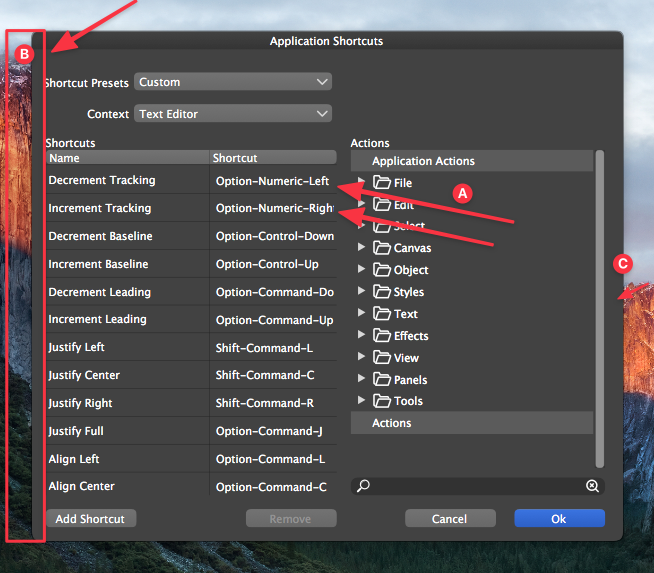
            0_1635009645353_09c81be9-3bd0-4204-912c-9b7d1099c582-image.png

            🍎 macOS Tahoe 26.2, Mac mini (M1, 2020), Chip Apple M1, Memory 16 GB
            Cintiq 27QHD Display and LG Ultra HD Display

            VectorStylerV 1 Reply Last reply Reply Quote 0
            • BoldlineB Offline
              Boldline @encart
              last edited by

              @encart said in Tracking Keyboard Shortcuts issue:

              Have you checked if you have assigned the correct combination to another function?

              Good question - I have not knowingly done that but I will take a closer look

              🍎 macOS Tahoe 26.2, Mac mini (M1, 2020), Chip Apple M1, Memory 16 GB
              Cintiq 27QHD Display and LG Ultra HD Display

              encartE 1 Reply Last reply Reply Quote 0
              • encartE Offline
                encart @Boldline
                last edited by

                @Boldline
                You can resize the columns
                https://recordit.co/n3cHSR40Is

                Windows 11 Home 10.0.22621

                BoldlineB 1 Reply Last reply Reply Quote 1
                • BoldlineB Offline
                  Boldline @encart
                  last edited by

                  @encart Thanks! This is true and that works, but you're still encroaching on the other column doing that. It's not a deal-breaker, but a little more room to work with would help in my opinion

                  🍎 macOS Tahoe 26.2, Mac mini (M1, 2020), Chip Apple M1, Memory 16 GB
                  Cintiq 27QHD Display and LG Ultra HD Display

                  1 Reply Last reply Reply Quote 0
                  • VectorStylerV Offline
                    VectorStyler @Boldline
                    last edited by

                    @Boldline In some cases when updating, or when reseting, it may revert to the default.

                    Would Option+Control+Left/Right be a better default?

                    BoldlineB 1 Reply Last reply Reply Quote 0
                    • BoldlineB Offline
                      Boldline @VectorStyler
                      last edited by

                      @vectoradmin Was this not already the default? We had discussed this a few weeks back

                      0_1635010953470_a8a1db64-e612-4b81-b9c6-c8c4c586313f-image.png

                      🍎 macOS Tahoe 26.2, Mac mini (M1, 2020), Chip Apple M1, Memory 16 GB
                      Cintiq 27QHD Display and LG Ultra HD Display

                      VectorStylerV 1 Reply Last reply Reply Quote 0
                      • VectorStylerV Offline
                        VectorStyler @Boldline
                        last edited by

                        @Boldline It is the default when not in text editing mode. But it seems that when the text is edited, the Option+Control+Comma is still assigned.

                        1 Reply Last reply Reply Quote 0
                        • First post
                          Last post
