VectorStyler
    • Categories
    • Unread
    • Recent
    • Tags
    • Popular
    • Register
    • Login

    Duplicating object by Alt + resize handle makes corners asymmetrical

    Scheduled Pinned Locked Moved VectorStyler 1.1 Bugs
    5 Posts 3 Posters 5.5k Views 2 Watching
    Loading More Posts
    • Oldest to Newest
    • Newest to Oldest
    • Most Votes
    Reply
    • Reply as topic
    Log in to reply
    This topic has been deleted. Only users with topic management privileges can see it.
    • encartE Offline
      encart
      last edited by

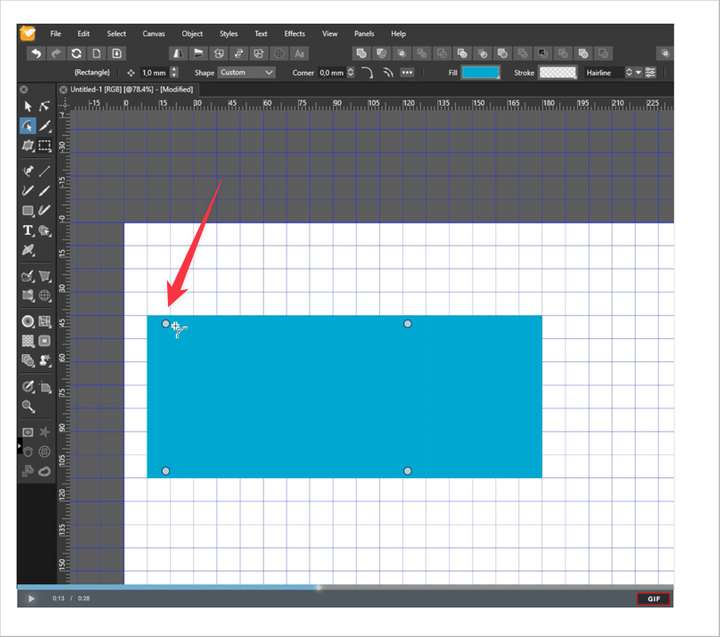
      I'm not sure how to describe that accurately and not sure if it a bug or intentional.

      https://recordit.co/4ExmjDuHq6

      Windows 11 Home 10.0.22621

      BoldlineB VectorStylerV 2 Replies Last reply Reply Quote 0
      • BoldlineB Offline
        Boldline @encart
        last edited by

        @encart What's interesting is that your corner indicators for the round corner tool are not set perfectly in each corner.
        0_1649514462850_b4448903-439e-486d-b603-55cda6a842ca-BLD 2022-04-09 at 10.27.17.png

        Here is a regular shape and the indicators are aligned with the corners

        0_1649514539677_e57d5192-8ab6-4494-92dc-ee2ec5f1d105-BLD 2022-04-09 at 10.28.07.png

        🍎 macOS Sequoia 15.3, Mac mini (M1, 2020), Chip Apple M1, Memory 16 GB
        Cintiq 27QHD Display and LG Ultra HD Display

        encartE 1 Reply Last reply Reply Quote 0
        • encartE Offline
          encart @Boldline
          last edited by encart

          @Boldline That's right. They change position depending on how the shape has been stretched. That is why I used Union.

          Windows 11 Home 10.0.22621

          1 Reply Last reply Reply Quote 0
          • VectorStylerV Offline
            VectorStyler @encart
            last edited by

            @encart yes, this can be replicated. The issue here is that (for most shapes) scaling the object results in the addition of a "Transform effect" on the object (editable in the Shape Effects panel).
            But corners are applied to a shape before this (or other) shape effect.

            I will try to find a solution for this, in the case of transformations. A convert to curve (before adjusting the corner) flattens the transform, and the corner handles are back where they should be.

            encartE 1 Reply Last reply Reply Quote 1
            • encartE Offline
              encart @VectorStyler
              last edited by encart

              @vectoradmin Thank you. I see. So I wasn't sure if it was a mistake. In part, I also wanted to inform the rest of the users what could be the reason for this.
              Do you think it's a bad idea to add something like 'Reset handles positions' to context menu? Even if the effect would be the same as convert to curves. Maybe for new users who will find themselves in this situation, it would be a help.

              Windows 11 Home 10.0.22621

              1 Reply Last reply Reply Quote 0
              • First post
                Last post
