VectorStyler
    • Categories
    • Unread
    • Recent
    • Tags
    • Popular
    • Register
    • Login

    PDFs do not export embedded images with a drop shadow

    Scheduled Pinned Locked Moved Resolved Issues
    7 Posts 3 Posters 6.9k Views 3 Watching
    Loading More Posts
    • Oldest to Newest
    • Newest to Oldest
    • Most Votes
    Reply
    • Reply as topic
    Log in to reply
    This topic has been deleted. Only users with topic management privileges can see it.
    • Victor VectorV Offline
      Victor Vector
      last edited by Victor Vector

      Hi,

      1. Create a new document.
      2. Import an image (or cut paste from a screen capture).
      3. Image Effects Panel > Add New Image Effect > Stylize > Drop Shadow
      4. File > Export > Format > PDF > OK > Save

      Resulting PDF is blank.

      The expected behaviour is of course to see the image with the drop shadow.
      Exporting the PDF with images that have no Drop Shadow image effect will work. I have not tested it with all the image effects so I don't know how deep this issue goes.
      Thank you.

      b77B VectorStylerV 2 Replies Last reply Reply Quote 0
      • b77B Offline
        b77 @Victor Vector
        last edited by b77

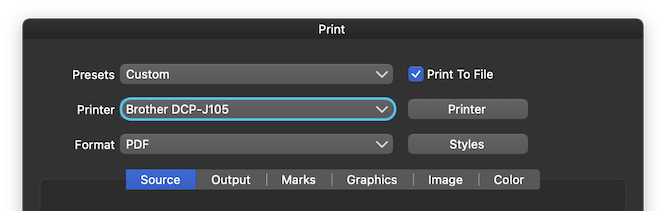
        @Victor-Vector Confirmed here. As a workaround for now, you can use the 'Print to File' option (select your printer's engine) from the Print dialog (File > Print).

        MacBook Pro (Intel) running Monterey 12.6.4

        Victor VectorV 1 Reply Last reply Reply Quote 0
        • Victor VectorV Offline
          Victor Vector @b77
          last edited by Victor Vector

          @b77 I tried the fix of printing to PDF and unfortunately that had the same unsuccessful result. Thanks for the suggestion.

          b77B 1 Reply Last reply Reply Quote 0
          • b77B Offline
            b77 @Victor Vector
            last edited by

            @Victor-Vector Is the printer engine selected here?
            0_1649628129378_ptf.png

            MacBook Pro (Intel) running Monterey 12.6.4

            Victor VectorV 1 Reply Last reply Reply Quote 0
            • Victor VectorV Offline
              Victor Vector @b77
              last edited by Victor Vector

              @b77
              0_1649629019612_Printer Options.png
              I am on Windows 11, btw.
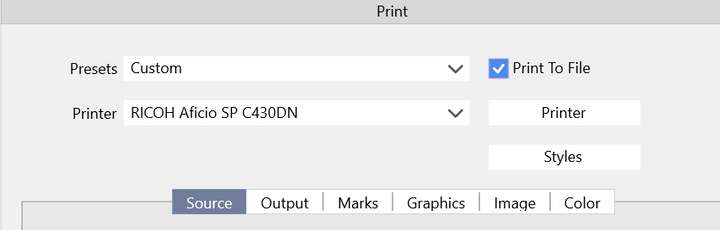
              I don't seem to have the format drop down option like you do. When I click print, the file extension is .PS (postscript) with no .PDF options like you have. The file only prints as a small .PS file.

              1 Reply Last reply Reply Quote 0
              • VectorStylerV Offline
                VectorStyler @Victor Vector
                last edited by

                @Victor-Vector Added this to the backlog.

                Victor VectorV 1 Reply Last reply Reply Quote 1
                • Victor VectorV Offline
                  Victor Vector @VectorStyler
                  last edited by

                  @vectoradmin a big thank you for fixing this in 1.1.030!!! 🏆

                  1 Reply Last reply Reply Quote 2
                  • First post
                    Last post