VectorStyler
    • Categories
    • Unread
    • Recent
    • Tags
    • Popular
    • Register
    • Login

    Opening existing VS files in full main artboard view

    Scheduled Pinned Locked Moved Features and Ideas
    14 Posts 4 Posters 11.7k Views 3 Watching
    Loading More Posts
    • Oldest to Newest
    • Newest to Oldest
    • Most Votes
    Reply
    • Reply as topic
    Log in to reply
    This topic has been deleted. Only users with topic management privileges can see it.
    • BoldlineB Offline
      Boldline @Ingolf
      last edited by

      @Ingolf Viewpoints are a cool idea - I could see use for that even in my own work. The position I find VS defaults to when I open files is not helpful at all - it's half on the artboard and half off - maybe it's related to where I have stored extra stuff off past the artboard edges?

      🍎 macOS Tahoe 26.2, Mac mini (M1, 2020), Chip Apple M1, Memory 16 GB
      Cintiq 27QHD Display and LG Ultra HD Display

      IngolfI 1 Reply Last reply Reply Quote 0
      • IngolfI Offline
        Ingolf @Boldline
        last edited by

        @Boldline said in Opening existing VS files in full main artboard view:

        @Ingolf Viewpoints are a cool idea - I could see use for that even in my own work. The position I find VS defaults to when I open files is not helpful at all - it's half on the artboard and half off - maybe it's related to where I have stored extra stuff off past the artboard edges?

        That may very well be; I only have objects inside the artboard area and Vectorstyler returns me to the exact spot and zoom level where I was last, when I reopen a file.

        🍏 macOS Sequoia Apple Silicon

        1 Reply Last reply Reply Quote 0
        • BoldlineB Offline
          Boldline
          last edited by

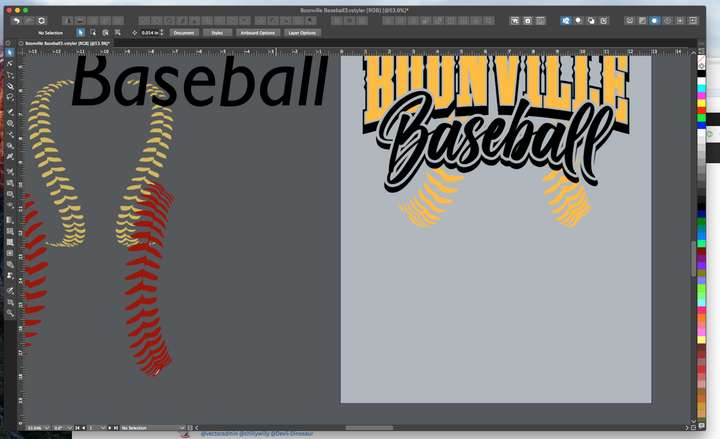
          Here is an example of an existing VS file I opened just now. The light gray rectangle is the only artboard. I do not believe this was the last position I was in when I saved the file as most files open in this same position.
          0_1650303054551_d893345f-3733-409b-8f8d-ae89bf9d2e34-image.png

          I was wondering if it related to items positioned off the artboard, but there is stuff on either side
          here is a full screen shot of the same file after I zoomed out:

          0_1650303160038_8b2ac26c-1b5d-4aba-83ea-bdce924153d5-image.png

          🍎 macOS Tahoe 26.2, Mac mini (M1, 2020), Chip Apple M1, Memory 16 GB
          Cintiq 27QHD Display and LG Ultra HD Display

          1 Reply Last reply Reply Quote 0
          • VectorStylerV Offline
            VectorStyler @Boldline
            last edited by

            @Boldline Currently, VS saves the last viewpoint of the file, so when opened next time (on the same screen) it should have the same viewpoint. Maybe an option could be added to have a "view all artboards" or "view last artboard" after opening?

            BoldlineB 1 Reply Last reply Reply Quote 0
            • VectorStylerV Offline
              VectorStyler @Ingolf
              last edited by

              @Ingolf I'd like to know more about this "viewpoint" feature and how it could work best in VS?

              IngolfI 1 Reply Last reply Reply Quote 0
              • IngolfI Offline
                Ingolf @VectorStyler
                last edited by Ingolf

                @vectoradmin said in Opening existing VS files in full main artboard view:

                @Ingolf I'd like to know more about this "viewpoint" feature and how it could work best in VS?

                The movie (ignore title)

                It think it would fit nicely into the navigation panel next to the zoom percentage. Similar to in AD.

                But please please with sugar on top, if you should ever add it, when adding a viewpoint the software should ask for a name immediately. I have to select rename just after creating viewpoints and other items in Affinity Designer. Every. Single. Time.

                And to avoid customers never finding it. I don't recommend hiding any of it in the panel menu. 🙂

                🍏 macOS Sequoia Apple Silicon

                VectorStylerV 1 Reply Last reply Reply Quote 1
                • VectorStylerV Offline
                  VectorStyler @Ingolf
                  last edited by

                  @Ingolf Added this to the backlog 🙂

                  1 Reply Last reply Reply Quote 1
                  • BoldlineB Offline
                    Boldline @VectorStyler
                    last edited by

                    @vectoradmin said in Opening existing VS files in full main artboard view:

                    Maybe an option could be added to have a "view all artboards" or "view last artboard" after opening?

                    This would be a great addition to VS - the option to decide how you want files to open

                    🍎 macOS Tahoe 26.2, Mac mini (M1, 2020), Chip Apple M1, Memory 16 GB
                    Cintiq 27QHD Display and LG Ultra HD Display

                    1 Reply Last reply Reply Quote 1
                    • S Offline
                      Subpath
                      last edited by Subpath

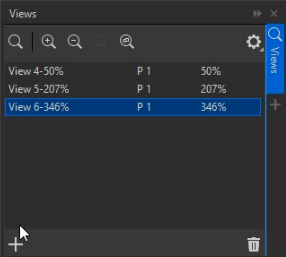
                      Here the CorelDraw Way to save Views.

                      And CorelDraw assigns names automatically
                      to the views. No need to do this yourself.
                      Save Views in CorelDraw Video

                      0_1650347425556_View-Manager-in-cdr.png

                      Win 11
                      CPU: AMD Ryzen 5 9600X, 6-core.
                      GPU: Nvidia Geforce RTX 5070.

                      IngolfI 1 Reply Last reply Reply Quote 1
                      • IngolfI Offline
                        Ingolf @Subpath
                        last edited by Ingolf

                        @Subpath But I need my own label for each viewpoint. Affinity also adds generic names automatically that I can't use for a thing later or now.

                        I need precise labels to know where the view takes me in a complex drawing. Many of these user interface choices are made from simple thinking, simple scenarios.

                        That dialog is full of percentages. That is designed by an engineer. I need info about what the viewpoints shows me, where it goes to. The percentage would never really matter to me.

                        @vectoradmin I would prefer that it behaved like when saving snapshots. Pop up with name suggestion (could be zoom percentage) - enter if user is okay with that name, and that would also mean consistant behavior across features. 🙂

                        🍏 macOS Sequoia Apple Silicon

                        S 1 Reply Last reply Reply Quote 0
                        • S Offline
                          Subpath @Ingolf
                          last edited by Subpath

                          @Ingolf

                          In Corel it is no problem to rename your View
                          according to your needs.

                          I don't like the way via dropdown menus, to save a view.
                          Like in Affinity Designer.

                          Win 11
                          CPU: AMD Ryzen 5 9600X, 6-core.
                          GPU: Nvidia Geforce RTX 5070.

                          IngolfI 1 Reply Last reply Reply Quote 1
                          • IngolfI Offline
                            Ingolf @Subpath
                            last edited by

                            @Subpath said in Opening existing VS files in full main artboard view:

                            @Ingolf
                            In Corel it is no problem to rename your View
                            according to your needs.

                            I know, but I never use and never used the proposed generic name in AD or Corel so it is a problem for me that I have to rename every viewpoint I create.

                            When it pops up with a suggestion (like snapshots do already) it requires just hitting ENTER to accept it. Not a big deal and easy to figure out as a user.

                            Renaming is a additional proces that is breaks creating a viewpoint into two actions - the second requiring a lot more. It is simply bad UI design.

                            🍏 macOS Sequoia Apple Silicon

                            1 Reply Last reply Reply Quote 0
                            • First post
                              Last post
