Transparency Mask Shape Delete Issue
-
Hello,
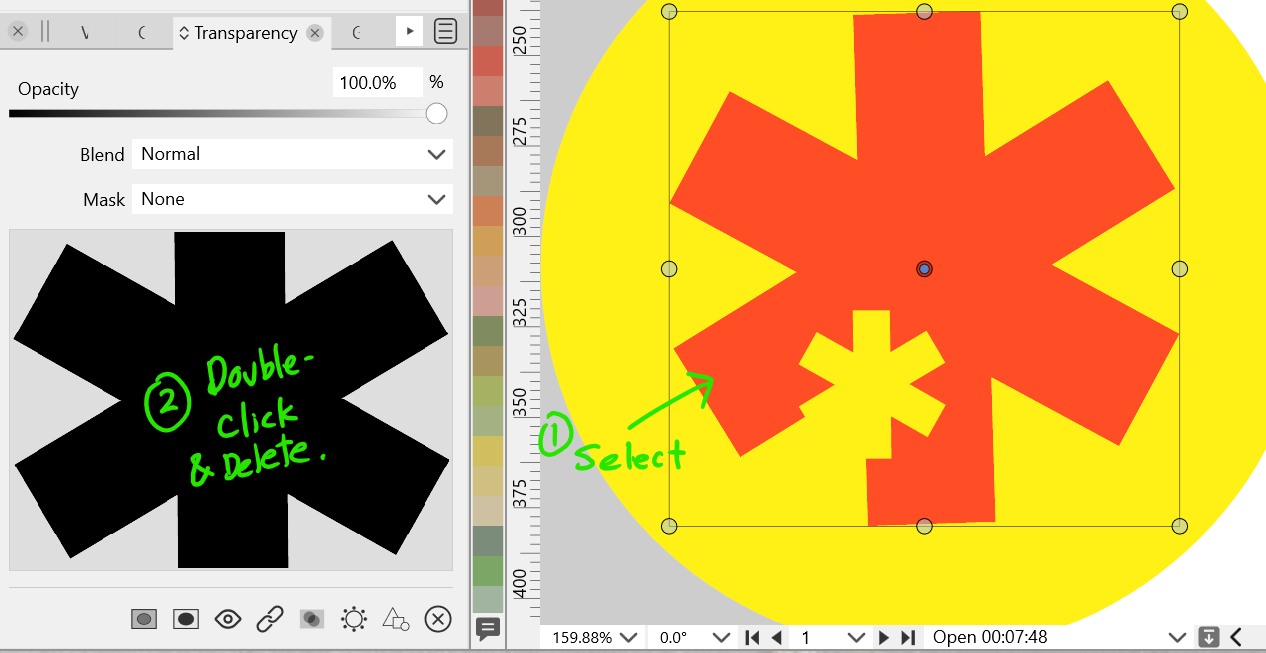
I am using VS 1.1.034 on a Win11 computer and I came across this unexpected behaviour.- I created a red asterisk shape and in the Transparency Panel I chose a "Drawing" mask in the Mask dropdown and created a black asterisk shape, using escape to leave the Isolation Mode.
- I went under the Mask drop down again and switched the mask to "None".
- With the red asterisk selected, in the Transparency Panel, double-click on the black asterisk in the Transparency Preview.
- VS enters Isolation Mode. Delete the black asterisk in the main view.
VS does not let me select anything any more. I can switch tools, but the tools don't work. Saving still works, so you can try my attached .Vstyler file and see if you get the same results.
-
@Victor-Vector Confirmed here. What happens is that after you entered isolation mode and deleted the black star manually, the app displays all the objects as if it exited isolation mode automatically, but it did not.
You need to double-click the canvas or press Esc to actually exit isolation, then drawing other objects should work as expected.Btw, should the app exit isolation mode automatically after deleting a mask object manually, or not?
EDIT: No, I don't think it should.
The glitch I see here is that the red star is displayed as having no mask (the Mask dropdown in the Transparency panel displays 'None'), but it's obvious that it has a drawing mask applied (the small black star).
Choosing 'None' from that menu should get rid of the mask and allow you to draw other objects directly.
-
@b77, thank you for investigating this.
I can confirm that, after deleting the black asterisk, if I double-click on the canvas, everything works again. Good to know that method.One of the problems is that the interface does not tell me that I am still in isolation mode. Normally it would have that horizonal information bar, under the horizontal ruler, containing the "Object Isolation Mode" text to let the user know.
Perhaps, in the interests of user interface friendliness, there could be a way to let users know the interface is still in Isolation Mode?
And, as you pointed out, fix the Mask drop-down to display "Drawing" instead of "None" when it is still in "Drawing" mode.Thanks again for your help!
-
@Victor-Vector Yes, the readout bar under the document tab should not go away — the object is still in isolation mode.
-
@Victor-Vector This looks like a bug, it can be replicated here also.
I will try to fix this ASAP. -
@Victor-Vector This problem should be fixed in 1.1.048


