VectorStyler
    • Categories
    • Unread
    • Recent
    • Tags
    • Popular
    • Register
    • Login

    Easily editable Arrow

    Scheduled Pinned Locked Moved Tutorials
    8 Posts 4 Posters 10.0k Views 3 Watching
    Loading More Posts
    • Oldest to Newest
    • Newest to Oldest
    • Most Votes
    Reply
    • Reply as topic
    Log in to reply
    This topic has been deleted. Only users with topic management privileges can see it.
    • S Offline
      Subpath
      last edited by Subpath

      What to see?
      Uses of a Composite Object.
      Easy Arrow making 🙂

      Please note:
      Due to some bugs in the composite object.
      ( I already mentioned this to @vectoradmin )
      the arrow and especially the 3 sides polygon
      should point to the left.

      And if you got a Result you like, copy it
      and convert the Copy to curves before use.

      .
      .
      Lets start:

      Create a rectangle and a polygon shape.
      Select the Polygon Shape and open the shape panel
      set the sides to 3.
      Arrange them both and align both Objects so that you have
      this arrow as a result.
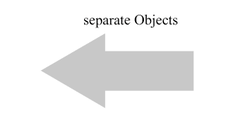
      0_1651144735837_Arrow-1.png

      .
      .
      Now the fun begins:

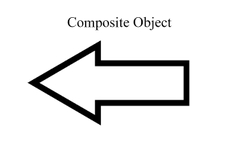
      Select both Objects, hold down the Alt key, and click on Union
      in the Boolean section. This will create a Composite Object.
      0_1651145659823_Union.png

      Give your result a line color and a line width, and no fill.
      It should look like this now.
      0_1651144851663_Arrow-2.png

      .
      Re-upload, Watch this Video to see what is now possible.

      .
      .
      Some additional Info about a Composite Object.

      .
      Add Parts:
      You could add Parts into a Composite Object.
      By select the Composite Object and the Shape you like to add
      and hold the Alt-Key again and repeate the Boolean e.g. Union.

      .
      Copy Parts:
      You could copy Parts inside of a Composite Object.
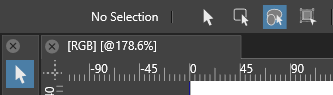
      By select the Transform Tool and then select
      "Select and transform shapes and members of composite shape"
      on the left of the Context Panel.
      0_1651152016188_TransformTool-1.png
      Now select the Part you whish to copy and hold the left mouse button down
      then press the Alt-Key only once. You will have a copy then.

      Win 11
      CPU: AMD Ryzen 5 9600X, 6-core.
      GPU: Nvidia Geforce RTX 5070.

      Victor VectorV BoldlineB 2 Replies Last reply Reply Quote 4
      • Victor VectorV Offline
        Victor Vector @Subpath
        last edited by

        @Subpath I love not only the simplicity of this tutorial, but the power it demonstrates. Thank you for creating it and sharing with the community.

        1 Reply Last reply Reply Quote 1
        • BoldlineB Online
          Boldline @Subpath
          last edited by

          @Subpath Thank you for taking the time to show and explain that! I will try that out and see what results I can get

          🍎 macOS Tahoe 26.2, Mac mini (M1, 2020), Chip Apple M1, Memory 16 GB
          Cintiq 27QHD Display and LG Ultra HD Display

          1 Reply Last reply Reply Quote 1
          • S Offline
            Subpath
            last edited by Subpath

            Thanks for the kind comments.
            But the praise, as always, goes to @vectoradmin for the
            possibilities he gave us with VS 🙂

            @Victor-Vector
            Very powerful indeed, not only for Arrows. And as I mentioned before,
            I'm exploring VS. So there are a few things to come.

            @Boldline
            Can really recommend to explore that. I see it also as a kind
            of Live Booleans like in Affinity Designer!

            Win 11
            CPU: AMD Ryzen 5 9600X, 6-core.
            GPU: Nvidia Geforce RTX 5070.

            1 Reply Last reply Reply Quote 1
            • encartE Offline
              encart
              last edited by

              @Subpath Thanks! Playing with it gives some strange pleasure.
              https://recordit.co/fO1fXYRXwA

              Windows 11 Home 10.0.22621

              S Victor VectorV 3 Replies Last reply Reply Quote 3
              • S Offline
                Subpath @encart
                last edited by Subpath

                @encart

                Re-upload from @encart video is here:
                Video from Encarts find
                .
                .
                WoW!, this is such a great find 👍

                I know this Effect from Affinity Designer's Compound Object
                and have also tried around in VS to get them. But I didn't
                come up with your idea. Pretty cool.

                Win 11
                CPU: AMD Ryzen 5 9600X, 6-core.
                GPU: Nvidia Geforce RTX 5070.

                1 Reply Last reply Reply Quote 1
                • Victor VectorV Offline
                  Victor Vector @encart
                  last edited by

                  @encart said in Easily editable Arrow:

                  @Subpath Thanks! Playing with it gives some strange pleasure.
                  https://recordit.co/fO1fXYRXwA

                  Yes, I remember when they introduced that recently into Affinity Designer. Thank you for showing us it is possible in VectorStyler as well!

                  1 Reply Last reply Reply Quote 1
                  • S Offline
                    Subpath @encart
                    last edited by Subpath

                    @encart
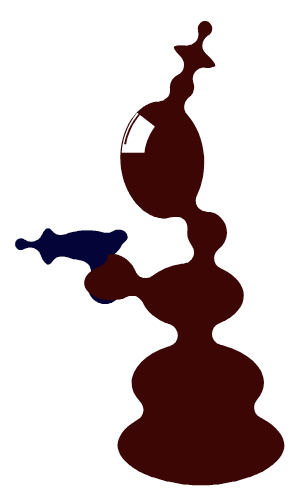
                    Tried what you found and had a Mars Attack 🙂
                    0_1651243662728_Mars-Attack.png

                    Win 11
                    CPU: AMD Ryzen 5 9600X, 6-core.
                    GPU: Nvidia Geforce RTX 5070.

                    1 Reply Last reply Reply Quote 2
                    • First post
                      Last post