VectorStyler
    • Categories
    • Unread
    • Recent
    • Tags
    • Popular
    • Register
    • Login

    HLS Slider needs a black/white button fix

    Scheduled Pinned Locked Moved Resolved Issues
    3 Posts 2 Posters 4.0k Views 2 Watching
    Loading More Posts
    • Oldest to Newest
    • Newest to Oldest
    • Most Votes
    Reply
    • Reply as topic
    Log in to reply
    This topic has been deleted. Only users with topic management privileges can see it.
    • Victor VectorV Offline
      Victor Vector
      last edited by

      Hi,
      Discovered this unexpected behaviour in the Color Panel, using VS 1.1. 037 in Win 11:

      1. New file, Draw a shape
      2. In the Color Panel, go to burger menu, choose HLS Slider if not already selected.
      3. In the Color Panel click between the "Select the black/white color in the current color mode" buttons.

      The fill or outline will remain black and not switch to white when "Select the white color in the current color mode" button is pressed.
      I tried it with the other color sliders and they all seem to work.
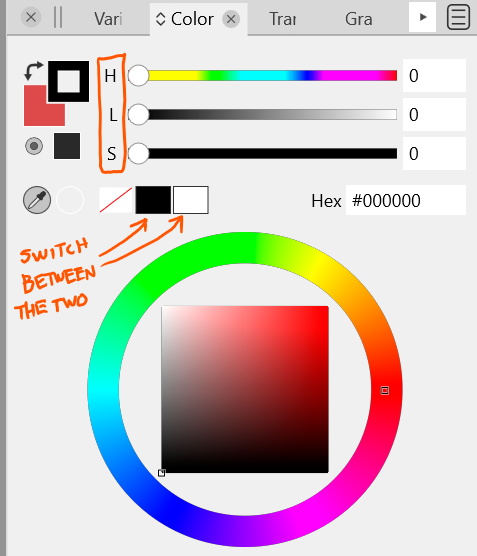
      0_1651243801172_HLS Slider needs a fix.png

      Can anyone else replicate?

      VectorStylerV 2 Replies Last reply Reply Quote 0
      • VectorStylerV Offline
        VectorStyler @Victor Vector
        last edited by

        @Victor-Vector Replicated!

        1 Reply Last reply Reply Quote 1
        • VectorStylerV Offline
          VectorStyler @Victor Vector
          last edited by

          @Victor-Vector This problem should be fixed in 1.1.048

          1 Reply Last reply Reply Quote 0
          • First post
            Last post
