VectorStyler
    • Categories
    • Unread
    • Recent
    • Tags
    • Popular
    • Register
    • Login

    Isometric Drawing Tutorial

    Scheduled Pinned Locked Moved Tutorials
    45 Posts 9 Posters 125.0k Views 9 Watching
    Loading More Posts
    • Oldest to Newest
    • Newest to Oldest
    • Most Votes
    Reply
    • Reply as topic
    Log in to reply
    This topic has been deleted. Only users with topic management privileges can see it.
    • S Offline
      Subpath @Devil Dinosaur
      last edited by

      @Devil-Dinosaur

      wow, i am speechless, amazing Tutorial 👍

      Win 11
      CPU: AMD Ryzen 5 9600X, 6-core.
      GPU: Nvidia Geforce RTX 5070.

      Devil DinosaurD 1 Reply Last reply Reply Quote 1
      • Devil DinosaurD Offline
        Devil Dinosaur @Subpath
        last edited by

        @Subpath Thank you for your comment and for your help for the tricks 😉

        Fred.
        MacBook Pro (M1) - MacOs Sonoma 14

        1 Reply Last reply Reply Quote 1
        • Victor VectorV Offline
          Victor Vector @Devil Dinosaur
          last edited by

          @Devil-Dinosaur fantastic tutorial, rich with examples and illustrations! I have not gone through it, but when I get my work done, I will be all over it.

          Thank you for taking the time to create this; great job!

          Devil DinosaurD 1 Reply Last reply Reply Quote 0
          • Devil DinosaurD Offline
            Devil Dinosaur @Victor Vector
            last edited by

            @Victor-Vector Thank you 🙂

            I uploaded the source files here.
            The master file was made in Affinity Publisher, but I guess anyone can open the PDF. The image files are JPG or PNG, the VS source files are there too. A little bit messy sometimes in the layers 😉

            Fred.
            MacBook Pro (M1) - MacOs Sonoma 14

            1 Reply Last reply Reply Quote 2
            • Devil DinosaurD Offline
              Devil Dinosaur
              last edited by Devil Dinosaur

              I just posted a video about Isometric drawing in VS. It's roughly the same content as the above PDF with a little bit extra information.
              Youtube link
              (play it faster than the real speed, I really think I need more energy in the way I speak 😅 )

              The next step will be to draw the same object, once as an isometric drawing, once as a conical perspective one. I don't know yet if I will do it as a time lapse or as a tutorial.

              Fred.
              MacBook Pro (M1) - MacOs Sonoma 14

              S Victor VectorV 2 Replies Last reply Reply Quote 6
              • S Offline
                Subpath @Devil Dinosaur
                last edited by Subpath

                @Devil-Dinosaur

                Great youtube tutorial
                like how clearly you described everthing 👍

                Had as a suggestion, to include maybe
                also a link to the VectorStyler homepage
                below the Video
                (for public relation purpose) 🙂

                Win 11
                CPU: AMD Ryzen 5 9600X, 6-core.
                GPU: Nvidia Geforce RTX 5070.

                1 Reply Last reply Reply Quote 1
                • Devil DinosaurD Offline
                  Devil Dinosaur
                  last edited by

                  Thank you ☺
                  Sure, I'm putting a link right now.

                  Fred.
                  MacBook Pro (M1) - MacOs Sonoma 14

                  1 Reply Last reply Reply Quote 2
                  • Victor VectorV Offline
                    Victor Vector @Devil Dinosaur
                    last edited by

                    @Devil-Dinosaur, thank you for also making a video tutorial to augment the written one. I find your speaking voice to be calming and perfect for tutorials ☺
                    I look forward to your next installment!

                    Devil DinosaurD 1 Reply Last reply Reply Quote 2
                    • Devil DinosaurD Offline
                      Devil Dinosaur @Victor Vector
                      last edited by

                      @Victor-Vector Thank you ☺

                      Fred.
                      MacBook Pro (M1) - MacOs Sonoma 14

                      1 Reply Last reply Reply Quote 0
                      • Devil DinosaurD Offline
                        Devil Dinosaur
                        last edited by Devil Dinosaur

                        Hi Everyone,
                        I just posted another Isometric drawing tutorial.
                        Isometric Part 2
                        Once again the pace is verrryyy slow and my globish shows flaws.

                        Nevertheless, I think it may help , that's why I posted it. I already prepare the next one that will be more interesting with more examples and work in progress and less explanations while slowly mumbling. 😅

                        Fred.
                        MacBook Pro (M1) - MacOs Sonoma 14

                        Victor VectorV 1 Reply Last reply Reply Quote 2
                        • S Offline
                          Subpath
                          last edited by Subpath

                          Only had a quick look at your tutorial.
                          But was already impressed how you explain
                          how to create an isometric sphere 👍

                          And since I read subtitles, you can mumble
                          without to worry 🙂

                          Win 11
                          CPU: AMD Ryzen 5 9600X, 6-core.
                          GPU: Nvidia Geforce RTX 5070.

                          1 Reply Last reply Reply Quote 1
                          • Victor VectorV Offline
                            Victor Vector @Devil Dinosaur
                            last edited by

                            @Devil-Dinosaur I am enjoying your tutorial right now. Again, no apologies needed, your deliver is fine. Thank you for addressing the more complex isometric shapes!

                            1 Reply Last reply Reply Quote 2
                            • Devil DinosaurD Offline
                              Devil Dinosaur
                              last edited by Devil Dinosaur

                              Part 3 of my isometric drawing tutorials. This time it's about accuracy in the settings and the use of VS "actions".
                              The good news for you is that I found a way to do time lapses 😁 , even if I don't use it enough right now...
                              Isometric Drawing Part 3

                              Fred.
                              MacBook Pro (M1) - MacOs Sonoma 14

                              Victor VectorV 1 Reply Last reply Reply Quote 4
                              • ? Offline
                                A Former User
                                last edited by

                                Awesome, subscribed

                                Devil DinosaurD 1 Reply Last reply Reply Quote 2
                                • Devil DinosaurD Offline
                                  Devil Dinosaur @Guest
                                  last edited by

                                  @plrang Thank You 🙂

                                  Fred.
                                  MacBook Pro (M1) - MacOs Sonoma 14

                                  1 Reply Last reply Reply Quote 0
                                  • Victor VectorV Offline
                                    Victor Vector @Devil Dinosaur
                                    last edited by

                                    @Devil-Dinosaur Thanks once again for this latest isometric installment. They get better with each one!

                                    1 Reply Last reply Reply Quote 1
                                    • S Offline
                                      Subpath
                                      last edited by

                                      I am impressed how detailed you describe everything in your tutorials.
                                      Could become the encyclopedia of isometric graphics 🙂

                                      Win 11
                                      CPU: AMD Ryzen 5 9600X, 6-core.
                                      GPU: Nvidia Geforce RTX 5070.

                                      1 Reply Last reply Reply Quote 3
                                      • Devil DinosaurD Offline
                                        Devil Dinosaur
                                        last edited by

                                        Thank you both. ☺

                                        Actually it's absolutely not an encyclopedia 😉 because of the shortcuts and simplification I use to save time. The target is illustrators but not technical drawing technician for whom things have to be perfectly accurate. For what I would call "artistic" illustration it's fine, quick and efficient to create and rotate shapes instead of building them each twice (top and side). As long as they stick to the grid, the global rules are applied. But the result is not totally true in terms of accuracy.

                                        It's the same thing with the linear perspective than I plan to develop on a coming tutorial. The example of how to make windows on my first perspective tutorial is consistent and plausible, but I didn't use exact measurement to define the size and space reduction. There's of course a way to do it, using some top view and side view. But in the case of an illustration, no one will check if the last window is strictly the size it should be.

                                        For my own work, I like to simply estimate what looks acceptable. I really try to emphasize on the storytelling and global mood rather than accuracy. 🤖 👾

                                        Fred.
                                        MacBook Pro (M1) - MacOs Sonoma 14

                                        Victor VectorV 1 Reply Last reply Reply Quote 1
                                        • Victor VectorV Offline
                                          Victor Vector @Devil Dinosaur
                                          last edited by

                                          @Devil-Dinosaur said in Isometric Drawing Tutorial:

                                          It's the same thing with the linear perspective than I plan to develop on a coming tutorial. The example of how to make windows on my first perspective tutorial is consistent and plausible, but I didn't use exact measurement to define the size and space reduction.

                                          I was playing around with your first tutorial, the building using 2-point perspective, and I was attempting to develop a technique using the Repeater, hoping there was a way to fake the perspective foreshortening using a scale gradient, but the tool only seems to apply the scale on both the X and Y axis, whereas I was hoping to isolate it to only the X axis, to make it look like the windows were receding into the distance.
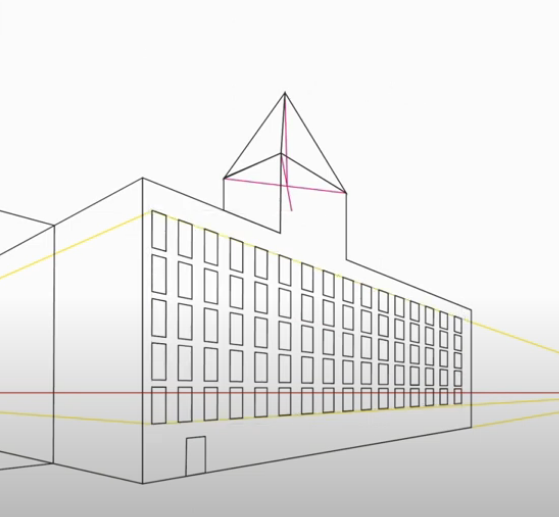
                                          0_1656289317793_fc9e5d44-a5ca-4055-b165-e01fdfacd057-image.png

                                          I had no luck with that. Indeed if anyone knows a way to accomplish it using the Repeater, it would make the Repeater so powerful to just make 1 complicated window element, then repeat it in a matrix. One could make a complicated cityscape very quickly, not to mention other applications.

                                          1 Reply Last reply Reply Quote 2
                                          • Devil DinosaurD Offline
                                            Devil Dinosaur
                                            last edited by

                                            I haven't understood explored 😁 the repeater tool yet.
                                            But it may be useful indeed.

                                            Fred.
                                            MacBook Pro (M1) - MacOs Sonoma 14

                                            1 Reply Last reply Reply Quote 1
                                            • First post
                                              Last post