VectorStyler
    • Categories
    • Unread
    • Recent
    • Tags
    • Popular
    • Register
    • Login

    Star Panel "Level" option up arrow faulty

    Scheduled Pinned Locked Moved Resolved Issues
    4 Posts 2 Posters 5.3k Views
    Loading More Posts
    • Oldest to Newest
    • Newest to Oldest
    • Most Votes
    Reply
    • Reply as topic
    Log in to reply
    This topic has been deleted. Only users with topic management privileges can see it.
    • BoldlineB Offline
      Boldline
      last edited by

      I noticed when I opened the star panel to edit the star shape I made, if I hover over the "Level" arrow, it jumps up to level 8 very quickly with no clicking from me on the mouse. The corresponding down arrow for "level" works normally. I can manually click on the down arrow and decrease the effect incrementally as expected. All the other arrows work as expected.
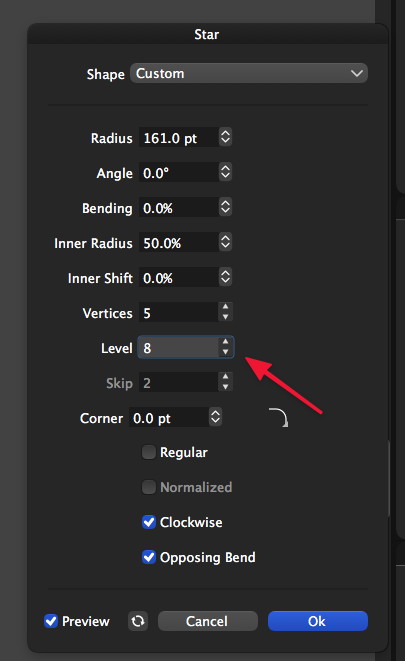
      0_1614796032171_star issue.png

      🍎 macOS Tahoe 26.2, Mac mini (M1, 2020), Chip Apple M1, Memory 16 GB
      Cintiq 27QHD Display and LG Ultra HD Display

      BoldlineB VectorStylerV 2 Replies Last reply Reply Quote 0
      • BoldlineB Offline
        Boldline @Boldline
        last edited by

        Update - I opened a new star panel and tried "line" again and this time it worked correctly. Not sure what to think!

        🍎 macOS Tahoe 26.2, Mac mini (M1, 2020), Chip Apple M1, Memory 16 GB
        Cintiq 27QHD Display and LG Ultra HD Display

        1 Reply Last reply Reply Quote 0
        • VectorStylerV Offline
          VectorStyler @Boldline
          last edited by

          @Boldline I will try to replicate this. It might still be an error here.

          1 Reply Last reply Reply Quote 1
          • BoldlineB Offline
            Boldline
            last edited by

            if it helps any, this happened repeatedly in that session. Several times I would bring the number down using the down arrow for the "line" option but as soon as I hovered over the up arrow, it raced up super fast to 8 again. It did not work properly again until I closed out that panel and double clicked to make a new one and tried again.


            🍎 macOS Tahoe 26.2, Mac mini (M1, 2020), Chip Apple M1, Memory 16 GB
            Cintiq 27QHD Display and LG Ultra HD Display

            1 Reply Last reply Reply Quote 1
            • First post
              Last post