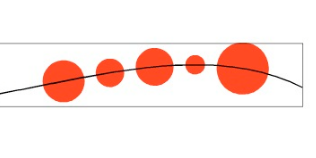
Collision snapping not far from perfect
-
@Subpath Awesome example again, you know everything, thanks a lot.
I just managed to get this result, do you have an idea how to prevent that order switching while clicking again to move? I tried that 3 available options but without luck.
-
@plrang said in Collision snapping not far from perfect:
If only every single shape, in this example each circle in the group, could snap to the selected guide accordingly. That could make a cool shape pattern fill tool.
Current stateIt is not clear from the recording, what is the blue shape made off? is it a regular shape or a pattern along a path?
I tested Collision snapping with a group of 3 circles and it was working per circle also. If you can attach that example, it could help replicating it.
-
@VectorStyler See the link above your post, did you manage to get the same result with Collision Snapping only?? I have no clue how did you do that.
-
@plrang
... you know everything, thanks a lot ...
also does not know everything in VS, only VectorStyler could
claim that
I've been experimenting a lot with VS for the last few months, and before that,
I gained a lot of experience in all sorts of vector graphics programs.
Except Illustrator (which I never liked ( long before the subscription )).And I have a great liking for exotic features and graphics programs

-
-
@Subpath Here is my collision snapping result
It's hard to operate, there are no clear indicators what is selected (as at the beginning of the video). Can't see any TOOL highlighted while in the "colliding" mode.
Never sure if I'm in a state where I can move things along the path or not. Sometimes the order is switching, sometimes the groups lose their connection and only one is moving
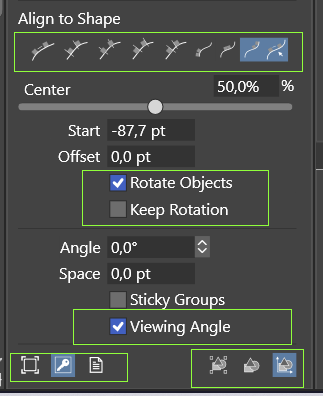
The Rotate Objects checkbox doesn't seem to work, unless its state is determined right before making a whole selection for collision. I don't know.
This thing needs more visual cues, some kind of HUD or more prominent icons with the current state.
Also I have no idea if these issues are caused inside that procedure or something else influences the whole operation, BECAUSE there are moments when it does work as it should.I have a feeling that all these icons need to be reclicked even if they're already highlighted, to get the desired effect.
Here is the 0_1656802753134_snap-collide-test-v1.vstyler VectorStyler file to try.
-
@plrang Got it! But this is not Collision snapping. This is the Align to Path feature.
The tool only works after an alignment to path is made. After the selected objects are aligned, without changing the selection, the tool can be used to shift the aligned object along the alignment path (no collision is detected here).
Yes, rotate object (and other options) must be set before the alignment is made.
The steps for aligning along a path:
- select the objects first and then add the path to the selected (Shift+Click). It is important that the path is selected last.
- adjust all the options in the alignment panel to the desired value.
- click one of the Align to Shape modes (except the last icon).
- use the align to path tool (the last icon) to adjust the object locations along the path.
I will try to add more visual cues.
-
@plrang
As VectorStyler said,
this is a method using the "Align to Shape" Tool
to align shapes onto Shapes / Paths.
Doesnt work like the Collide Tool feature.
Though the results are similar.Might have mentioned that, it was just obvious to me.
By the way, I rarely move then Shapes by Hand along a Path.
Regulary i move the Shapes by changing Values in the Start Field.
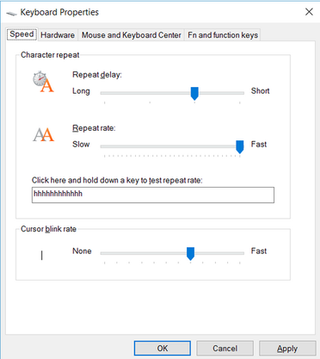
( Put the cursor in the Start Field and press the UP or DOWN ARROW.)And i have always set my keyboard refresh rate in Windows high
for all kind of texts. This speeds up value change also when i use
the UP and DOWN ARROW buttons.
-
@VectorStyler So I merged those two features into one while working with the align to shape really, got it.
It doesn't store its state. Not a problem with some simple patterns, but it may get difficult with more complicated ones.
Would be much easier to work if the state would stick to arranged already elements.
But if you don't plan that, it needs some persistent indicators like those in Transform tools . Currently, I believe there, is just a tiny rectangle around the objects and going back after some time to editing the setup is a challenge.And more clear button highlights in the alignment panel.
Because the panel keeps a kind of a state which IMO is misleading. -
Thanks, your way may work but again it takes too long to move the hand. The left one for the cursor keys? Right hand off the mouse? I don't think so.
I recently proposed a solution to this:
https://www.vectorstyler.com/forum/topic/2141/scroll-drag-to-change-an-option-value/2 -
@plrang
In the meantime, i think, you could give Actions a try
to repeate a Result you like/need
Panels > Prefs > Actions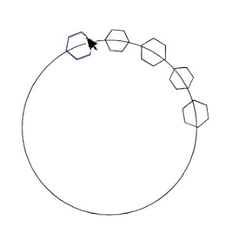
-
@Subpath
I noticed these Actions recently but haven't had a chance to use them yet. I just thought it was some kind of macro recording, I left it for later because I need to design. But I will definitely check'em out.I'll tell you again, if you recorded it in smartphone video format, added text and posted it on Tiktok, you'd probably be the first one.
There you just add the text, which is automatically changed to voice over and you're done. And the audience is huge.
-
@plrang said in Collision snapping not far from perfect:
@Subpath
I noticed these Actions recently but haven't had a chance to use them yet. I just thought it was some kind of macro recording, I left it for later because I need to design. But I will definitely check'em out.I'll tell you again, if you recorded it in smartphone video format, added text and posted it on Tiktok, you'd probably be the first one.
There you just add the text, which is automatically changed to voice over and you're done. And the audience is huge.
.
.
Well, Tik Tok is not really my universe.I think I'll stay VektorStyler Forum exclusive
for now
and if the world wants to see me it has to come
here and meet VectorStyler right awayYes, you right Actions is a kind of Macro Recorder
but will not Record everthing.
But it works with the Alignment Panel and also
in this case.