VectorStyler
    • Categories
    • Unread
    • Recent
    • Tags
    • Popular
    • Register
    • Login

    Taking a preferences file used on an intel mac and installing it on an M1 makes the artboard all gray
    Scheduled Pinned Locked Moved VectorStyler 1.1 Bugs
    6 Posts 3 Posters 6.1k Views 2 Watching
    Loading More Posts
    • Oldest to Newest
    • Newest to Oldest
    • Most Votes
    Reply
    • Reply as topic
    Log in to reply
    This topic has been deleted. Only users with topic management privileges can see it.
    • BoldlineB Offline
      Boldline
      last edited by Boldline

      When I was testing other things, I wanted to see if the preferences file I had put on my intel machine a while back would solve a different problem on my M1 Mac.

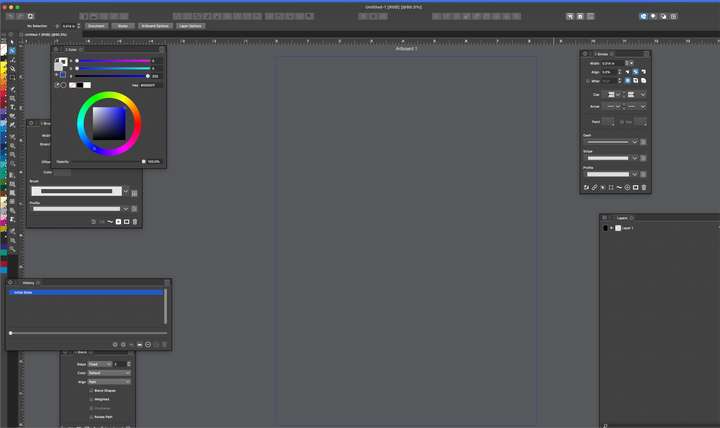
      When I installed it and restarted VS, my VS UI was all the same dark gray of the canvas. There was no white filled document like a normal starting file. Just a black outline where it would be normally. I tried restarting VS and it remained the same issue. When I put it back on default or my main custom pref file, everything worked appropriately.

      When I open an existing VS file, i can select vectors but can only see the selection box and outlines... all fills are gone
      0_1657735291465_f3dda33e-c4e6-479d-b25a-d71af7f8ab6d-BLD 2022-07-13 at 14.01.21.png

      🍎 macOS Tahoe 26.2, Mac mini (M1, 2020), Chip Apple M1, Memory 16 GB
      Cintiq 27QHD Display and LG Ultra HD Display

      VectorStylerV 1 Reply Last reply Reply Quote 0
      • VectorStylerV Offline
        VectorStyler @Boldline
        last edited by

        @Boldline Check the display mode in Preferences -> Performance. OpenGL is not working on M1.

        BoldlineB b77B 3 Replies Last reply Reply Quote 1
        • BoldlineB Offline
          Boldline @VectorStyler
          last edited by

          @VectorStyler Ok I will try that when I can, but now that you mention it, it makes sense

          🍎 macOS Tahoe 26.2, Mac mini (M1, 2020), Chip Apple M1, Memory 16 GB
          Cintiq 27QHD Display and LG Ultra HD Display

          1 Reply Last reply Reply Quote 1
          • b77B Offline
            b77 @VectorStyler
            last edited by

            @VectorStyler Would including the processor family in the file be a solution? So that when the prefs file made on an Intel machine is loaded on M1 or M2 Macs, the app can make the switch from OpenGL to Metal automatically.

            MacBook Pro (Intel) running Monterey 12.6.4

            VectorStylerV 1 Reply Last reply Reply Quote 0
            • VectorStylerV Offline
              VectorStyler @b77
              last edited by

              @b77 Since there are only a few options that might not work (also between Windows and Mac) the best solution wold be VS would autocorrect these.
              I add this to the backlog.

              1 Reply Last reply Reply Quote 1
              • BoldlineB Offline
                Boldline @VectorStyler
                last edited by

                @VectorStyler said in Taking a preferences file used on an intel mac and installing it on an M1 makes the artboard all gray:

                @Boldline Check the display mode in Preferences -> Performance. OpenGL is not working on M1.

                Yes that was the issue. When i switched the display mode to metal, it worked just fine in the M1 - thanks!
                (this preferences file did not fix the issue with making cusp nodes with the pen tool - so that must be something else)


                🍎 macOS Tahoe 26.2, Mac mini (M1, 2020), Chip Apple M1, Memory 16 GB
                Cintiq 27QHD Display and LG Ultra HD Display

                1 Reply Last reply Reply Quote 1
                • First post
                  Last post