Create Artboard: Landscape option glitching.
-
On a Win 11 machine, using VS 1.1.026.
When using Canvas > Create Artboard, the default is A4.
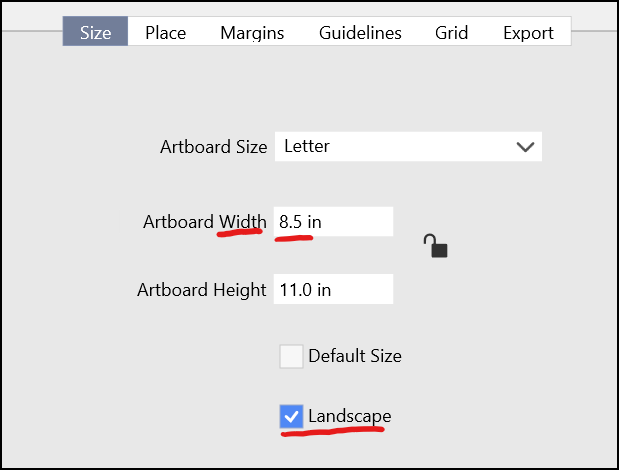
When I change the option to North American Letter paper and the "Landscape" option is already checked, it does not orient the paper correctly.
Workaround: Clicking on the Landscape option off, then on again, will reset it correctly.The expected behaviour is that when Landscape is already checked and a new artboard size is chosen, it will respect that choice.
Another minor thing:
I found a bug report related to this issue form a few months ago.
https://www.vectorstyler.com/forum/topic/1032/weird-issues-with-paper-size
When using Canvas > Create Artboard, and selecting "Letter" artboard size to create a new artboard, if you try and add another Letter sized artboard using Canvas > Create Artboard, interface resets to A4 size.The expected behaviour is that the settings will retain their last options settings.
Thank you. -
@Victor-Vector Added this to the backlog.
-
@Victor-Vector This problem should be fixed in build 1.1.048
-
@Victor-Vector said in Create Artboard: Landscape option glitching.:
Another minor thing:
I found a bug report related to this issue form a few months ago.
https://www.vectorstyler.com/forum/topic/1032/weird-issues-with-paper-size
When using Canvas > Create Artboard, and selecting "Letter" artboard size to create a new artboard, if you try and add another Letter sized artboard using Canvas > Create Artboard, interface resets to A4 size.
The expected behaviour is that the settings will retain their last options settings.First off, thanks for fixing the Landscape option glitch; much appreciated!
As for this "minor thing" it is still not working as expected.
- I created a new VS document. My default paper size is Letter, Landscape. The artboard in the new document is Letter-sized, as expected.
- Create a second artboard: Menu > Canvas > Create Artboard > Size (tab) > Artboard Size, says "A4", but clicking "Ok", without changing the paper size, will add a Letter-sized artboard instead.
The expectation is that it would say "Letter".
Thank you. -
@Victor-Vector I will keep this issue open.

