VectorStyler
    • Categories
    • Unread
    • Recent
    • Tags
    • Popular
    • Register
    • Login

    Image Effects Filter - "Opacity Values and Mask" Drop-down UI glitch

    Scheduled Pinned Locked Moved Resolved Issues
    3 Posts 2 Posters 3.9k Views 2 Watching
    Loading More Posts
    • Oldest to Newest
    • Newest to Oldest
    • Most Votes
    Reply
    • Reply as topic
    Log in to reply
    This topic has been deleted. Only users with topic management privileges can see it.
    • Victor VectorV Offline
      Victor Vector
      last edited by Victor Vector

      Hello,
      This is on Win11 VS 1.1.028:

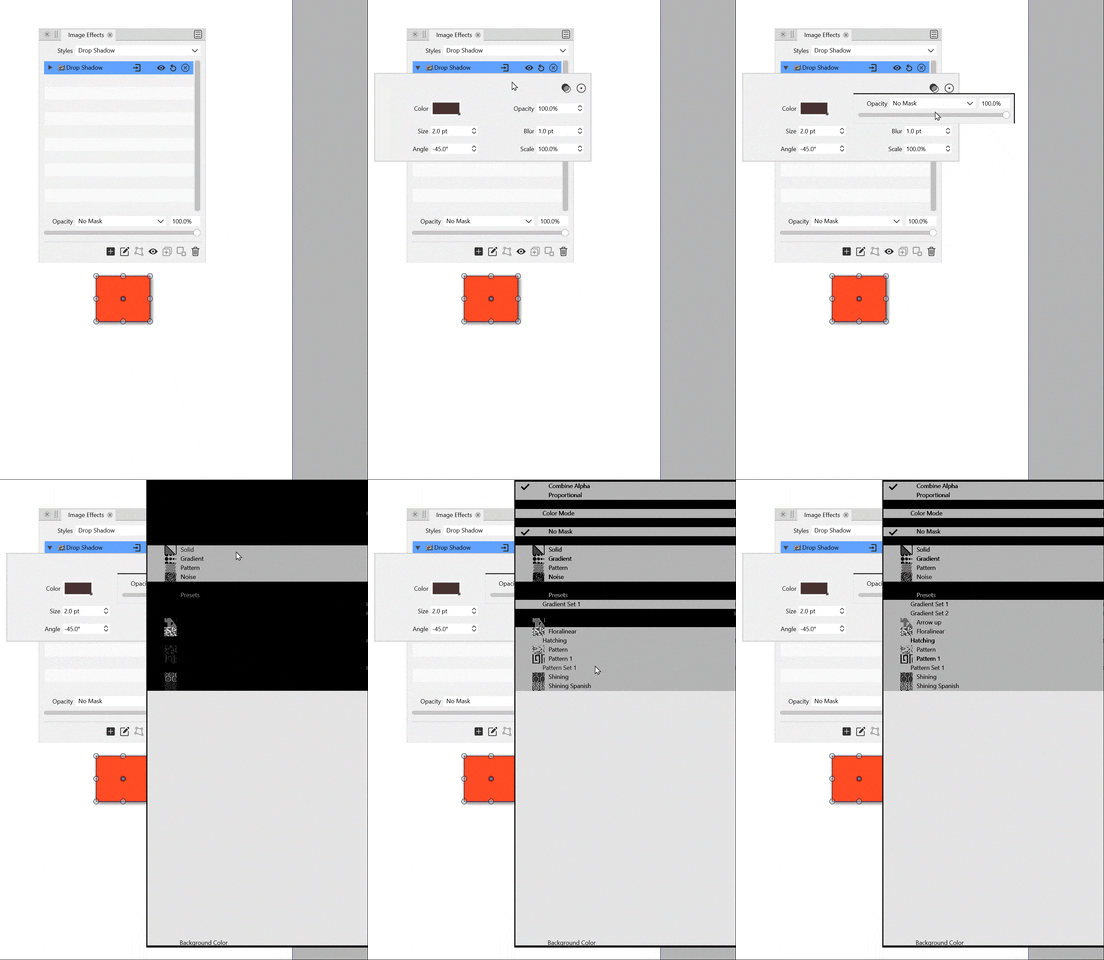
      1. From the Image Effects Panel I added a drop shadow to a shape.
      2. Used the leftmost drop-down arrow on the effect to open the adjustments window.
      3. Click on the "Select the opacity..." icon on the right.
      4. Click on the "Select the filter opacity value and mask" drop-down.
      5. The new drop-down window had a visual glitch.
      alt text

      I can send you anything you need to troubleshoot, just let me know.
      Thank you.

      VectorStylerV 2 Replies Last reply Reply Quote 0
      • VectorStylerV Offline
        VectorStyler @Victor Vector
        last edited by

        @Victor-Vector Cab be replicated easily on Windows. I added this to the backlog.

        1 Reply Last reply Reply Quote 1
        • VectorStylerV Offline
          VectorStyler @Victor Vector
          last edited by

          @Victor-Vector This problem should be fixed in 1.1.048

          1 Reply Last reply Reply Quote 0
          • First post
            Last post
