VectorStyler
    • Categories
    • Unread
    • Recent
    • Tags
    • Popular
    • Register
    • Login

    Cannot disable HEX color from main prefs
    Scheduled Pinned Locked Moved VectorStyler 1.1 Bugs
    3 Posts 2 Posters 4.4k Views 2 Watching
    Loading More Posts
    • Oldest to Newest
    • Newest to Oldest
    • Most Votes
    Reply
    • Reply as topic
    Log in to reply
    This topic has been deleted. Only users with topic management privileges can see it.
    • IngolfI Offline
      Ingolf
      last edited by

      This setting (Show Hex color) cannot be disabled - I can remove the check mark but the HEX field in the color panel is still visible. If you then restart VS and check the preferences, Show HEX color has a check mark. Windows/macOS.
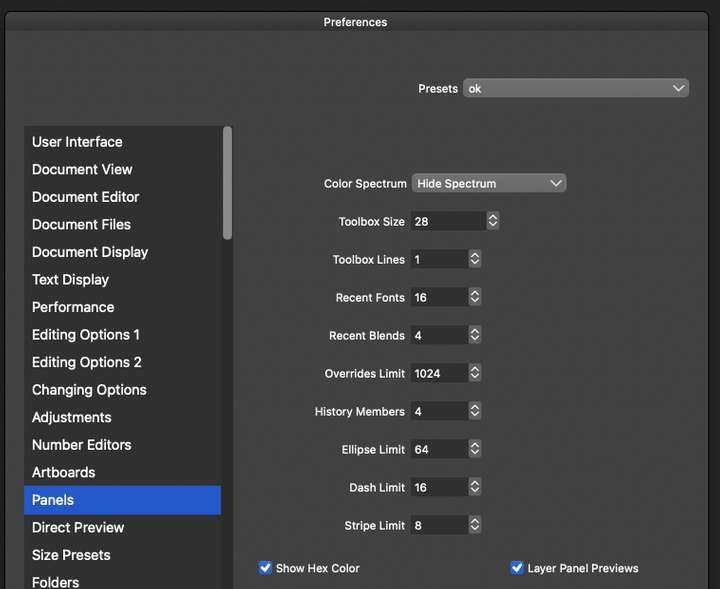
      0_1654641588249_08daa30b-4328-4ddb-b649-7b8dd511f6d5-image.png

      The very same option works fine in the panel menu, and it is the best place for it, so I think it should just be removed from the main preferences.

      🍏 macOS Sequoia Apple Silicon

      VectorStylerV 2 Replies Last reply Reply Quote 0
      • VectorStylerV Offline
        VectorStyler @Ingolf
        last edited by

        @Ingolf Yes, this can be replicated. The change in preference does not register when the color (or palette) panel is open.
        Use the "Show Hex Color" option in the Color panel menu.

        1 Reply Last reply Reply Quote 0
        • VectorStylerV Offline
          VectorStyler @Ingolf
          last edited by

          @Ingolf This problem should be fixed in 1.1.049

          1 Reply Last reply Reply Quote 1
          • First post
            Last post
