Repeater halftone problem on rasters
-
@Boldline I always wanted to check out Phantasm, the Astute Illustrator plug-in, for its ability to do instant vector halftones, but because it's subscription based, never bothered - I think Repeater is already going way beyond what you can do with Phantasm, although I remember seeing a video a fair few years ago detailing that it could do halftones on live text - so got to see if it's doable in VS ---- sure enough:
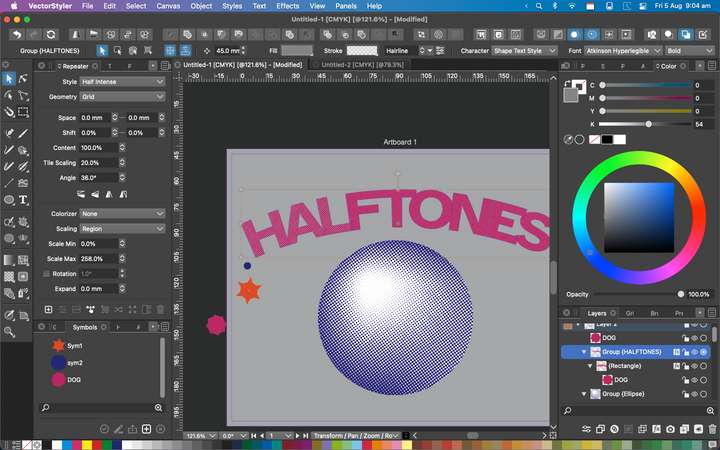
All elements remain editable --- AWESOME!@Boldline said in Repeater halftone problem on rasters:
Some inspiration for what I hope Repeater can do now (in part) and what could be added in the future:
Yes this is exactly what I need - With a bit of faffing around you can do stuff like this in VectorRaster but I'm never 100% happy withVR creations as there always seems to be a lot of clean-up, well that's my experience with VR but Repeater shows tonnes of potential to do all that really well, it's already amazing now.
-
@Subpath said in Repeater halftone problem on rasters:
i am a little unshure, but it seems to me
not so very far away.The top example would be totally usable for me - a lot better than my experiments with lines.
The bottom example is not far off - I think the only worry for me is how complex the end result is in regards to the amount of nodes, as there seemed to be a lot of overlapping when I was getting close to something usable.
I'm sure @VectorStyler will amaze us further with what's planned for the Repeater in the road map plans

-
@Dazmondo said in Repeater halftone problem on rasters:
I think the only worry for me is how complex the end result is in regards to the amount of nodes, as there seemed to be a lot of overlapping when I was getting close to something usable.
Would be really handy to post a couple of gifs here--- oh well... here's a link to a couple of gifs detailing my concerns: https://drive.google.com/file/d/1HYBexsLQ8O4wyC2O9W7fBu0bzlpWbKAS/view?usp=sharing
https://drive.google.com/file/d/1K1gPC7fPUUk90oFHlgD6bkjbrlv9c0Q1/view?usp=sharingThe above two gifs show examples of what I hope to achieve at some point in the future, although, the circle line gradient is easily achievable using the blend tool for a simple gradient, but would be handy has an halftone option to use on rasters
This also slows VS to a crawl and when trying to create new gradients on a page, somehow creates multiple gradients, and moving shapes on the page a fraction with the mouse launches them off the artboard
-
To achieve something like this would be incredible:
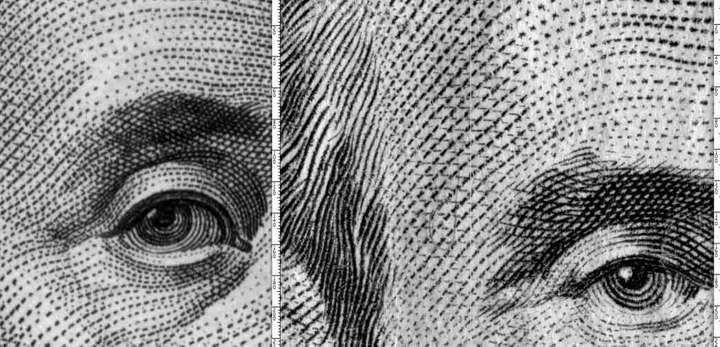
I've tried most of the solutions to recreate this sort of thing (without having to do it just using a pen tool) and never been happy with the results I'm guessing it's impossible, but you never know? -
@Dazmondo This (the dollar scan) is much more complex and because it was done manually, even specialized software like StrokesMaker (very expensive and PC only) can not imitate the slight variations perfectly.
https://www.guard-soft.com/strokes_maker.html (click the 'Gallery' button).
I think an alternative would be dividing the image into sections (forehead, eyes, brows, cheeks, etc), bending and blending lines in different directions for each section then feeding the rasterized versions of each blend object to the Repeater.
I haven't tried it and don't plan to — it's a lot of work, but it might do it.
MacBook Pro (Intel) running Monterey 12.6.4
-
Hmm… there's a StrokesMaker app sold by a Russian guy for 99 USD — not sure if this is related to the one from GuardSoft…
https://www.strokesmaker.com/ (Mac and PC version available)
MacBook Pro (Intel) running Monterey 12.6.4
-
Win 11
CPU: AMD Ryzen 5 9600X, 6-core.
GPU: Nvidia Geforce RTX 5070. -
@b77 said in Repeater halftone problem on rasters:
I haven't tried it and don't plan to — it's a lot of work, but it might do it.
I had a try, well started and gave up trying, a splitting a face into sections technique when I first got Vectoraster 3 in 2009 - At the moment I think the repeater would be unable to produce anything close to VR, but who knows, with VS ability to distort and bend vector strokes it may be doable in the future if we get a way to use simple lines in Repeater?
-
@b77 said in Repeater halftone problem on rasters:
Hmm… there's a StrokesMaker app sold by a Russian guy for 99 USD — not sure if this is related to the one from GuardSoft…
https://www.strokesmaker.com/ (Mac and PC version available)Strokesmaker looks like it's probably the closest I've seen to achieving this type of thing but I suspect the really authentic looking art on the site would need a lot of work ---- ACE
-
@Subpath said in Repeater halftone problem on rasters:
@b77
Here a Video Tutorial about how they create those Lines
in this Software.
Youtube VideoWow just watched the video - giving me ideas how to do this in VS --- thanks
-
Is there a way to get multiple color results from an imported raster image?
🍎 macOS Tahoe 26.2, Mac mini (M1, 2020), Chip Apple M1, Memory 16 GB
Cintiq 27QHD Display and LG Ultra HD Display -
@Boldline Export separations with Print to File and open the generated PDFs back in VS, change the black shapes to the correct color for the first three files (C, M, Y) or for the Pantones, and run Repeater on them.
MacBook Pro (Intel) running Monterey 12.6.4
-
@b77 Thanks!!!! I am going to try that and get back to you. This is exciting!
-
@VectorStyler Can a pseudo-separation be done using the color adjustment effects, so that each of four duplicates of a color image can have the cyan, the magenta, the yellow and the black separation, and Boldline doesn't need to export separation PDFs for this?
I tried a bit with the available effects but couldn't do it. Maybe I didn't try enough?
-
@b77 Maybe with the Curves color effect. Create four copies of an image and clump down all but one color channel curve on each.
-
@Boldline said in Repeater halftone problem on rasters:
Is there a way to get multiple color results from an imported raster image?
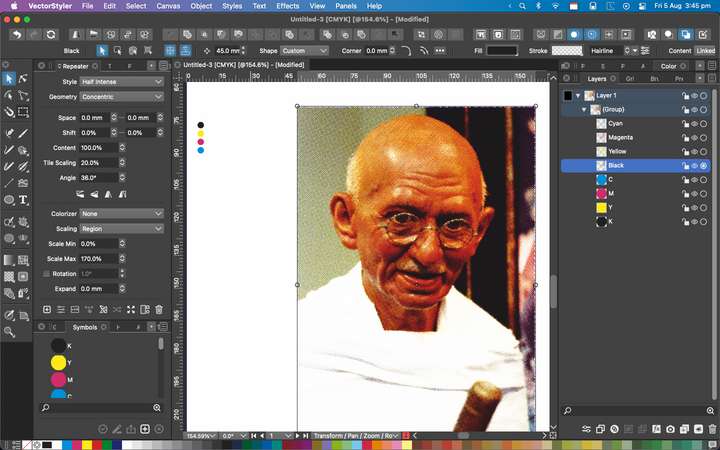
Just had a quick mess around by separating in Affinity, importing into VS and assigning repeater dots --- works great - obviously needs tweaking but opens up a few doors for creating duotones for T-shirts
-
@VectorStyler Nope, tried that. It applies cyan, magenta and yellow where's only black or grey.
Probably because the effect is RGB based (the image was changed to CMYK color mode).OK, I'll post a solution here if I find an effect that does this.
-
@Dazmondo said in Repeater halftone problem on rasters:
Just had a quick mess around by separating in Affinity, importing into VS and assigning repeater dots --- works great - obviously needs tweaking but opens up a few doors for creating duotones for T-shirts
Heres the VS doc: https://drive.google.com/file/d/1IefoB6blZgPRVzZ6A_7UVgZww0CERITJ/view?usp=sharing
-
@Dazmondo said in Repeater halftone problem on rasters:
Wow just watched the video - giving me ideas how to do this in VS --- thanks
i though it would give us a few ideas

and maybe VectorStyler too
-
@Dazmondo said in Repeater halftone problem on rasters:
etched style halftones
There is a larger repeater task planned just after 1.2, so not very soon but soon.


