VectorStyler
    • Categories
    • Unread
    • Recent
    • Tags
    • Popular
    • Register
    • Login

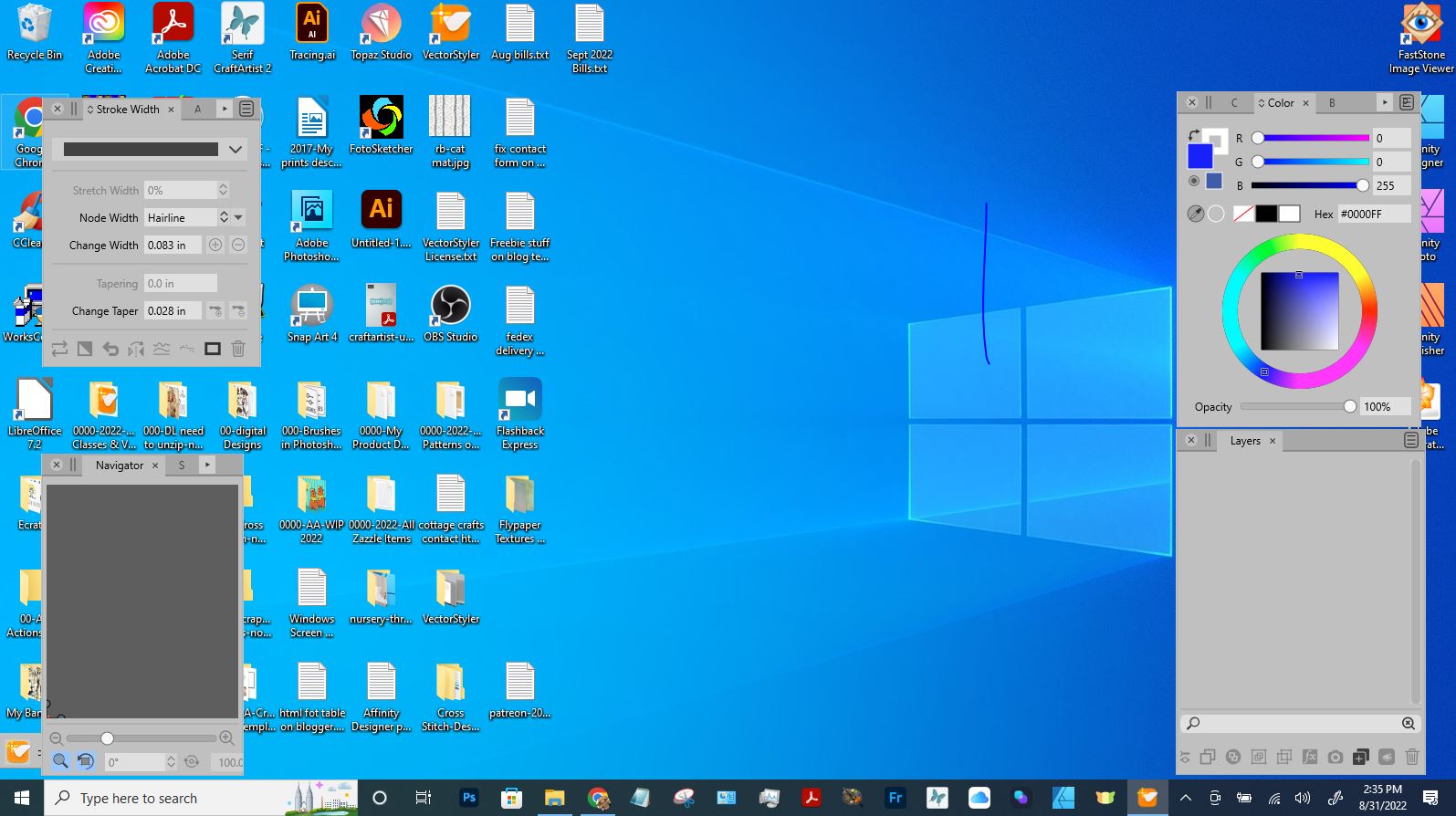
    Lost background canvas of program
    Scheduled Pinned Locked Moved Resolved Issues
    19 Posts 4 Posters 18.3k Views 4 Watching
    Loading More Posts
    • Oldest to Newest
    • Newest to Oldest
    • Most Votes
    Reply
    • Reply as topic
    Log in to reply
    This topic has been deleted. Only users with topic management privileges can see it.
    • IngolfI Offline
      Ingolf
      last edited by Ingolf

      No, jun run VS, it will start from scratch with default settings so you'll have to restore the license file or re-enter license code.

      🍏 macOS Sequoia Apple Silicon

      1 Reply Last reply Reply Quote 0
      • S Offline
        SJStalter
        last edited by

        That didn't change anything. Still only the panels showing. It did not reset to default. Bummer.

        Win 10
        HP Laptop
        AMD Athlon Gold 3150U with Radeon Graphics
        64-bit operating system

        1 Reply Last reply Reply Quote 0
        • IngolfI Offline
          Ingolf
          last edited by Ingolf

          That is strange, we just removed every bit of configuration from the equation. How is your setup, external screen and laptop, both screens on?

          🍏 macOS Sequoia Apple Silicon

          1 Reply Last reply Reply Quote 0
          • S Offline
            SJStalter
            last edited by

            not sure what you mean abut setup, external screen and yes my laptop screen is on. I was using my ipad as a drawing tablet but that is turned off now.

            Win 10
            HP Laptop
            AMD Athlon Gold 3150U with Radeon Graphics
            64-bit operating system

            IngolfI 1 Reply Last reply Reply Quote 0
            • S Offline
              Subpath @SJStalter
              last edited by

              @SJStalter said in Lost background canvas of program:

              FWIW-mine is Win Vers 10.0.19043

              Sorry, I think there was a misunderstanding here

              with VS 1.1.059 i meant the VectorStyler version I use.

              Win 11
              CPU: AMD Ryzen 5 9600X, 6-core.
              GPU: Nvidia Geforce RTX 5070.

              1 Reply Last reply Reply Quote 0
              • IngolfI Offline
                Ingolf @SJStalter
                last edited by Ingolf

                @SJStalter Just what stuff you have 🙂 Any of this any help?

                Support

                I had some weird problems with two monitors and the laptop screen disabled.

                How does it work with only the external screen on?

                Windows key + P

                @VectorStyler If my theory here is right, the issues I reported about two external monitors also occurs in a laptop-external screen setup and then must be solved.

                🍏 macOS Sequoia Apple Silicon

                1 Reply Last reply Reply Quote 0
                • S Offline
                  SJStalter
                  last edited by

                  @subpath.....lol...sorry I misunderstood.

                  @Ingolf--I have completely removed all traces of VectorStyler from my computer, re-downloaded from site, reinstalled. and darn it , I still only see panels. No place to put in software key. The thing is, it was working with ipad as drawing tablet screen along with laptop screen UNTIL I tried to put toolbar Horizontal. I cant even use the program right now. there is probably an easy fix, I will just do something else until I hear more.

                  Win 10
                  HP Laptop
                  AMD Athlon Gold 3150U with Radeon Graphics
                  64-bit operating system

                  1 Reply Last reply Reply Quote 0
                  • IngolfI Offline
                    Ingolf
                    last edited by

                    @Ingolf said in Lost background canvas of program:

                    Windows key + P

                    But try this - now we could have Windows involved in the issue, that would explain why the settings are not related.

                    🍏 macOS Sequoia Apple Silicon

                    1 Reply Last reply Reply Quote 0
                    • S Offline
                      SJStalter
                      last edited by SJStalter

                      Oh boy that was fun. that made everything on my screen gigantic! lol. I was barely able to reboot to get out of that. I am thinking that you just cant use another screen to draw on with this software. I have a Huion 13" and a regular drawing tablet that is not a screen. I'll give them a try if I am ever able to open VectorStyler again. At this point I still cant open the program, only the panels show.

                      Win 10
                      HP Laptop
                      AMD Athlon Gold 3150U with Radeon Graphics
                      64-bit operating system

                      1 Reply Last reply Reply Quote 0
                      • IngolfI Offline
                        Ingolf
                        last edited by Ingolf

                        In a normal Windows setup, "External only" should display your desktop in a normal resolution, and your laptop's screen should be turned off. Sometimes you have to adjust it up a bit.

                        This is what I constantly use at work for presentations.

                        You can also fiddle with it more manually from display setup, where you can see what resolution Windows is about to use when you press apply.

                        By the way, Windows reverts to the original setup after 15 seconds if you haven't approved the setup.

                        🍏 macOS Sequoia Apple Silicon

                        1 Reply Last reply Reply Quote 0
                        • VectorStylerV Offline
                          VectorStyler @SJStalter
                          last edited by VectorStyler

                          @SJStalter On the bottom left corner of the screenshot in the first post I see the VectorStyler window title icon.
                          It should not be that small, but can it be resized?

                          EDIT: red circle around the possible VS window. But it should not be at that size.
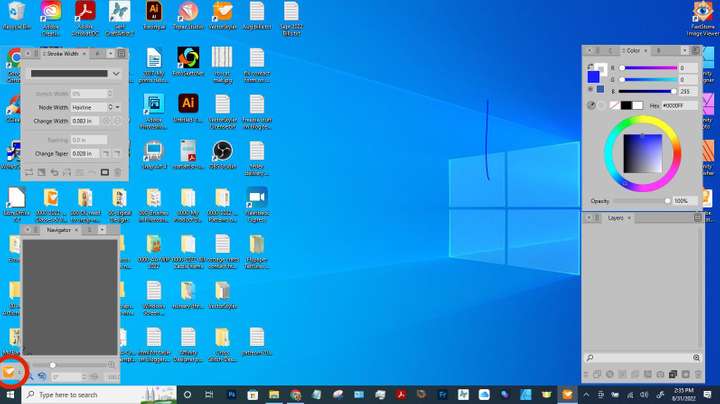
                          0_1662010497078_vectorstyler-icon.jpg

                          1 Reply Last reply Reply Quote 0
                          • S Offline
                            SJStalter
                            last edited by

                            Yes i found it. Yesterday the Navigator panel was covering the critical part. I've resized it and now have my program background. Thank you so much!


                            Win 10
                            HP Laptop
                            AMD Athlon Gold 3150U with Radeon Graphics
                            64-bit operating system

                            1 Reply Last reply Reply Quote 2
                            • First post
                              Last post