update 1.1.060
-
Is it me or does it return to default black stroke and no fill if I fail to close a shape with the pencil tool? (Win)
-
@Ingolf Should not if Preferences > Changing Options > Filled Shapes with Pencil Tool is enabled.
-
@VectorStyler said in update 1.1.060:
@Ingolf Should not if Preferences > Changing Options > Filled Shapes with Pencil Tool is enabled.
It is - and in the beginning it does happen with grey fill color - if I accidentially miss closing it, it returns to black strok, no fill.
-
@Ingolf After drawing with the pencil, what is shown in the Color panel top-left knob for the fill and stroke?
And if the newly drawn shape is deselected, does it still have an outline?I tried to replicate on Windows, but here it seems to be working.
The only thing that might be confusing is the black outline shown while the object is selected. -
Movie coming up. I am using a PC with some ancient settings I will try with defaults after this movie.
-
its no fall back here
once you set a Fill Colorand it doesnt matter if a shape is open
here a video
.
. -
-
If I after the steps in this movie toggle fill and stroke, it works.
Perhaps something related to the fact that I probably never used the pencil before on this machine/config?
🍏 macOS Sequoia Apple Silicon
-
Dont know if you need the pencil to do such designs.
I would recommend to use the Path Sketch Tool for this.
Because with the Path Sketch Tool its easier to get closed Shapes. -
@Ingolf I will try to replicate this
-
I only use the pen/node tool and shapes + boolean ops. Just trying the implemented change.
-
@Ingolf If you set a fill color in the Color panel (other than the default) and leave the stroke to none, is the Pencil still drawing with a stroke?
-
@VectorStyler said in update 1.1.060:
@Ingolf If you set a fill color in the Color panel (other than the default) and leave the stroke to none, is the Pencil still drawing with a stroke?
Then it works, yes.
-
@Ingolf said in update 1.1.060:
@VectorStyler
@Subpath said in update 1.1.060:I love that you can sketch now in Fill Mode, right from the start.
With the Path Sketch and the Pencil Tool.
Preferences > Changing Options > Filled Shapes with Pencil ToolThis should be (sticky) settings in the context toolbar.
As I said - and as I will repeat on repeat forever - this setting belongs in the context toolbar, and to see why you can check out the excellent implementation in Xara, where their very short label explains it all. And the interface is simple and clean.

This is what a context toolbar is for, and this is why it is pure madness (and thus non-standard) to hide settings for this deep in the preferences. It is a simple button that toggles how the tool works immidiately and it is impossible to miss. This is how you work with tools quickly and dynamically and without a hailstorm of panels, shortcuts and preferences.
Ladies and gentlemen, the context toolbar and its raison d'être.
🍏 macOS Sequoia Apple Silicon
-
@Ingolf said in update 1.1.060:
As I said - and as I will repeat on repeat forever - this setting belongs in the context toolbar, and to see why you can check out the excellent implementation in Xara, where their very short label explains it all. And the interface is simple and clean.
@Ingolf I appreciate many good ideas and bug fixes you have for VS, but in this area, I'll continue to repeat that you advocate for more options to be always available in the contextual menu bar but at the same time mention that the UI of VS feels "cluttered". You can't have it both ways.
You're comparing apples to oranges, because Xara does not offer anywhere near as many tools or features as VS does, so there is plenty of room to add tool options. They have the save icon, new document icon, export, undo icons all on there taking space as well!
Using VS on a large screen is less of an issue, but using VS on a 16 inch laptop screen means existing icons are hard to keep on screen. We've had discussions in the forum over finding ways to consolidate existing icons in the horizontal toolbars - like the boolean operations
With this tool for the pencil tool in particular, most users are going to want one preference or the other for primary use. Even switching between the pencil being fill only, stroke only, or both is fairly easy and straightforward as it is already.
I understand you prefer to avoid keyboard shortcuts and want everything at surface level, but that does not bode well for a clean and organized UI. If every tool and preference is represented on the UI at all times, we would just have chaos. -
@Ingolf The context toolbar customization (long overdue) is in the backlog. This can added there.
Different workflows require different options
-
@Boldline said in update 1.1.060:
You're comparing apples to oranges, because Xara does not offer anywhere near as many tools or features as VS does,
i think you nail it
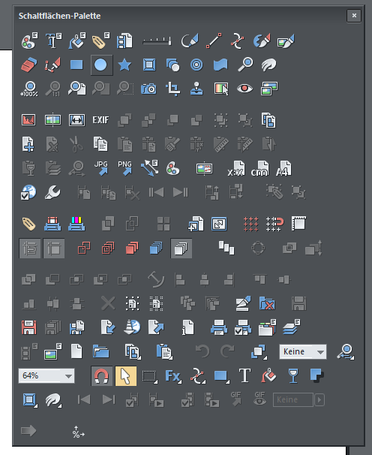
Here a pic of Xara Tool Button palette, with all tools avaiable
Win 11
CPU: AMD Ryzen 5 9600X, 6-core.
GPU: Nvidia Geforce RTX 5070. -
I found it a bit easier in Xara to create my own little Tool Palette.
Which i love to useI think it is doable in VS, but it seems to be a bit more complicated
which is a bit of a hindrance to trying it for me.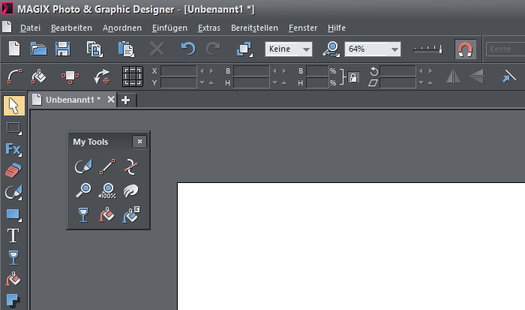
-
@Subpath Toolbox customization (and shortcuts as well) are on the features list.
-
@Subpath said in update 1.1.060:
@Boldline said in update 1.1.060:
You're comparing apples to oranges, because Xara does not offer anywhere near as many tools or features as VS does,
Here a pic of Xara Tool Button palette, with all tools avaiableYou still don’t get it. And taking things so literally every time is not a good sign. Again, just enjoy the calm interface in Xara and others and think “could we simplify something”.
Regardless of the nummer of tools a program has to offer, you don’t show them all and you show what you do show as smart and simple as you can. And that is what the context toolbar is there for, hiding and showing options in different contexts. Automatically if at all possible.
This is a tool toggle that should be available as default. Some options are secondary and can be hidden or made available more discreet. Many text labels can be hidden and a simple icon can save tons of space. It is not just about features. It is about UI design and elegance.
Customisation is nice but if the default setup is not what a majority of new users expect they have to alter the default again and again. And they don’t. It is not how you sell products nowadays. Don’t expect happy customers that will love to go the basement to look for tools again and again. They won’t. Even satisfied customers. This phrase I have heard for 30 years from customers, people and coworkers: “whow can I do that”. Sometimes I haven’t really used the program in question much.
If you think that we represent the average users, think again. They are not patient, they do not register on any forum, they do not accept reading long manuals and Usability is the biggest parameter there is together with price.
Affinity has millions of users, and far below one percent of them are on their forum. And that particular forum is cursed by a few handful of fanboys and freaks who defend whatever shortcoming Affinity has. They big question is how many thousands of their customers that struggle in silence at home or uninstall during the Affinity trial and how many do with vectorstyler.
Thinking back I uninstalled countless programs during my career because I knew after a number of observations that if I see this in a program, it will never improve, simply because if that’s how it looks in version 2 or 3, the company will never get it right.
And that is why big competitors have presets for different workflows, some simple. Even though the programs have a gazillion options. Because people do not pay for complexity and losing hours of their life.
🍏 macOS Sequoia Apple Silicon


