Font sizes in prefs
-
If the last open document - or the active open document - uses mm or something else as units, then this unit is used as font size in preferences, as here.
I would always expect Points as the default and specified scale for the font on the screen, whatever the input field supports.
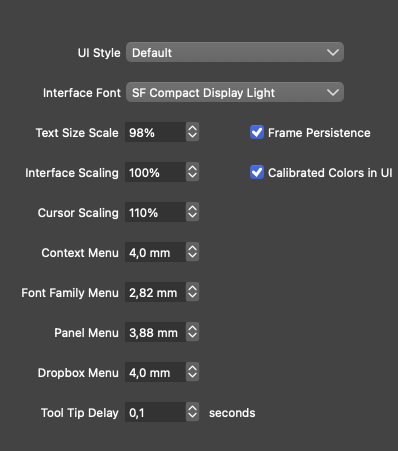
🍏 macOS Sequoia Apple Silicon
-
@Ingolf If you change the 'Font Size Units' from 'Default' to 'Points' in Prefs > Number Editors, this overrides the document unit (mm, cm…) and the UI displays text size in points (pt).
Are you saying that it should also use Points here in Preferences > User Interface when the setting I mentioned above is set to Points?
-
@Ingolf I think this could use points at all time. Anyway these are not real points but screen points (not pixels in retina).
-
@VectorStyler Then use (non-Retina) pixels.
-
@b77 said in Font sizes in prefs:
@Ingolf If you change the 'Font Size Units' from 'Default' to 'Points' in Prefs > Number Editors, this overrides the document unit (mm, cm…) and the UI displays text size in points (pt).
Are you saying that it should also use Points here in Preferences > User Interface when the setting I mentioned above is set to Points?
Ah, I wrote points by mistake. My bad. But I thought of screen points.
You don't need typographic units here, and not several units to choose from either. What is needed is a scale that is familiar, preferably from the rest of the operating system.
Here I would expect:
- an integer value, where I can enter 8, 10, 11, 12 whatever (the classic method) which is what many would like if they get roughly same (predictable!) results with for example 8 in VS as in other programs
- It could even be percent which is easier to understand with 100% a familiar starting point
As simple as that.
-
@Ingolf This issue should be fixed in build 1.1.062


