Pattern fill to edges and word art fill option
-
Is it possible to get a result using patterns like the image of the "D"?
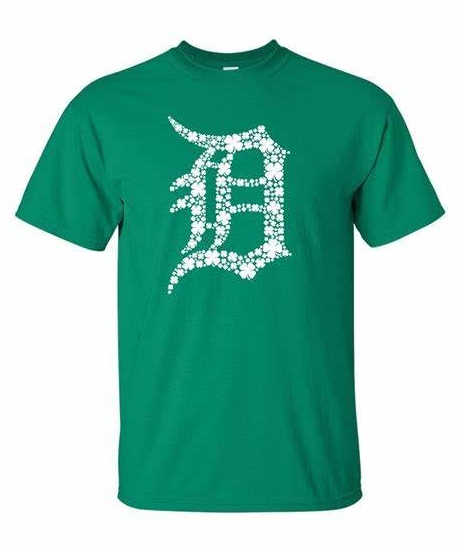 Where the pattern subject matter can be given a size range to work within and fill the defined space as close to full as possible with a gap remaining between objects. The priority would be filling as much of the containing shape as possible, in this case, the letter D, so it's legible but none of the fill objects inside are clipped.
If this gets added, a real-time preview would be amazing to be able to size the largest to smallest fill objects. Even an option to use more than one fill shape?
I read through all the pattern info in the VS help section - I did not understand everything in there. I know the pattern tool, like most VS tools is full of amazing possibilities and options, so it's possible the setting and options already exist.
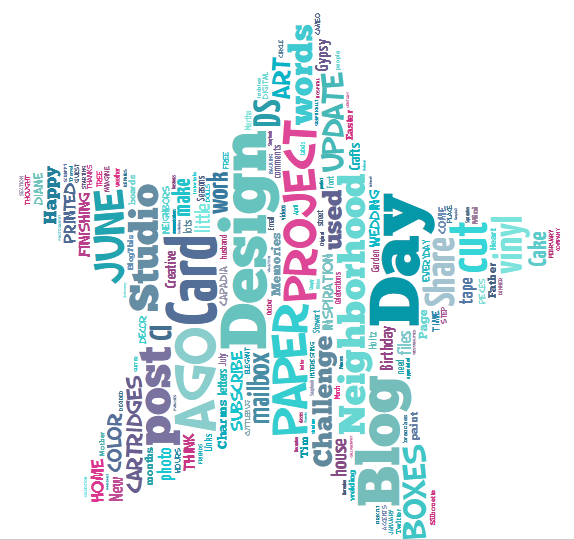
The second idea is similar to the first but utilizes wording. We've all seen those word fill tools online to add a certain number of words
The problem with them is they are all raster based and if I make one, I have to recreate it by taking a screen shot and placing the words manually over top as vectors.
This option would be a major help in VS. Maybe for version 2?
-
@Boldline It is not possible to do this at this time. But maybe using the hexagonal tiling mode, and a tile containing the large and a few smaller versions of those leaves could be close to this result.
Otherwise, this is an interesting idea. But it cannot make it into version 1. I add this to the backlog of future features. It could make it into version 2.
-
@vectoradmin Thanks for considering it. I am not expecting it in version 1 - I appreciate your willingness to look into it and consider for the next version. I could see it being a literal selling point in the second version. It's also something the other vector apps do not offer currently.
in a way, the two ideas seem to almost the same thing (at least from my non-programmer view!) Filling a given space with specific text entries or with a shape or set of shapes and adjusting the way it fills that shape by setting size and repetition parameters and a color palette.
-
If you happen to be on a Mac, for a single shape being used to fill the outer shape (so not the collection of words, but maybe for the clover above it), you can get something somewhat similar to this using Vectoraster from lostminds.com (though perhaps not quite exactly the same)
-
 C Clippy notes referenced this topic on

