The pencil tool doesn't respect the fill and stroke color styling attributes set by the user.
-
What other programs make this setting accessible in the contextual menu bar? Once someone adjusts the settings, (wherever it's located), how often would they be adjusting it? Is the argument being made that the reasoning behind moving it to the contextual menu bar simply about making it easy to find for a new user? I agree that hiding it in the preferences is harder to find than it should be, but moving it to the contextual menu seems like an extreme shift in the pendulum.
I
🍎 macOS Tahoe 26.2, Mac mini (M1, 2020), Chip Apple M1, Memory 16 GB
Cintiq 27QHD Display and LG Ultra HD Display -
I think it is difficult to agree on a fixed approach (option or no option), that is why customization (in the future) of the context bar is the only way to go.
-
I don't think any of us knows how often users need to change from one mode to another.
- last time I checked AI didn't have a such a checkbox in the context bar;
- no idea about AD (you guys should know), and…
- from this short video it looks like CDR has a different approach where if you double-click the Fill or Stroke button in the toolbar or context(?) bar you get a settings window where you can change the defaults for different types of objects.
-
@VectorStyler said in The pencil tool doesn't respect the fill and stroke color styling attributes set by the user.:
I think it is difficult to agree on a fixed approach (option or no option), that is why customization (in the future) of the context bar is the only way to go.
@b77 said in The pencil tool doesn't respect the fill and stroke color styling attributes set by the user.:
I don't think any of us knows how often users need to change from one mode to another.
I agree with everyone that customization of the contextual menu bar is the ultimate solution - much like offering several different UI skins allows for each user to pick their own look to VS. The question really is, what is the best default UI setup that is most helpful but not too busy? What settings are most commonly adjusted frequently by the majority vs what are set it once and be done for the most part? Is the focus of the default contextual menu bar about making everything super accessible for the new user or about putting the most commonly adjusted settings there for efficiency of use? What is the proper ratio of UI simple space to being full of icons and buttons?
With every choice in the UI and in VS overall, there could be arguments made for and against any type of default layout option. We all know the defaults will never satisfy everyone - much less any one person because the first thing we do once we get comfortable with the program is start modifying the layout to fit our own needs. That said, first impressions visually and operationally matter as well. Is a new user going to be more comfortable with a default contextual bar loaded with icons?
I'm of the opinion that the default contextual menu bar should only be added to with great consideration and justification.
There's limited space already and one of the criticisms of VS has been that it can feel overwhelming when first opened to a new user.
Even if i don't agree completely with the views shared on this topic or other topics , I am stimulated by the ideas going around and all considerations examined. The default UI of VS in terms of development seems fluid - in that just because something is located where it is now does not mean it cannot be moved later should the circumstances justify it. Whatever @VectorStyler ends up doing will be the default and we'll all accept it for what it is. With time, experience, usage, as well as the continued awesome humble approach @VectorStyler has taken to considering new ideas - we may all be looking at it differently in a year anyway! -
Done the right way none of us would do this work and we wouldn't have to agree either. We would not even know about each other. But the person doing it would sum up knowledge in the world and knowledge about the user base (and the potential users) and apply a proven method. The ongoing debate here about something this trivial is just leading nowhere. The wrong people doing the work the wrong way.
AI and CorelDRAW has archaic user interfaces that sucks ass and any program that dares to improve a workflow by taking out the guesswork and complexity tends to succeed. Leaning towards the dinoraurs is dangerous.
-
How about grouping tools that belong together
in the preferences a little bit ?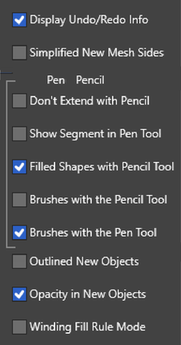
-
If you didn't catch my drift; if this little microscopic bugger of a setting is going to require so much and so many posts from random users, how on earth could something like the interface of complex features be completed or improved?
-
@Ingolf said in The pencil tool doesn't respect the fill and stroke color styling attributes set by the user.:
if this little microscopic bugger of a setting is going to require so much and so many posts from random users, how on earth could something like the interface of complex features be completed or improved?
The issue is not really about this pencil setting itself - it's really about deciding what kind of approach is given to creating the best default UI interface, tool panel preferences and the contextual menu bar.
The UI and the contextual menu bar are both finite in the amount of space within that can house tools and shortcuts. The debate is really about what NEEDS to be readily accessible at all times, what needs to be in the tool panel preferences and what can be left in the main preferences themselves.
In the end it's up to @VectorStyler what he feels best fits his vision of the application called Vectorstyler. Time and user experience will eventually prove his decisions right or wrong and we'll celebrate the good ones and make suggestions on what to improve as we go along. -
anyone know whats going on here?
im disabling the stroke before i draw
and still it appearsMacBook Pro 16” M1 Max 64GB RAM
-
@ncic I can replicate the issue here — it looks like the previous object had a black stroke and (with that object deselected) changing the stroke color right after choosing the Pencil tool and before drawing with it doesn't register the change to 'no stroke'.
As a simple workaround for now, change the stroke to 'none' after the first stroke and the strokes to follow should have only a fill.
-
-
@ncic Selecting "None" will set the stroke to none, it is just the editor field has an error and shows Hairline.
At least here, once the None is selected (or the stroke is cleared from the color panel), the pencil tool will draw without stroke. -
@ncic This issue should be fixed in build 1.1.062
-
@VectorStyler
thank you