
VectorStyler
    • Categories
    • Unread
    • Recent
    • Tags
    • Popular
    • Register
    • Login

    Artboard margins ?

    Scheduled Pinned Locked Moved Questions and Support
    22 Posts 2 Posters 26.5k Views 2 Watching
    Loading More Posts
    • Oldest to Newest
    • Newest to Oldest
    • Most Votes
    Reply
    • Reply as topic
    Log in to reply
    This topic has been deleted. Only users with topic management privileges can see it.
    • B Offline
      B-Vs-V @VectorStyler
      last edited by B-Vs-V

      @VectorStyler A while ago, as I was trying to figure out how to generate presets, I think it was through "New document setup"--> Format-->Margins.

      Edit: I've just tried to repeat these steps and I did get margins once on three times. I don't know what I do wrong.

      W11 Pro 25H2 - 12th Gen Intel(R) i7-12700K 3.61 GHz - RAM 64 Go - NVIDIA GF GTX 4070 Ti - Intuos - Dell UP3216Q / Eizo ColorEdge
      W11 Pro 25H2 - 12th Gen Intel(R) i7-12700KF 3.60 GHz -RAM 64 Go - NVIDIA GF GTX 3080 - IntuosPro- ProArt PA329C

      VectorStylerV 1 Reply Last reply Reply Quote 0
      • VectorStylerV Offline
        VectorStyler @B-Vs-V
        last edited by

        @PatrickM steps that might help me find a bug:
        create a document with new document setup and set nonzero margins in Artboard -> Format -> Margins.
        check if the margins are show. If not, save the document and send it to me.

        B 1 Reply Last reply Reply Quote 0
        • B Offline
          B-Vs-V @VectorStyler
          last edited by

          @VectorStyler Ok, I've sent you two files but I'll repeat the workflow when I'll have a bit more time 😖

          W11 Pro 25H2 - 12th Gen Intel(R) i7-12700K 3.61 GHz - RAM 64 Go - NVIDIA GF GTX 4070 Ti - Intuos - Dell UP3216Q / Eizo ColorEdge
          W11 Pro 25H2 - 12th Gen Intel(R) i7-12700KF 3.60 GHz -RAM 64 Go - NVIDIA GF GTX 3080 - IntuosPro- ProArt PA329C

          VectorStylerV 1 Reply Last reply Reply Quote 1
          • VectorStylerV Offline
            VectorStyler @B-Vs-V
            last edited by

            @PatrickM Got the files, and it seems that no margin was selected. Could be that the preset did not store the margins.

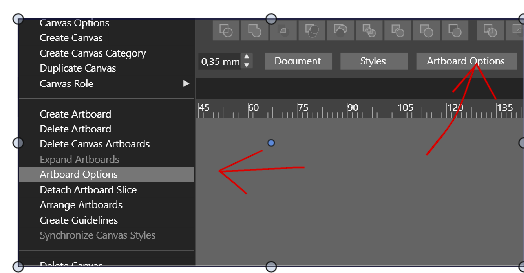
            One more thing to try: go to Canvas -> Artboard Options and select the margin there.

            B 2 Replies Last reply Reply Quote 0
            • B Offline
              B-Vs-V @VectorStyler
              last edited by B-Vs-V

              @VectorStyler Ok, will do but I can't before this WE at best.
              I'll test again everything I can (the all workflow) on both W10 and W11.

              Is it the same ?:
              0_1665129050045_da43ad5c-d3a2-42b0-9d0e-eeacf0515550-image.png

              W11 Pro 25H2 - 12th Gen Intel(R) i7-12700K 3.61 GHz - RAM 64 Go - NVIDIA GF GTX 4070 Ti - Intuos - Dell UP3216Q / Eizo ColorEdge
              W11 Pro 25H2 - 12th Gen Intel(R) i7-12700KF 3.60 GHz -RAM 64 Go - NVIDIA GF GTX 3080 - IntuosPro- ProArt PA329C

              VectorStylerV 1 Reply Last reply Reply Quote 0
              • VectorStylerV Offline
                VectorStyler @B-Vs-V
                last edited by

                @PatrickM said in Artboard margins, what did I do ?:

                Is it the same ?:

                yes, they are the same commands.

                1 Reply Last reply Reply Quote 0
                • B Offline
                  B-Vs-V @VectorStyler
                  last edited by B-Vs-V

                  @VectorStyler ok, it is fine.
                  If I click on 'Artboard options' in the Context panel, it seems that I can only add margins to one of my two artboards (with the select tool selected).
                  I have then either to go to Canvas-->Artboard options, or by selecting the two artboards throughn the Canvas-Artboard panel.

                  W11 Pro 25H2 - 12th Gen Intel(R) i7-12700K 3.61 GHz - RAM 64 Go - NVIDIA GF GTX 4070 Ti - Intuos - Dell UP3216Q / Eizo ColorEdge
                  W11 Pro 25H2 - 12th Gen Intel(R) i7-12700KF 3.60 GHz -RAM 64 Go - NVIDIA GF GTX 3080 - IntuosPro- ProArt PA329C

                  VectorStylerV 1 Reply Last reply Reply Quote 0
                  • VectorStylerV Offline
                    VectorStyler @B-Vs-V
                    last edited by

                    @PatrickM said in Artboard margins, what did I do ?:

                    I can only add margins to one of my two artboards

                    This one sets the margins of the current artboard. Use the pageup/pagedown to go to an other artboard and set the margins for that.

                    Another way is to select multiple artboards using the Artboard Tool, and then use the artboard options.

                    B 1 Reply Last reply Reply Quote 0
                    • B Offline
                      B-Vs-V @VectorStyler
                      last edited by

                      @VectorStyler This what I do/did and there is an issue (I think) with margins' preset:

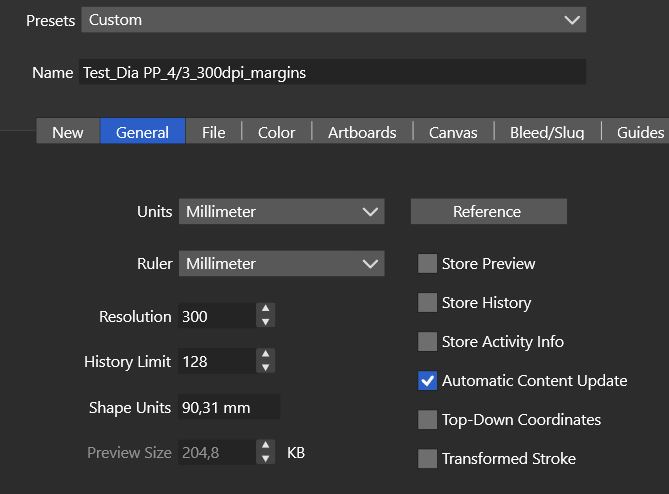
                      1. I go to: File-->New document setup

                      0_1665384564037_VS1_Shape units.JPG
                      By the way, I'm wondering what is "Shape units" and why this value of 90,31mm ?

                      1. I setup the document : 2 artboards & size of the artboards (PP 4/3)
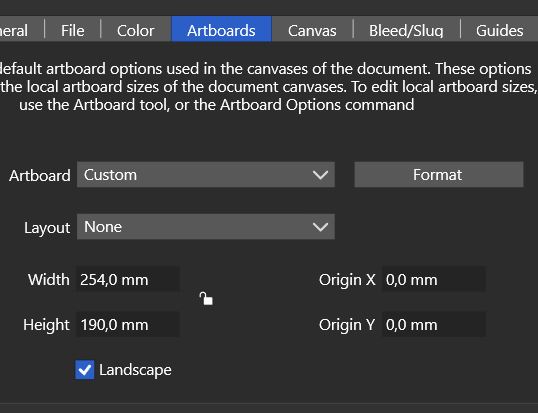
                      0_1665384664299_VS1_Artboards.JPG
                      So far so good

                      1. I then setup the margins : by going to Artboards-->Format--> Margins
                        and I create a preset with the ad hoc margins values... but when I create a new doc and want to adjust the margins' values with the preset, I still get 0. Or I do somethiong wrong or the values are not stored.
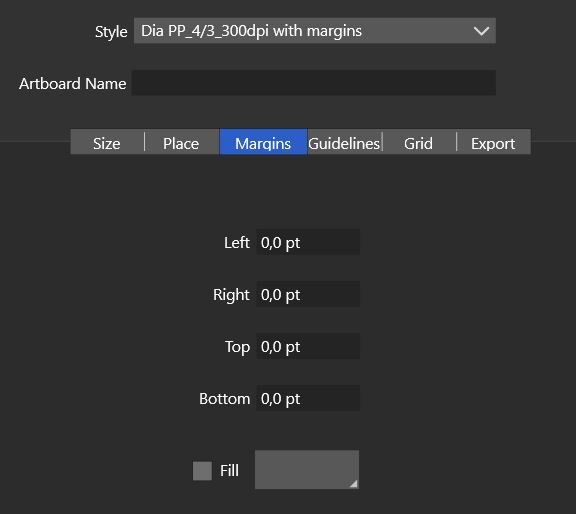
                      0_1665384713359_VS_Margins preset.JPG

                      W11 Pro 25H2 - 12th Gen Intel(R) i7-12700K 3.61 GHz - RAM 64 Go - NVIDIA GF GTX 4070 Ti - Intuos - Dell UP3216Q / Eizo ColorEdge
                      W11 Pro 25H2 - 12th Gen Intel(R) i7-12700KF 3.60 GHz -RAM 64 Go - NVIDIA GF GTX 3080 - IntuosPro- ProArt PA329C

                      VectorStylerV 1 Reply Last reply Reply Quote 0
                      • VectorStylerV Offline
                        VectorStyler @B-Vs-V
                        last edited by

                        @PatrickM Can be replicated! will be fixed ASAP.

                        B 2 Replies Last reply Reply Quote 1
                        • B Offline
                          B-Vs-V @VectorStyler
                          last edited by B-Vs-V

                          @VectorStyler glad I can help ☺ Great for the fix 👍

                          W11 Pro 25H2 - 12th Gen Intel(R) i7-12700K 3.61 GHz - RAM 64 Go - NVIDIA GF GTX 4070 Ti - Intuos - Dell UP3216Q / Eizo ColorEdge
                          W11 Pro 25H2 - 12th Gen Intel(R) i7-12700KF 3.60 GHz -RAM 64 Go - NVIDIA GF GTX 3080 - IntuosPro- ProArt PA329C

                          1 Reply Last reply Reply Quote 0
                          • B Offline
                            B-Vs-V @VectorStyler
                            last edited by

                            @VectorStyler Fixed, very nice.

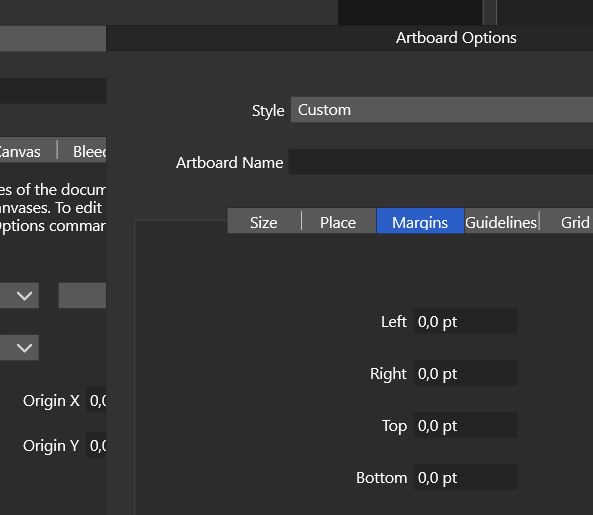
                            I've found how to delete a preset (Preset Manager) but I can't found how to see margins values in mm when I setup a new document.
                            When I setup a new document, I see margins values in pt. When I check in "Artboard options", I see them in mm (as I defined them).
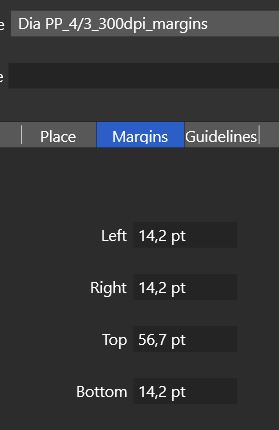
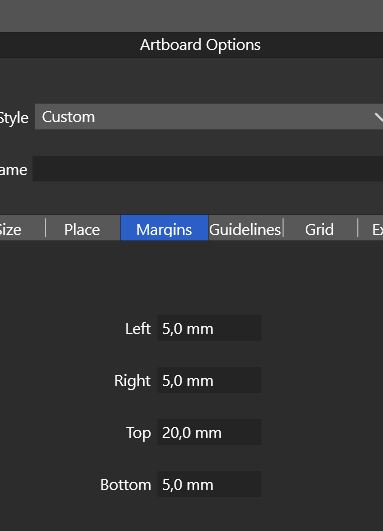
                            0_1666152436171_M1.JPG

                            0_1666152457244_M2.JPG

                            Not a big deal but I prefer to see these values in mm when I design a document in VS .
                            Thanks.

                            W11 Pro 25H2 - 12th Gen Intel(R) i7-12700K 3.61 GHz - RAM 64 Go - NVIDIA GF GTX 4070 Ti - Intuos - Dell UP3216Q / Eizo ColorEdge
                            W11 Pro 25H2 - 12th Gen Intel(R) i7-12700KF 3.60 GHz -RAM 64 Go - NVIDIA GF GTX 3080 - IntuosPro- ProArt PA329C

                            VectorStylerV 1 Reply Last reply Reply Quote 0
                            • VectorStylerV Offline
                              VectorStyler @B-Vs-V
                              last edited by

                              @PatrickM It will show in MM only after the document options are confirmed (which is a bit of a problem, since they are being edited).

                              I will try to find a solution for this.

                              B 1 Reply Last reply Reply Quote 0
                              • B Offline
                                B-Vs-V @VectorStyler
                                last edited by B-Vs-V

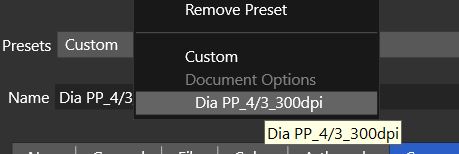
                                @VectorStyler I wanted to test some patterns in VS: I go to 'New Doc Setup' as usual, then determine the size of the artboards and I get the margins of my previous document.
                                This time, margins are not necessary. Would it be possible to get '0' for a new document or maybe better, a reset button ?
                                Thanks,
                                P.
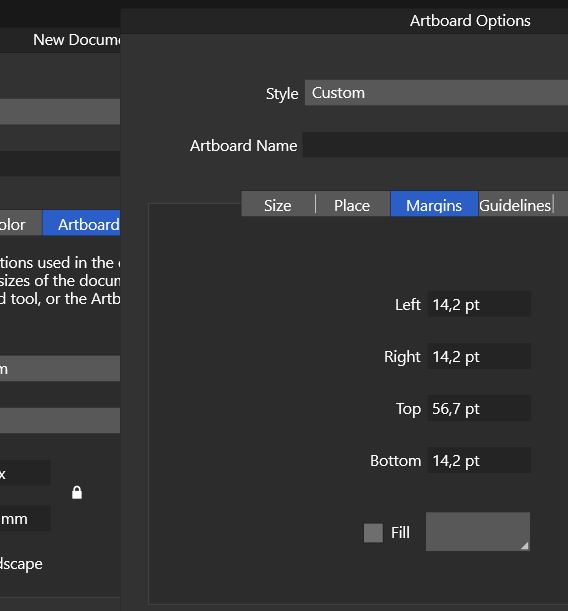
                                0_1666429135072_Capture.JPG

                                W11 Pro 25H2 - 12th Gen Intel(R) i7-12700K 3.61 GHz - RAM 64 Go - NVIDIA GF GTX 4070 Ti - Intuos - Dell UP3216Q / Eizo ColorEdge
                                W11 Pro 25H2 - 12th Gen Intel(R) i7-12700KF 3.60 GHz -RAM 64 Go - NVIDIA GF GTX 3080 - IntuosPro- ProArt PA329C

                                VectorStylerV 1 Reply Last reply Reply Quote 0
                                • VectorStylerV Offline
                                  VectorStyler @B-Vs-V
                                  last edited by

                                  @PatrickM said in Artboard margins ?:

                                  Would it be possible to get '0' for a new document or maybe better, a reset button

                                  A reset button is I think the best solution here.

                                  But, there is a solution already. Create a preset with the preferred default settings and then just select that from the Style drop down.

                                  B 2 Replies Last reply Reply Quote 1
                                  • B Offline
                                    B-Vs-V @VectorStyler
                                    last edited by B-Vs-V

                                    @VectorStyler yes, indeed. It is even nicer to go by presets in VS.

                                    We would have to store a preset with '0' then.

                                    Edit : Done and it is fine. I always try to avoid using the keyboard when I can.

                                    W11 Pro 25H2 - 12th Gen Intel(R) i7-12700K 3.61 GHz - RAM 64 Go - NVIDIA GF GTX 4070 Ti - Intuos - Dell UP3216Q / Eizo ColorEdge
                                    W11 Pro 25H2 - 12th Gen Intel(R) i7-12700KF 3.60 GHz -RAM 64 Go - NVIDIA GF GTX 3080 - IntuosPro- ProArt PA329C

                                    1 Reply Last reply Reply Quote 0
                                    • B Offline
                                      B-Vs-V @VectorStyler
                                      last edited by

                                      @VectorStyler A simple idea is that it depends on the unit used when creating a new document: if it is in px, the data of the guides etc. are given in px, and so on. I don't know the feasibility of this.

                                      W11 Pro 25H2 - 12th Gen Intel(R) i7-12700K 3.61 GHz - RAM 64 Go - NVIDIA GF GTX 4070 Ti - Intuos - Dell UP3216Q / Eizo ColorEdge
                                      W11 Pro 25H2 - 12th Gen Intel(R) i7-12700KF 3.60 GHz -RAM 64 Go - NVIDIA GF GTX 3080 - IntuosPro- ProArt PA329C

                                      VectorStylerV 1 Reply Last reply Reply Quote 1
                                      • VectorStylerV Offline
                                        VectorStyler @B-Vs-V
                                        last edited by

                                        @PatrickM I added this to the backlog, I think it is easy to fix it.

                                        1 Reply Last reply Reply Quote 0
                                        • First post
                                          Last post