VectorStyler
    • Categories
    • Unread
    • Recent
    • Tags
    • Popular
    • Register
    • Login

    VS freezing after unknown dialog

    Scheduled Pinned Locked Moved VectorStyler 1.1 Bugs
    9 Posts 3 Posters 8.4k Views 2 Watching
    Loading More Posts
    • Oldest to Newest
    • Newest to Oldest
    • Most Votes
    Reply
    • Reply as topic
    Log in to reply
    This topic has been deleted. Only users with topic management privileges can see it.
    • VectorWhizV Offline
      VectorWhiz
      last edited by VectorWhiz

      While editing a vector portrait, a dialog appeared as shown below and VS was not responding. Please advice:
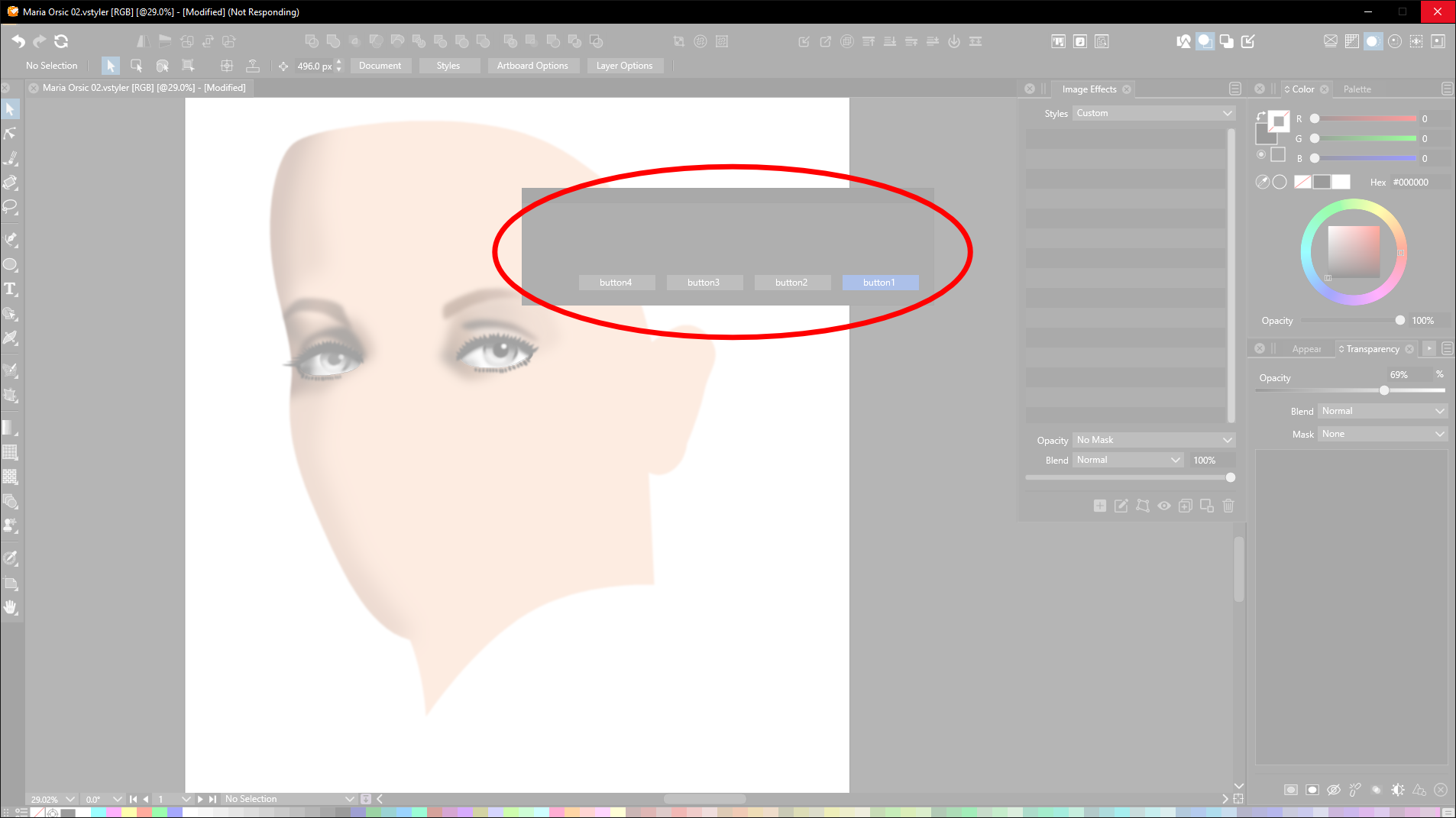
      dialog

      After closing VS in the Taskmanager (Windows 10) and reopening VS, I was presented the option to open up a backup file, that opened properly. Did I do something wrong?

      Digital Art & Creative Text - https://vectorwhiz.com | Portfolio blog - https://communicats.blogspot.com

      VectorStylerV 1 Reply Last reply Reply Quote 0
      • VectorStylerV Offline
        VectorStyler @VectorWhiz
        last edited by

        @VectorWhiz What was the action that resulted in the popup with the buttons?

        VectorWhizV VectorStylerV 2 Replies Last reply Reply Quote 0
        • VectorWhizV Offline
          VectorWhiz
          last edited by

          I was resizing the iris of the left eye and moving the pupil.

          Digital Art & Creative Text - https://vectorwhiz.com | Portfolio blog - https://communicats.blogspot.com

          1 Reply Last reply Reply Quote 0
          • VectorWhizV Offline
            VectorWhiz @VectorStyler
            last edited by

            @VectorStyler these objects were clipped several layers deep.

            Digital Art & Creative Text - https://vectorwhiz.com | Portfolio blog - https://communicats.blogspot.com

            BoldlineB 1 Reply Last reply Reply Quote 0
            • VectorStylerV Offline
              VectorStyler @VectorStyler
              last edited by

              @VectorStyler From the screenshot, it seems that an alert is triggered by VS, but without specific content (message).

              I opened a bug on this one to review what might cause this.

              VectorWhizV 1 Reply Last reply Reply Quote 0
              • BoldlineB Offline
                Boldline @VectorWhiz
                last edited by

                @VectorWhiz If you haven't already done so, having these settings turned on for your projects can help @VectorStyler diagnose the issues when you send troubled files to him review.
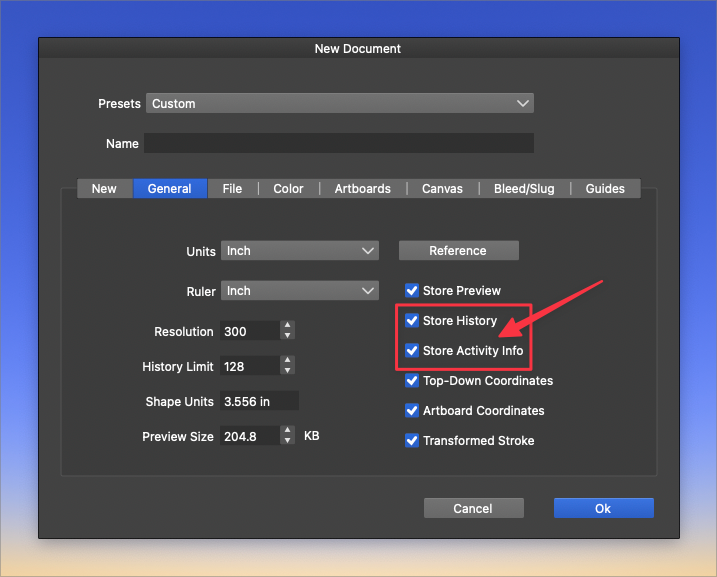
                0_1666626618910_534ee023-05df-4cc9-b4c6-74d1ca5c43b9-BLD 2022-10-24 at 11.48.30.png

                🍎 macOS Tahoe 26.2, Mac mini (M1, 2020), Chip Apple M1, Memory 16 GB
                Cintiq 27QHD Display and LG Ultra HD Display

                VectorWhizV 1 Reply Last reply Reply Quote 3
                • VectorWhizV Offline
                  VectorWhiz @VectorStyler
                  last edited by

                  @VectorStyler Thank you for the swift response. This is brilliant.

                  Digital Art & Creative Text - https://vectorwhiz.com | Portfolio blog - https://communicats.blogspot.com

                  1 Reply Last reply Reply Quote 0
                  • VectorWhizV Offline
                    VectorWhiz @Boldline
                    last edited by

                    @Boldline Thanks for pointing this out, I will follow your advice.

                    Digital Art & Creative Text - https://vectorwhiz.com | Portfolio blog - https://communicats.blogspot.com

                    BoldlineB 1 Reply Last reply Reply Quote 0
                    • BoldlineB Offline
                      Boldline @VectorWhiz
                      last edited by

                      @VectorWhiz said in VS freezing after unknown dialog:

                      @Boldline Thanks for pointing this out, I will follow your advice.

                      No problem. I have it set this way in the "new document setup" so it's activated for every new file I make. There are many upsides to having this active; namely being able to return to it later and make adjustments and for sharing issues with the developer. It does increase file size and after a long period of working on a complex job, it can slow down VS dramatically. It helps at that point to delete the history in the history panel and save the file to free up space.


                      🍎 macOS Tahoe 26.2, Mac mini (M1, 2020), Chip Apple M1, Memory 16 GB
                      Cintiq 27QHD Display and LG Ultra HD Display

                      1 Reply Last reply Reply Quote 0
                      • First post
                        Last post