VectorStyler
    • Categories
    • Unread
    • Recent
    • Tags
    • Popular
    • Register
    • Login

    Pattern Brush from Blends seems to be broken

    Scheduled Pinned Locked Moved Resolved Issues
    3 Posts 2 Posters 4.4k Views 2 Watching
    Loading More Posts
    • Oldest to Newest
    • Newest to Oldest
    • Most Votes
    Reply
    • Reply as topic
    Log in to reply
    This topic has been deleted. Only users with topic management privileges can see it.
    • S Offline
      Subpath
      last edited by Subpath

      Pattern Brushes from Blends are actually possible
      in VS since version 1.0.42.

      But in VS 1.1.064 Pattern Brush from Blends seems
      to be broken.

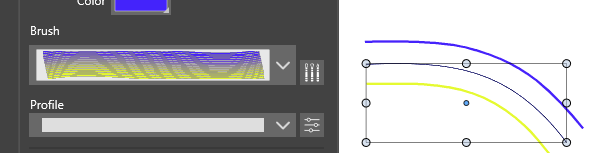
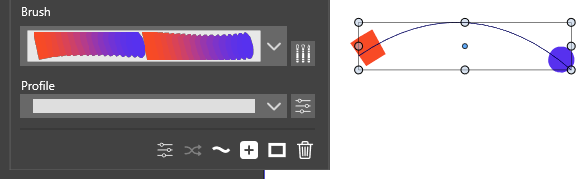
      I tried a previously created pattern brush of mine
      and got this result. Recreated the brush once and
      got the same result.
      0_1666629221558_Pattern Brush from Blend.png

      0_1666629243246_Pattern Brush from Blend-2.png
      .
      .
      My steps:
      In my case created a blend between two lines
      then grouped this blend
      and choosed
      Menu Styles -> Create Styles -> Create Pattern Brush Preset...
      to create a pattern brush.

      in both cases I got only this result
      The Brush in Brush panel looks as expected

      Win 11
      CPU: AMD Ryzen 5 9600X, 6-core.
      GPU: Nvidia Geforce RTX 5070.

      VectorStylerV 2 Replies Last reply Reply Quote 0
      • VectorStylerV Offline
        VectorStyler @Subpath
        last edited by

        @Subpath Could be a regression. I will try to replicate this.

        1 Reply Last reply Reply Quote 1
        • VectorStylerV Offline
          VectorStyler @Subpath
          last edited by

          @Subpath This issue should be fixed in build 1.1.072

          1 Reply Last reply Reply Quote 1
          • First post
            Last post