VectorStyler
    • Categories
    • Unread
    • Recent
    • Tags
    • Popular
    • Register
    • Login

    Panel graphic popup menus displaced if on second monitor
    Scheduled Pinned Locked Moved Resolved Issues
    4 Posts 2 Posters 5.8k Views 2 Watching
    Loading More Posts
    • Oldest to Newest
    • Newest to Oldest
    • Most Votes
    Reply
    • Reply as topic
    Log in to reply
    This topic has been deleted. Only users with topic management privileges can see it.
    • R Offline
      Raven
      last edited by

      I have moved most of VS's floating panels onto a second monitor, which is to the left of the main monitor, to reduce clutter in the document window.

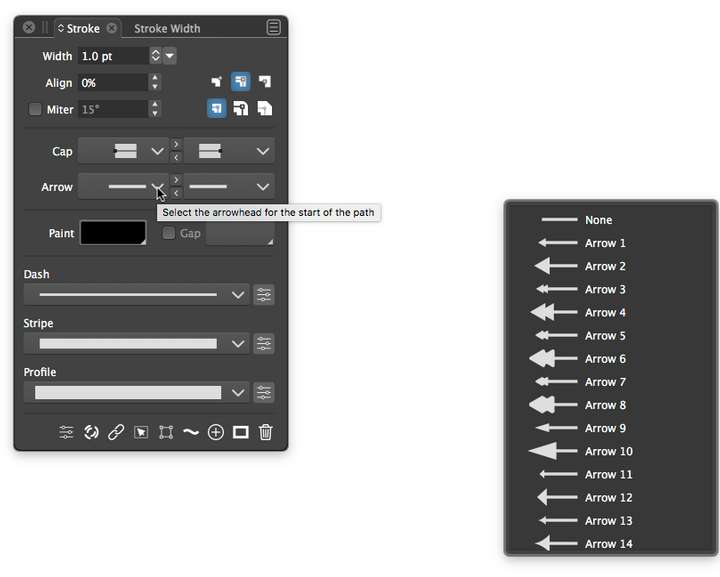
      In the panels, all of the popup menus that have non-text content, eg the arrowhead popup, appear horizontally displaced away from the panel. Always butted to the right edge of the second monitor, as shown below.

      The same issue affects the Dash, Stripe and Profile popups in this panel, but not the Cap popups.
      The same affects similar popup graphical menus in other panels, and in modals.
      All work correctly if moved back to the main monitor.

      This is on a MacPro5,1, Radeon HD 5770, 2 x 2560 x 1600 px, OSX 10.12.6.
      Any suggestions?
      0_1669953752132_screenshot.png

      VectorStylerV 3 Replies Last reply Reply Quote 0
      • VectorStylerV Offline
        VectorStyler @Raven
        last edited by

        @Raven Welcome to VectorStyler.

        So this might be a bug when using two monitors.
        I will try to replicate this and have a fix as soon as possible.

        1 Reply Last reply Reply Quote 0
        • VectorStylerV Offline
          VectorStyler @Raven
          last edited by

          @Raven Can be replicated on dual screen setup!

          1 Reply Last reply Reply Quote 0
          • VectorStylerV Offline
            VectorStyler @Raven
            last edited by

            @Raven This issue should be fixed in build 1.1.072

            1 Reply Last reply Reply Quote 0
            • First post
              Last post