VectorStyler
    • Categories
    • Unread
    • Recent
    • Tags
    • Popular
    • Register
    • Login

    Lines: spacing... functional ?

    Scheduled Pinned Locked Moved Resolved Issues
    9 Posts 3 Posters 11.1k Views 3 Watching
    Loading More Posts
    • Oldest to Newest
    • Newest to Oldest
    • Most Votes
    Reply
    • Reply as topic
    Log in to reply
    This topic has been deleted. Only users with topic management privileges can see it.
    • B Offline
      B-Vs-V
      last edited by

      I create some lines with the Line tool. Fine and I succeed to change the spacing between them but I don't remember how ? Now, I've tried with the spacing in the "Lines" popup window without success.
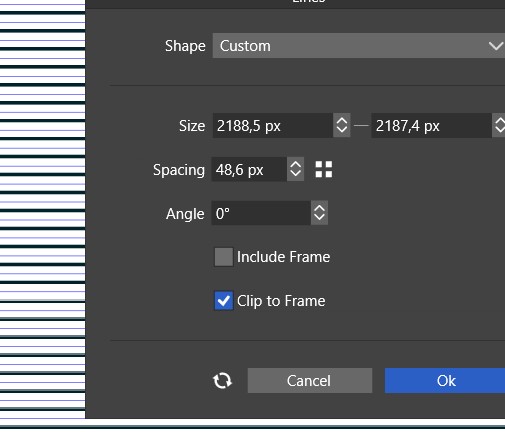
      0_1670181891319_lines spacing.jpg

      W11 Pro 25H2 - 12th Gen Intel(R) i7-12700K 3.61 GHz - RAM 64 Go - NVIDIA GF GTX 4070 Ti - Intuos - Dell UP3216Q / Eizo ColorEdge
      W11 Pro 25H2 - 12th Gen Intel(R) i7-12700KF 3.60 GHz -RAM 64 Go - NVIDIA GF GTX 3080 - IntuosPro- ProArt PA329C

      b77B VectorStylerV 3 Replies Last reply Reply Quote 0
      • B Offline
        B-Vs-V
        last edited by

        Mouse right click allows me to increase the distance between lines but I'm sure I did enter a value before... 🤔 🕵

        W11 Pro 25H2 - 12th Gen Intel(R) i7-12700K 3.61 GHz - RAM 64 Go - NVIDIA GF GTX 4070 Ti - Intuos - Dell UP3216Q / Eizo ColorEdge
        W11 Pro 25H2 - 12th Gen Intel(R) i7-12700KF 3.60 GHz -RAM 64 Go - NVIDIA GF GTX 3080 - IntuosPro- ProArt PA329C

        1 Reply Last reply Reply Quote 0
        • b77B Offline
          b77 @B-Vs-V
          last edited by

          @Pat Is there a 'Lines' settings window? Where? I didn't know that…

          MacBook Pro (Intel) running Monterey 12.6.4

          B 1 Reply Last reply Reply Quote 0
          • VectorStylerV Offline
            VectorStyler @B-Vs-V
            last edited by

            @Pat @b77 The "Line Grid Shape" can generate a set of lines at some fixed space.
            There are multiple ways to edit the options of such a shape:

            • select the line grid shape.
            • in the context panel, click on the Shape drop down and select edit.
            • or: open the Panels -> Shape panel and edit the options there.
            b77B 1 Reply Last reply Reply Quote 1
            • b77B Offline
              b77 @VectorStyler
              last edited by

              @VectorStyler said in Lines: spacing... functional ?:

              @Pat @b77 The "Line Grid Shape" can generate a set of lines at some fixed space.

              Oh… 😆

              OK, but the tool is named 'Line Grid Shape' and the settings window for it says 'Lines'.

              MacBook Pro (Intel) running Monterey 12.6.4

              VectorStylerV 1 Reply Last reply Reply Quote 1
              • B Offline
                B-Vs-V @b77
                last edited by

                @b77 ok @VectorStyler posted a reply. You can have a popup window by double clicking the Line grid shape tool.

                W11 Pro 25H2 - 12th Gen Intel(R) i7-12700K 3.61 GHz - RAM 64 Go - NVIDIA GF GTX 4070 Ti - Intuos - Dell UP3216Q / Eizo ColorEdge
                W11 Pro 25H2 - 12th Gen Intel(R) i7-12700KF 3.60 GHz -RAM 64 Go - NVIDIA GF GTX 3080 - IntuosPro- ProArt PA329C

                b77B 1 Reply Last reply Reply Quote 0
                • VectorStylerV Offline
                  VectorStyler @b77
                  last edited by

                  @b77 said in Lines: spacing... functional ?:

                  OK, but the tool is named 'Line Grid Shape' and the settings window for it says 'Lines'.

                  This can be fixed.

                  1 Reply Last reply Reply Quote 1
                  • b77B Offline
                    b77 @B-Vs-V
                    last edited by b77

                    @Pat said in Lines: spacing... functional ?:

                    @b77 ok @VectorStyler posted a reply. You can have a popup window by double clicking the Line grid shape tool.

                    I knew that, I just thought you were talking about the Line tool, which doesn't display a settings
                    window when you double-click its button in the toolbox.

                    MacBook Pro (Intel) running Monterey 12.6.4

                    1 Reply Last reply Reply Quote 0
                    • VectorStylerV Offline
                      VectorStyler @B-Vs-V
                      last edited by

                      @Pat This issue should be fixed in build 1.1.072

                      1 Reply Last reply Reply Quote 1
                      • First post
                        Last post
