update 1.1.070
-
VectorStyler 1.1.070 release notes
- Flatten opacities of overlapping shapes filled with solid colors.
- Better sensitivity when selecting small shapes.
- Fixed problems with PDF opening.
- Importing text with background from AI files.
- Live preview of values in Transform panel as the objects are moved, resized or rotated.
- Handling double click with pen tablets.
- Artboard tool should not create new artboard when clicking on objects over existing artboards.
- Importing images with masks from AI files.
- Navigator popover content was not showing.
- Drop down lists with style content was not positioned correctly on second screen.
- Colorize filter with gradient mode did not select gradient correctly.
- Eraser tool did not cut overlapping open shapes correctly.
- Improved undo for shape builder tool.
- Accessing more CJK glyph alternates with OpenType fonts.
- Preferences option for tool shortcut activation and deactivation modes.
- Added shortcut and action for view centering to the location under the cursor.
- Improved thumbnail refresh in the Layers panel.
- Use more distinguishable terms in the palette menus.
- Changing Performance - Hovering Selection option should not require app restart.
- Gradient rendering with Display color space mode.
- Move transform pivot also when scaling nodes.
- Allow numeric keys for shortcuts in Windows.
- Select same should ignore Inside Selection option.
- Object renaming command did not use the Number First option.
- Cloned group isolation editing.
- Reseting shape options in modal shape editors.
- Do not allow uneven flipping with constrained text scaling.
- Allow zoom out modifier in temporary zoom tool also.
- Option to disable calibrated screen display on Windows.
- Moving away from boolean buttons should cancel preview.
- Improved stylus pressure handling for brush and pencil tools.
- Drag and drop fonts in font manager.
- Use different icons for font folder and font groups in the Font Manager.
- Changing values with Shift/Ctrl in numeric fields.
- Splitting transformed text did not position glyphs correctly.
- Allow select next / previous shortcuts while editing text.
- Improved font detection when importing PDF files.
- Fixed rendering artifacts on scaled Windows displays.
- Improved AI file format compatibility.
- Better handling of gaps and overlaps in the shape builder tool.
- Added selection commands to select parent or member objects.
- Added uniform stroke scaling option.
-
@VectorStyler If I click on an object while other object already selected, it doesn't get selected. The object which was already selected got diselected, I need to click again to select the object. Meaning it took 2 click to select an object if there is any object already selected.
Mac Mini M4 Pro | 24Gb
WIndows 11 | Intel i5 11Gen
Wacom Intuos Pro -
@Jayanta-Das Confirmed here.
This means that if I want to select two objects for a Combine operation, only box select with click-and-drag works. -
Same here. Selecting multiple objects with Shift is possible when Node tool is active.
-
@Jayanta-Das @b77 @encart The issue has been identified. Fix will be up tomorrow.
-
@VectorStyler said in update 1.1.070:
Added shortcut and action for view centering to the location under the cursor
Re-assigned M for this - brilliant! Looking forward to numeric keyboard support for shortcurs as well in macOS, but M is perfect too. So helpful!
-
Uploaded a new build (1.1.071). This should fix a few regressions.
-
Thank you @VectorStyler for the new build and all the fixes. Your hard work is much appreciated. It still amazes me to see how quickly VS improves from month to month
-
@VectorStyler Thank you for this build! it has a lot of improvements!
After upgrading to 071 I have problem. After I close document (blank or not), some panels (Color, Stroke, Brush) are closing as well. - Recordit
-
@Harry This might be related to some configuration / option.
One thing to try is to do a settings and workspace reset, on Windows that is:- for settings: Edit -> Preference Files -> Restore Default
- for workspace: View -> Workspaces -> Restore Default
If this issue persists afterwards, I will try to replicate it.
-
@VectorStyler Restoring Defaults did not help. I think this issue might be related to Palette panel. After closing it, issue don't persist, but after changing its position - problem still exists - Recordit
@VectorStyler said in update 1.1.070:
Improved font detection when importing PDF files.
I have also problems with opening PDFs - Dimensions are ok, but fonts recognition not always works. Here is Documentation section of VS website created by Opera browser:
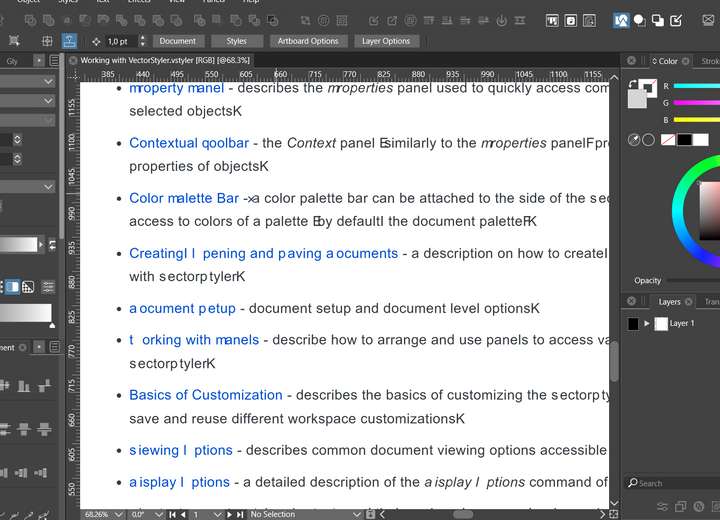
And I'm afraid those are one of the best results I got

-
@Harry Importing text from PDF still has some issues.
-
@VectorStyler said in update 1.1.070:
Added selection commands to select parent or member objects.
Where have selection commands been added?
They're not showing up for me in build 70 or 71, in the Select menu or in the available Application Actions in preferences. I would like to able to add them to the Context panel or add keyboard shortcuts.
-
@Raven These should be in the Select menu.
If the main menu was customized, then these will not show up, so the workspace must be reset.Will be added into the customization list ASAP.
-
@VectorStyler said in update 1.1.070:
the workspace must be reset
Thanks, setting Workspaces >> Restore Default has worked, to show the new Parent and Member selection commands.
I can't speak for others, but for myself, a "Select All Members" would be more usefull than "Select First Member" and "Select Last Member", especially if it selects all members of multiple selected groups.